Install the central information display (CID)
NOTE:
RISK OF DAMAGE Electrostatic discharge. Damage to or destruction of electrical components.
- Leave electrical components in original packaging until just before they are installed. Use the original packaging only for any return shipments. Always package removed components straight away.
- Read and comply with user information on using the associated special tool 12 7 060.
- Only touch the housings of electrical components. Do not touch pins or multi-pin connectors directly.
- Wear electrically conductive clothing and antistatic shoes (with ESD symbol).
- For additional information see: 61 35... NOTES for ESD protection (electrostatic discharge)
- Position and connect the connector (1) to the central information display (CID) (2).
- Insert the central information display (CID) (2) in the instrument panel and tighten the screws (1).
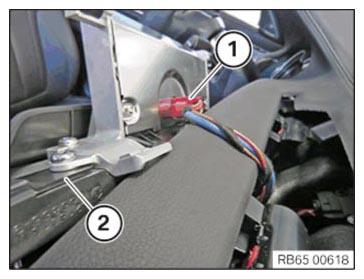
TIGHTENING TORQUES SPECIFICATION
| Central information display to instrument panel | |
| Screw | Tightening torque |
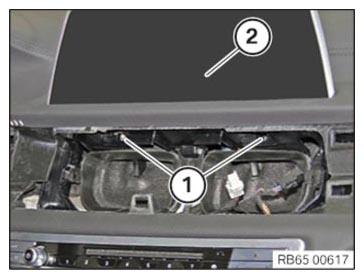
Follow-up Work
- Install the finisher on the right INSTRUMENT PANEL .
- Install the right instrument panel SIDE PANEL .