Replacement Remote Control Key Is Inoperative (SI B66 06 21)
Publication date: 2021-12-09Reference number: SI B66 06 21
REPLACEMENT REMOTE CONTROL KEY IS INOPERATIVE
TECHNICAL SERVICE BULLETIN
| BMW: | All Models |
SITUATION
Replacement remote-control key does not work or initialize.
CAUSE
Several reasons can cause this concern:
- Incorrect VIN entered when ordering the new remote-control key
- Initialization procedure incorrectly performed or not performed at all
- Remote-control key battery discharged or faulty
- Replacement remote-control key is defective
- Defective locking and security control module (e.g., CAS, FEM or BDC)
PROCEDURE
Follow step by step procedure when initialization failed on the replacement key.
- Verify the correct VIN is on the body (door jamb).
Electronically verify the VIN by using a working key on a service advisor ISPA Next (Avoid solely relying on the vehicle registration card provided by the customer)
IMPORTANT: The new key can only be read by the key reader after it is initialized. - Make sure a working remote is not inside the vehicle, because it could block the new one.
- Disconnect USB Plug-in accessories and remove Bluetooth devices.
- Ensure the batteries on the new remote-control key are in good condition; or swap a known good remote-control battery.
- Older vehicle keys without a replaceable battery should be recharged for 5 minutes, by placing them in the ISPA Next
- Enable the key by performing the manual procedure or service function below:
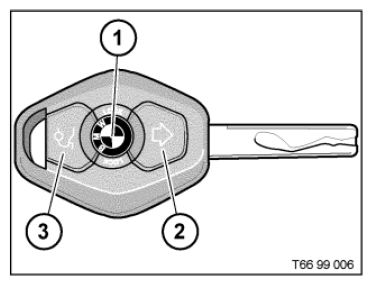
Enabling procedure for ZKE and EWS for older vehicles with the following key style:
Initialization procedure:
- Open the central locking system (ZV) using the ignition key.
- Get into the vehicle and close all doors.
- With an ignition key, turn the ignition lock briefly to ignition lock position 1, switching it on and back off again.
- It must remain switched on for less than 5 seconds, otherwise the system will not be ready to initialize
- On the master key, press button 2 and hold it down.
- Press button 1 three times (within 10 seconds) while holding button 2 pressed down.
- Release button 2.
- The ZV signals that a master key has been initialized successfully with "locking" and immediate "unlocking" messages.
Vehicles equipped with CAS module (e.g., E90, E65, E66) key enabling service function available on ISTA:
- Service functions
- Body
- Locking and security functions
- Block and enable remote key
- Disable missing keys from the vehicle and enable only the available keys,NOTE: Comfort Access only allows 2 keys to be enabled at the same time.
NOTE: On vehicles equipped with a CAS module, at least one good working key needs to be available to teach in a new replacement Key. Otherwise, CAS with key set part number may be required.Enabling procedure for F and G series vehicles (FEM/BDC):
- Remove all existing keys from the passenger compartment except for the new key.
- Press the START/STOP button. The Check Control message "No remote key found" appears, and then the request to hold the key at the ring aerial.
- Hold the new remote against the steering column between the ring aerial marks. Press the START/STOP button again. If necessary, press the START/STOP button several times until the ignition can be switched on.NOTE: On early production vehicles, hold the key slightly off to the right of the marks. On difficult cases, performing a battery reset and updating the new key data by pressing and holding central lock button with the key on steering column will allow to initialize the new remote key.
- Perform a functional check, i.e., lock/unlock the central locking system and engine start.
If manual procedure is not successful, perform service function available on ISTA:
Service functions
Body
Locking and security functions
Block and enable remote key.
- Repeat steps 4 to 5 a few more times if necessary.
- Does the remote-control lock/unlock the central locking system and start the vehicle?
Yes: No further work required.
No: Verify that the VIN number on the DME label matches the VIN number on the vehicle chassis and inquire with the customer if any modules (CAS, EWS, BDC, DME) have been swapped from another vehicle.
- Is the VIN correct on the DME, the chassis VIN, and the new remote key label?
YES: Continue diagnosis with ISTA. If further assistance is needed, please submit a regular TSARA case. Provide pictures of the Chassis, DME and new key label VIN. Do not order a second key unless instructed by the TSARA Hotline.
No: Advice the customer that the vehicle will need all the original VIN specific components. This may not be covered under warranty.
PARTS INFORMATION
Obtain and confirm the part numbers for your specific vehicle by entering the chassis number in either ETK or AIR which takes into account specific equipment and/or options.
| Part Number | Description | Quantity |
|---|---|---|
| Refer to ETK | Remote Control Key | 1 |
| Refer to ETK | CAS with Key Set | 1 |
| Refer to ETK | FEM with Key Set | 1 |
| Refer to ETK | BDC with Key Set | 1 |
CLAIM INFORMATION
Information only
QUESTIONS REGARDING THIS BULLETIN
| Technical inquiries | Submit feedback at the top of this bulletin |