Surround View: Wrong Vehicle Model Displayed After Programming (SI B66 09 20)
Publication date: 2020-05-29Reference number: SI B66 09 20
SURROUND VIEW: WRONG VEHICLE MODEL DISPLAYED AFTER PROGRAMMING
TECHNICAL SERVICE BULLETIN
| BMW: | See The Chart Below |
MODEL
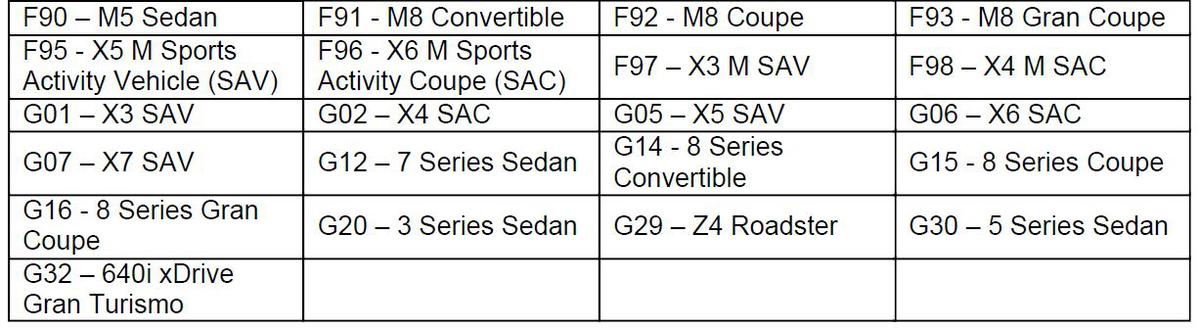
From Start Of Production (SOP) and equipped with one of the following option code 5DL - Surround View
Or
5DN - Parking Assistant Plus
SITUATION
After programming, the wrong vehicle model is displayed in the Central Information Display (CID) when the Surround View is activated.
CAUSE
Software in the ICAM control module. The ICAM module logged the fault code 800B8A - "3D model failed to upload".
CORRECTION
Encode the ICAM control module.
PROCEDURE
- Connect the vehicle to ISTA (vehicle returns to the workshop).
- Start a new programming session.
- Manually select ICAM control module for encoding.
- Calculate and accept measures plan.
- Once the encoding is completed, allow the vehicle to sleep for 5 minutes.
- Reassess the vehicle.
Always connect a BMW-approved battery charger/power supply ( SI B04 23 10 ) when performing programming.
For information on programming and coding with ISTA, refer to CenterNet/TIS/Technical Documentation/Programming and Diagnostics/Programming Documentation.
WARRANTY INFORMATION
Covered under the terms of the BMW New Vehicle Limited Warranty for Passenger Cars and Light Trucks.
Vehicle is still in the workshop or in conjunction with performing a programming and encoding Technical Campaign repair during the same workshop visit-
| Defect Code | Refer to AIR | Claim with the defect code that applies to the initial/previous repair work that necessitated this additional work procedure to be performed |
|---|---|---|
| Labor Operation | Description | Labor Allowance |
| 61 00 731 | Additional work after 1st termination when programming/encoding (Associated work) | Refer to AIR |
Or, the:
Vehicle returns to the workshop-
| Defect Code: | 6653040200 | Control unit TRVC/TRSVC, surround view camera (Rear Side View camera) software error/internal equipment fault |
|---|---|---|
| Labor Operation | Description | Labor Allowance |
| 00 00 006 | Performing vehicle test (with vehicle diagnosis system - checking faults) (Main work) | Refer to AIR |
| Or: | ||
| 00 00 556 | Performing vehicle test (with vehicle diagnosis system-checking faults) (Plus work) | Refer to AIR |
| And: | ||
| 61 21 528 | Connect an approved battery charger/power supply (indicated in AIR as Charging battery) | Refer to AIR |
| And: | ||
| 61 00 730 | Programming/encoding control unit(s) | Refer to AIR |
And, additionally for the:
e-Vehicles-
| Labor Operation | Description | Labor Allowance |
|---|---|---|
| 61 25 910 | Recharging high-voltage battery unit (to high voltage charging socket) | Refer to AIR |
If you are using a Main labor code for another repair, use the Plus code labor operation 00 00 556 instead of 00 00 006.
Refer to AIR for the corresponding flat rate unit (FRU) allowances.
Programming and Encoding - Vehicle Control Units (RO and Claim Comments Required)
The programming procedure automatically reprograms and encodes all vehicle control modules which do not have the latest software I-level. If one or more control module failures occur during this programming procedure:
- Please claim this consequential control module-related repair work (including performing the IRAP Control Unit Recovery procedure first as required, refer to the SIB in AIR) under the defect code listed in this bulletin with the applicable AIR labor operations.
Please explain this additional work (The why and what) on the repair order and in the claim comments section
For control module failures that occurred prior to performing this programming procedure:
- When covered under an applicable limited warranty, claim the applicable test plan and the corresponding control module-related repair work using the applicable defect code and labor operations in AIR (including diagnosis with separate punch times).