Service Action: Programming The Telematics Control Unit - 3G Sunset (SI B84 08 22)
Publication date: 2023-03-15Reference number: SI B84 08 22
SERVICE ACTION: PROGRAMMING THE TELEMATICS CONTROL UNIT - 3G SUNSET
SERVICE CAMPAIGN BULLETIN
| BMW: | F06 6 Series Gran Coupe July 10, 2017 - September 26, 2018; F15 X5 Sports Activity Vehicle March 27, 2017 - June 29, 2018; F16 X6 Sports Activity Vehicle April 23, 2018 - May 8, 2019; F22 2 Series Coupe September 13, 2017 - June 24, 2021; F23 2 Series Convertible August 15, 2017 - June 24, 2021; F25 X3 Sports Activity Vehicle February 13, 2017 - August 7, 2017; F30 3 Series Sedan July 27, 2016 - October 11, 2018; F31 3 Series Sport Wagon July 10, 2017 - May 15, 2019; F32 (4 Series Coupe); F80 (M3 Sedan); F97 (X3 M Sports Activity Vehicle); G14 (8 Series Convertible); F33 (4 Series Convertible); F82 (M4 Coupe); F98 (X4 M Sports Activity Vehicle); G15 (8 Series Coupe); F34 (3 Series Gran Turismo); F83 (M4 Convertible); G01 (X3 Sports Activity Vehicle); G20 (3 Series Sedan); F36 (4 Series Gran Coupe); F85 (X5 M Sports Activity Vehicle); G02 (X4 Sports Activity Vehicle); G30 (5 Series Sedan); F39 (X2 Sports Activity Vehicle); F86 (X6 M Sports Activity Vehicle); G05 (X5 Sports Activity Vehicle); G32 (640i xDrive Gran Turismo); F44 (2 Series Gran Coupe); F87 (M2 Coupe); G07 (X7 Sports Activity Vehicle); F48 (X1 Sports Activity Vehicle); F90 (M5 Sedan); G12 (7 Series Sedan) |
SERVICE INFORMATION
This Service Information Bulletin (Revision 2) replaces SI B84 08 22 dated January 2023 .
What's New (Specific text highlighted):
- Selected as "Mobile Friendly"
- Procedure Section revised
- Parts Section removed (not applicable)
AFFECTED VEHICLES
Affected vehicles which require this Campaign to be completed will show it as "Open" when checked either in AIR, the "Service Menu" of DCSnet (Dealer Communication System), ISPA NEXT or Warranty Vehicle Inquiry.
SITUATION
The 3G network in the US has been shut down. This means that only the 4G network will be available. In the 4G network, voice calls will be transferred via the Voice over LTE (VoLTE) function. For this purpose, the SIM card must perform an IMS registration in the mobile communication network. Due to a production error, the telematics control units were delivered without an IMS configuration.
The Connected Drive voice services (Concierge Call, BMW Assistance, and emergency call voice) can no longer be used regionally in the US in vehicle with telematics control units ATM-1 and TCB-4G.
Voice control of the vehicle and all other telephone (paired mobile devices) functions are not affected. Emergency call location data is unaffected.
CORRECTION
Manually select the Telematics Control Unit to program using the most current version of ISTA.
PROCEDURE
The Telematics Control Unit must be programmed to write the IMS configuration into it. The vehicle's electrical system integration level (I-level) isn't important. The act of programming itself will initiate the update to the IMS configuration.
When programming with ISTA, only those control units for which a more up-to-date software is available will be identified to be programmed.
If the Telematics Control Unit is not listed as part of the measures plan, it must be manually selected.
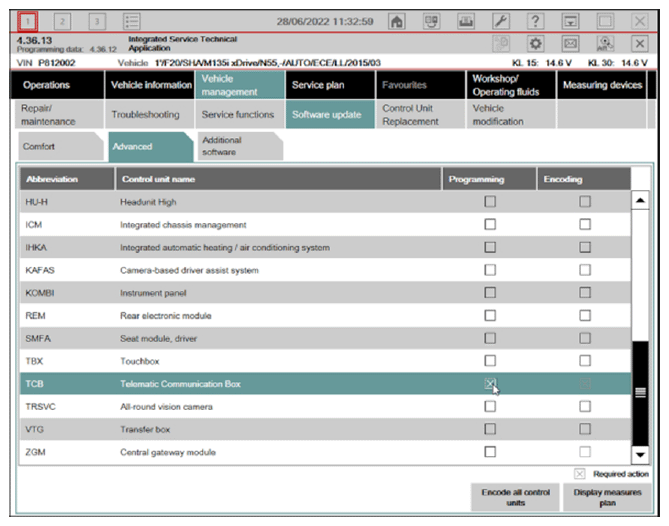
- Start a programming session with ISTA
- Select "Software Update"
- Select "Advanced"
- Select the Telematics Control Unit (ATM or TCB) and check off the "Programming" box
- Determine Measures plan and complete the programming.
- Follow the rework list for any final initializations or calibrations.
After the programming has been fully completed, check functionality of the system.
Always connect a BMW-approved battery charger/power supply ( SI B04 23 10 ) .
For information on programming and coding with ISTA, refer to Dealer Universal Portal/TIS/Technical Documentation/Diagnostics and Programming/Programming Documentation.
CLAIM INFORMATION
During this workshop visit, the affected vehicle may also show one or more programming and encoding Technical Campaign repairs open, the programming and encoding procedure may only be invoiced one time.
Select one of these open Technical Campaigns to perform and submit for updating the vehicle to the required I-level or higher.
For this Service Acton, if the Telematics Control Unit is not listed as part of the measures plan, as noted above, it must be manually selected prior to programming the vehicle.
Please be sure to also perform any additional before and/or after work (including attaching labels) as required by the open campaigns on the vehicle.
Close any other open programming and encoding Campaign repairs as outlined in the corresponding Service Information Bulletin.
As determined by the above, reimbursement for this Service Action will be via normal claim entry utilizing the work package information below that applies.
| Defect Code: | 0084140200 | Fx Gx Program control units (telematics control unit-Sunset) |
COMPLETION BEFORE THE FIRST VEHICLE DELIVERY TO A CUSTOMER OR THE VEHICLE IS ALREADY IN THE WORKSHOP
| Work Pkg | Labor Operation | Description (Plus work) | Labor Allowance |
|---|---|---|---|
| # 1 | 00 72 903 | Programming and encoding the vehicle control units, includes Carrying out vehicle test (00 00 556/61 21 528) | 8 FRU |
| Or: | |||
| # 2 | 00 72 904 | Programming and encoding the vehicle control units was performed in conjunction with another campaign/repair prior to or during this workshop visit (vehicle is already at the specified Target integration level or higher, no repair is necessary) | 1 FRU |
Or:
THE VEHICLE ARRIVES AT YOUR CENTER AND THIS SERVICE ACTION SHOWS OPEN (NO OTHER MAIN WORK WILL BE PERFORMED OR CLAIMED DURING THIS WORKSHOP VISIT)
| Work Pkg | Labor Operation | Description (Main work) | Labor Allowance |
|---|---|---|---|
| # 3 | 00 72 321 | Programming and encoding the vehicle control units, includes Carrying out vehicle test (00 00 006/61 21 528) | Refer to AIR |
| Or: | |||
| # 4 | 00 72 322 | Programming and encoding the vehicle control units was performed in conjunction with another campaign/repair prior to this workshop visit (vehicle is already at the specified Target integration level or higher, no repair is necessary) | 1 FRU |
Only one of the flat rate labor operation codes listed above can be used for claim submission/reimbursement purposes. Also, only one Main work flat rate labor operation code can be claimed per workshop visit.
PROGRAMMING AND ENCODING - VEHICLE CONTROL UNITS (RO AND CLAIM COMMENTS REQUIRED)
This procedure automatically reprograms and encodes any vehicle control modules that do not have the latest software I-level.
If one or more control modules fail during the reprogramming procedure, claim the required consequential repair work procedures to address this issue (including performing the IRAP Control Unit Recovery first as required, refer to the SIB in AIR) under the Defect Code in this bulletin with the labor operations in AIR that apply.
Please explain the additional work procedures that were performed (The why and the what) on the repair order and in the claim comments.
For covered repairs that address control module failures that occurred prior to performing this reprogramming procedure, claim this work with the Defect Code and labor operations (including the diagnosis that applies*) in AIR that apply.
*Based on which one applies to your center, please refer to SI B01 01 20 or SI B01 07 20 for the applicable procedure for documenting, claiming, and explaining, on the RO and in the claim comments, your diagnosis work time (WT), job/repair work time (WT), and the vehicle repairs your center performed, unless otherwise required by State law.
FEEDBACK REGARDING THIS BULLETIN
| Technical Feedback | To submit feedback for the technical topics of this bulletin: Submit your feedback in the rating box at the top of this bulletin |
| Warranty Feedback | To submit feedback for the CLAIMS section of this bulletin: Submit an IDS ticket to the Warranty Department, or use the chat available in the Warranty Documentation Portal |
| Parts Feedback | To submit feedback for the PARTS section of this bulletin: Submit an IDS ticket to the Parts Department |