Apple CARPLAY™ Extension (TRI B84 03 20)
Publication date: 2021-10-15Reference number: TRI B84 03 20
Supersedes refnos: SI B84 03 20
APPLE CARPLAY™ EXTENSION
SERVICE CAMPAIGN BULLETIN
| BMW: | See The Chart Below |
SERVICE INFORMATION
This Service Information Bulletin (Revision 1) replaces TRI B84 03 20 dated January 2020 . This bulletin is information only, no claim information intended.
What's New (Specific text highlighted):
- This Service Bulletin B84 03 20 replaces TRI B84 03 20. There is no content change.
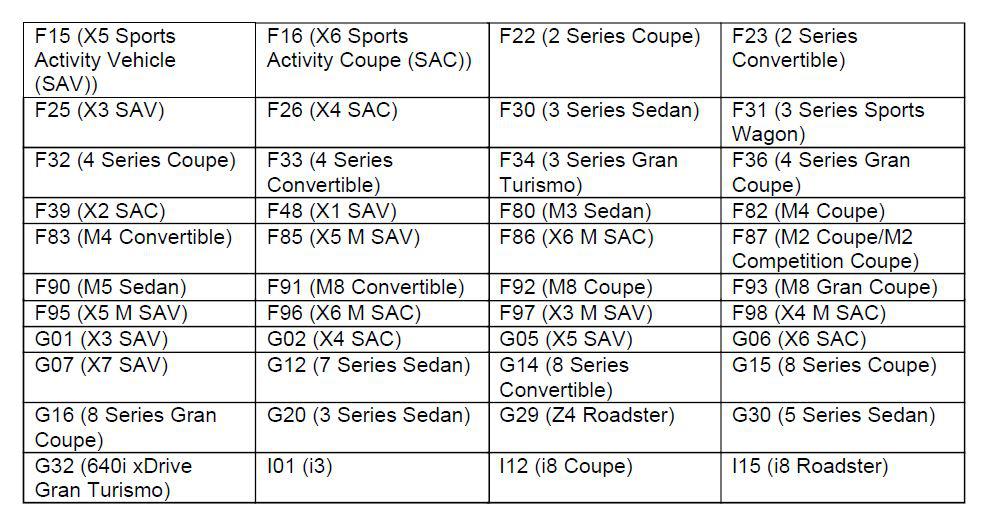
MODEL
INFORMATION
As communicated in a DCSnet message (Dec. 5, 2019) and Dealer Direct Article (Dec. 12, 2019), BMW is no longer requiring a subscription by extending the Apple CarPlay™ Compatibility option for many vehicles without run-time limitations, effective December 4th, 2019. This includes the following vehicles/scenarios:
Which vehicles are affected?
MY2017 and MY2018 vehicles where the customer did not purchase Apple CarPlay™ from the ConnectedDrive Store: These vehicles will not receive the extension; the customer can purchase Apple CarPlay™ for a one-time cost from the ConnectedDrive Store if their vehicle supports the functionality.
If the vehicle supports CarPlay™ then it will be available to purchase in the ConnectedDrive Store (www.bmwusa.com/MyBMWConnectedDrive). The Dealer can also check to see if the customer can purchase CarPlay™ in the ConnectedDrive Dealer Cockpit.
MY2017 and MY2018 vehicles purchased with option 6CP: These vehicles are not relevant for the extension, because CarPlay™ will already remain active in the vehicle for as long as the feature is technically supported. No action is needed by the customer.
New MY2019 and MY2020 Vehicles Equipped with a One-Year Factory Trial:
- Customers are still within the trial period will be extended to a 20-year term.
- Those who purchased a one-year renewal from the ConnectedDrive Store will be extended to a 20-year term, even if the renewal has expired.
- Customers who have not renewed following their expired trial period will be extended to a 20-year term.
- No action is needed for customers who have already purchased a 20-year term.
MY2018 and MY2017 Vehicles Where the Customer Purchased CarPlay™ from the ConnectedDrive Store:
- One-year term will be extended to a 20-year term
- No action is needed for customers who have already purchased a 20-year term
- An extension is ONLY available to customers who purchased CarPlay™ from the ConnectedDrive Store
Customers will incur no additional costs for the extension.
BMW Center staff should know:
- BMW recommends that affected customers update the ConnectedDrive services in their vehicle by following the steps outlined below. No additional dealer action is required .
- Due to the volume of vehicles affected by this change, it may take several weeks for all vehicles to be updated in the ConnectedDrive backend
- Customers can check the current status of their CarPlay™ and ConnectedDrive services by visiting "connecteddrive.bmwusa.com". Dealers may also check customer VINs using the ConnectedDrive Dealer Cockpit.
- The extension applies to a particular vehicle and cannot be transferred to the owner for use with additional vehicles
- The $80, one-year CarPlay™ renewal has been eliminated from the ConnectedDrive Store as of December 4th, 2019
- Customers and dealer inquiries can be directed to customercare@bmwassist.com or BMW Assist Customer Care at 1-888-333-6118
Customer Steps:
As part of this change, we recommend that affected customers perform an update of the ConnectedDrive services in their vehicle and make sure CarPlay™ is turned on. This can be done by following the steps below.
iDrive 6 and earlier:
- Update apps in the iDrive under:
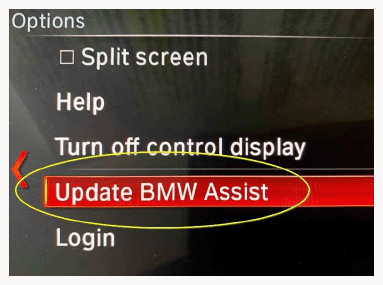
- "ConnectedDrive" or "BMW Assist"
- Open "Option" (physical button surrounding your iDrive controller)
- Select "Update BMW Assist"
- Once the update completes, we then recommend shutting the vehicle off, exiting the vehicle, locking the doors and allowing 10 minutes before restarting the vehicle.
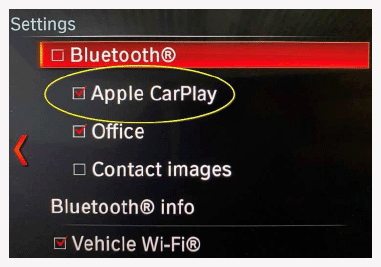
- Check to make sure CarPlay™ is activated in the iDrive:
- "Communication"
- "Manage mobile devices"
- "Settings"
- Make sure "Apple CarPlay™" is selected and checked
- Now you will be able to connect your Apple iPhone via CarPlay™
iDrive
7:
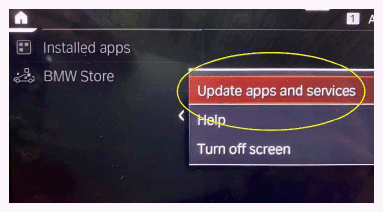
- Update apps in the iDrive under:
- "Apps"
- Open "Option" (physical button surrounding your iDrive controller)
- Click on "Update apps and services"
- Once the update completes, we then recommend shutting the vehicle off, exiting the vehicle, locking the doors and allowing 10 minutes before restarting the vehicle.
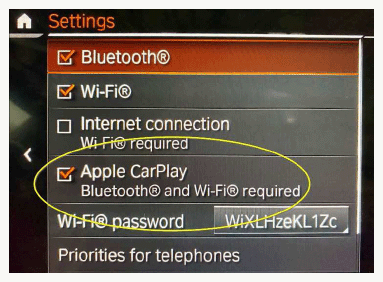
- Check to make sure CarPlay™ is activated in the iDrive:
- "COM"
- Select "Mobile devices"
- Select "Setting"
- Make sure "Apple CarPlay™" is selected and checked
- Now you will be able to connect your Apple iPhone via CarPlay™.
Supporting Materials
picture as pdf B84 03 20 CarPlay DCS Message.pdf
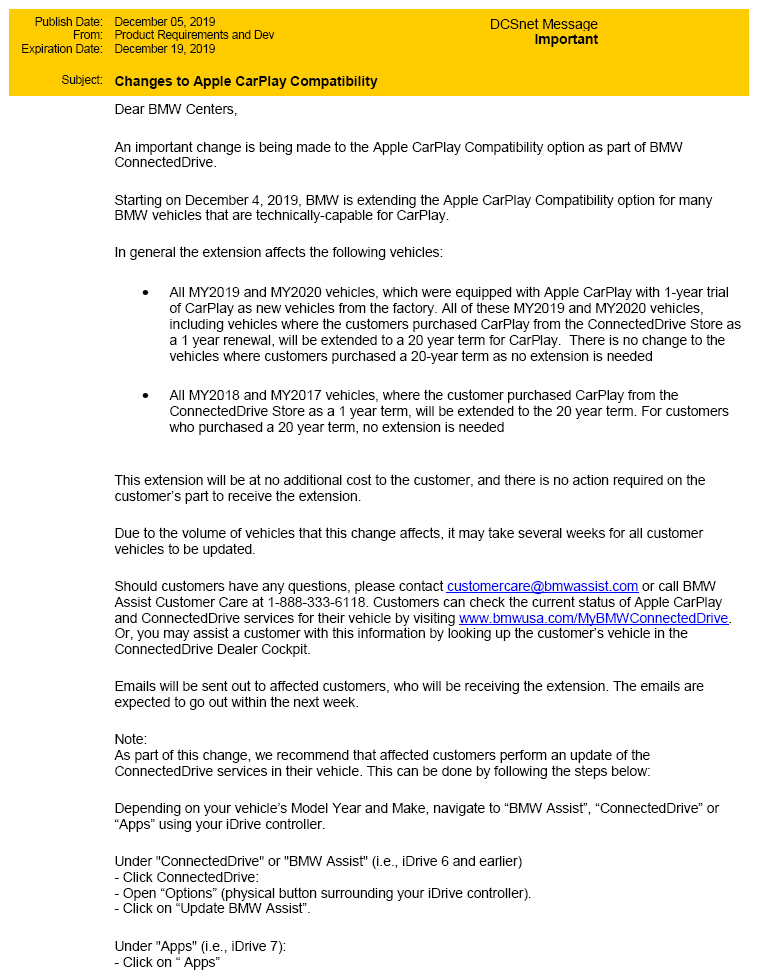
picture as pdf B84 03 20 Email to Customers.pdf