NAV System Enabling Code Cannot Be Automatically Downloaded During QC1 (FSC) (SI B65 25 22)
Publication date: 2022-12-22Reference number: SI B65 25 22
NAV SYSTEM ENABLING CODE CANNOT BE AUTOMATICALLY DOWNLOADED DURING QC1 (FSC)
TECHNICAL SERVICE BULLETIN
| BMW: | All Models in the US Market |
SITUATION
For new vehicles in-stock, prior to the first delivery, the automatic activation of the Navigation System fails during QC1 (aka PDI).
The following message is displayed in ISTA:
"Activation of the navigation map without a manual order process could not be carried out successfully."
CAUSE
ISTA is unable to access the BMW backend to generate or download the Navigation Enabling Code (FSC Enabling Code).
CORRECTION
If ISTA is unable to either request or install the Enabling Code on the first attempt, a second attempt should be performed after the ISTA machine has been restarted.
If the second attempt fails, a manual process is available to order the INITIAL NAV enabling code and install it in the vehicle.
PROCEDURE
On the second attempt to automatically activate the Navigation system of the vehicle, please follow these steps:
- Shut down and restart the ISTA machine being used.
- Connect the battery charger to the vehicle.
- Connect the diagnosis system to the vehicle (ISTA 4).
- Run either of the following test plans:
- "ABL-DIT-AS6100_TRAMODE_RESET - Delete Transport Mode"
- "ABL-WAR-AS6100_SWT_UDS_AUTO - Automatically Enabling the Navigation"
- Clear all faults in the vehicle.
- Perform a function test of the Navigation System.
If the second attempt to automatically activate the Navigation system fails, follow these steps to manually create and download the INITIAL Nav Map enabling code:
- Order the INITIAL NAV enabling code for the vehicle through your parts department. After the order is processed, it can take up to an hour to become available for download.
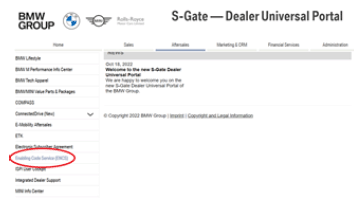
- Access the Enabling Code Service (ENCS) in the Dealer Universal Portal.
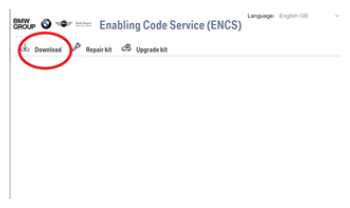
- For the INITIAL NAV enabling code, choose "Download". Only after a successful download of the initial Nav Map enabling code will it become available in the "Repair Kit" for the vehicle.
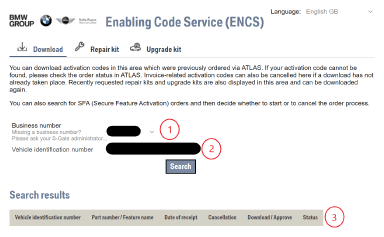
- Input the business number (dealer number) as seen in the area marked "1". Input the VIN as seen in the area marked "2" then press "Search". Once available, the Nav Map enabling code will appear below in the area marked as "3".
- Once downloaded, the Nav Map enabling code can be loaded onto a USB Drive and uploaded to the vehicle. Reference SIB 65 13 12 for more detailed instructions of this process.
Always connect a BMW-approved battery charger/power supply ( SI B04 23 10 ).
PARTS INFORMATION
Obtain and confirm the part numbers for your specific vehicle by entering the chassis number in either ETK or AIR which considers specific equipment and/or options.
| Part Number | Description | Quantity |
|---|---|---|
| Refer to ETK | Release Code Initial NAV | 1 |
CLAIM INFORMATION
The following applies to new in-stock vehicles during the QCI prior to the vehicle's first delivery.
- NAV Enabling Code Download and Install - First Attempt
The initial attempt to perform this procedure on a new vehicle is included in the QCI, when successful, no further action is necessary.
For QC I Claim Payment information, refer to SI B01 01 08.
- First NAV Enabling Code Download and Install Attempt Fails - Second Attempt
When required for a new vehicle, as a separate RO line-item, the second attempt procedure is covered under the terms of the BMW New Vehicle Limited Warranty for Passenger Cars and Light Trucks
1 Defect Code: 1 9999011800 Delay of Navigation enabling code | Refer to AIR for the corresponding flat rate unit (FRU) allowances.
Labor Operation Description (Associated work to the QC1) Labor Allowance 00 00 556 Performing vehicle test (with vehicle diagnosis system - checking faults) (Plus work) Refer to AIR And: 61 21 528 Support voltage of the vehicle electrical system/recharge vehicle electrical system battery Refer to AIR And Performing vehicle diagnosis - test modules, clear faults, and function test (Work time) 2 FRU 61 00 006 Additionally with the above, when applicable:
- Install NAV Enabling Code Manually after Failed Second Download and Install Attempt (B)
Labor Operation Description (Associated work to the QC1) Labor Allowance 65 99 000 Manually create and download the INITIAL Nav Map enabling code (Work time) 2 FRU Ands 65 90 600 Installing navigation map(s) (Repeated downland attempt failed, install with new enabling code) Refer to AIR Work time labor operation codes 61 00 006 and 65 99 500 are not considered a Main labor operations.
Based on which one applies to your center, please refer to SI B01 01 20 or SI B01 07 20 for the applicable procedure for documenting, claiming, and explaining, on the RO and in the claim comments job/repair work time (WT), and the vehicle repairs your center performed, unless otherwise required by State law.
FEEDBACK REGARDING THIS BULLETIN
| Technical Feedback | To submit feedback for the technical topics of this bulletin: Submit your feedback in the rating box at the top of this bulletin |
| Warranty Feedback | To submit feedback for the CLAIMS section of this bulletin: Submit an IDS ticket to the Warranty Department, or use the chat available in the Warranty Documentation Portal |
| Parts Feedback | To submit feedback for the PARTS section of this bulletin: Submit an IDS ticket to the Parts Department |