Heated Surfaces And Driver Profile (SI B64 02 23)
Publication date: 2023-02-15Reference number: SI B64 02 23
HEATED SURFACES AND DRIVER PROFILE
TECHNICAL SERVICE BULLETIN
| BMW: | F44 (2 Series GranCoupe); F90 (M5 Sedan); F91 (M8 Convertible); F92 (M8 Coupe); F93 (M8 Gran Coupe); F95 (X5 M SportsActivity Vehicle (SAV)); F96 (X6 M SportsActivity Coupe (SAC)); F97 (X3 M SAV); F98 (X4 M SAC); G01 (X3 SAV); G02 (X4 SAC); G05 (X5 SAV); G06 (X6 SAC); G07 (X7 SAV); G09 (XM SAV); G12 (7 Series Sedan); G14 (8 Series Convertible); G15 (8 Series Coupe); G16 (8 Series GranCoupe); G20 (3 Series Sedan); G22 (4 Series Coupe); G23 (4 Series Convertible); G26 (4 Series GranCoupe); G29 (Z4 Roadster); G30 (5 Series Sedan); G42 (2 Series Coupe); G60 (5 Series Sedan); G70 (7 Series Sedan); G82 (M4 Coupe); G83 (M4 Convertible); I20 (iX SAV); U11 (X1 SAV) |
SITUATION
Customer states that the seat, steering wheel, heated surfaces settings in the IHKA menu are missing/different then in their previous BMW vehicle. They can no longer select, under the climate rules, at what temperature Fahrenheit the heated surfaces will automatically turn on. Certain other "apps" and functions are not available, including these climate control rules.
CAUSE
Customer profile integration.
CORRECTION
Explain the advantages of the customer profile to the customer.
INFORMATION
The vehicles listed on this bulletin are either classified as SP18 (Service Pack 2018) or SP21(R) (ServicePack 2021) architecture.
- SP18 vehicles utilize a BDC_18 Gateway Module with ID6 or Bus Operating System 7 menus
- SP21 (R) vehicles utilize a BCP Gateway Module with ID8 menus.
The SP21 vehicles currently include I20, G05 LCI, G07 LCI, G20 LCI, G60, G70 and U11.
Service Pack 18 Vehicles
The Head unit High from 2018, introduced cloud-based driver profiles for all vehicles with the BMW iDrive operating concept with BMW Operating System 7 in BMW Connected Drive markets. To create a personal driver profile, the customer needed to log in with his or her personal Connected Drive account in the vehicle.
An active Connected Drive account (username and password) was a prerequisite to create a personal driver profile in the vehicle. This is the same Connected Drive account that the customer used to register in the BMW Connected App or in the BMW web portal.
Once created, this driver profile can be used to log into other vehicles to allow setting stored in the cloud to transfer to other vehicles operated by the customer.
Reference SI B65 04 22 - Limited Functionality Without BMW ID and Driver Profile
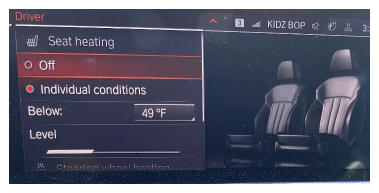
SP18 vehicles have a driver profile functionality called "Climate Control Rules". This functionality was connected to a customer's BMW ID and could be transferred from vehicle to vehicle.
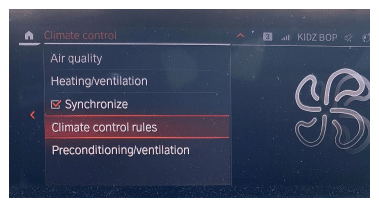
Under the Climate Control Rules, you can set the vehicle to turn on heated seats and heated steering wheel (if equipped) at a preset outside temperature. These rules are linked to individual driver profiles (except "Guest") and are not linked to specific vehicles.
Service Pack 21 Vehicles
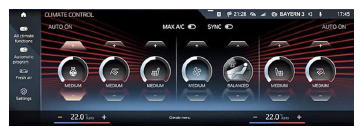
The SP21 vehicles use a different artificial intelligence climate control system, to control heated surfaces. The new intelligent control "AURA" made it possible to dispense almost entirely with traditional, physical push-buttons for climate control. Temperature and comfort functions were controlled holistically and intelligently for the first time. As such, the control of the air conditioning has been integrated into the multifunctional display with touch screen control. The priority of this system is to only utilize electricity for these systems when necessary to maximize fuel economy, reduce charging system load on the engine, and minimize CO emissions.
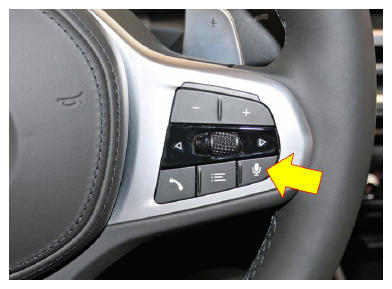
With the elimination of physical buttons, customers should rely more upon speech recognition* to turn seat heating, steering wheel heating on/off.
Alternatively, they can use the touch screen within the Climate Control menu to control these heated surfaces.
*Speech recognition button (arrow) shown on G20 LCI; other SP21 models similar.
The climate menu is accessible in all profiles, so that a customer does not have to be signed into a profile for heated surfaces to operate. The issue occurs if the customer wants to save climate settings in the vehicle or transfer settings to another vehicle. Climate settings only carry over with the driver profile.
- If a customer wants climate settings to activate via key memory or to be restored on next vehicle startup, they must use a profile to log in
- If they set their intensity levels while in a specific driver profile and then come to a vehicle in either a different driver profile or the "Guest" profile, these settings will be different
In relation to the "Climate Control Rules", it is no longer possible to set a default exterior temperature at which point the seat heating, or "heated surfaces" would trigger automatically (as shown above under SP18).
In SP21 the automatic climate operation has been completely redesigned. The activation of most features depends on outside temperature, interior temperature of vehicle, user set output vent temperature, and user set heating intensity of the heated surface. The concept is that the customer wouldn't need to set an activation temperature, as the automatic program would intuitively activate these functions based on customer settings and environmental conditions.
In the "Automatic" mode, the customer selected "Intensity Level" of certain features (i.e., seat heating, fan intensity) will be stored in the profile and remembered on the next drive cycle with this driver profile. This does not necessary mean that if the surface heating functions were previously active, that they will still be active on the next drive. If other environmental conditions have changed, the surface heating may not activate even with the same settings.
Example: A customer has seat heating intensity set to "High" and outside temp is 40°F. If the customer has the output vent temperature set to 65°F, the seat heating may activate. If the outside temperature rises to 55°F, the seat heating could then deactivate.
When the customer has "Automatic" set to "Off", the seat heating and steering wheel heating will only activate when the customer manually selects them in the "Climate" menu. This means regardless of the outside temperature; surface heating will not activate unless the customer physically selects this feature via the "Climate" menu.
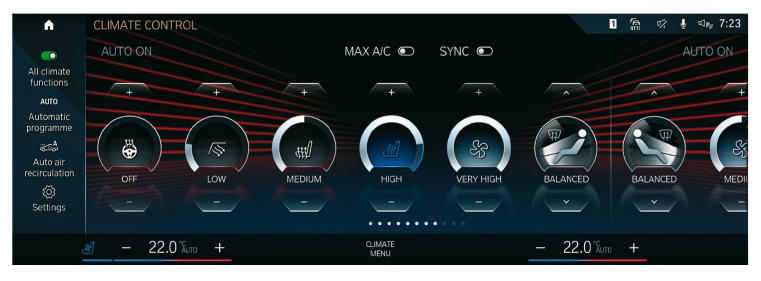
To help the customer understand the system's behavior, additional information is shown on the multifunctional display. For example, cooling and heating processes are visualized by way of a blue or red animation next to the nominal temperature display.

In addition to visualization in the form of symbols, the customer is also informed of whether the system is currently undertaking a heating or cooling process in general (IN AUTO MODE ONLY). To this end, blue or red "dynamic" bars are shown to the left and right, at the bottom of the display for the nominal temperature. If grey, then that heated surface is currently off.
Please note the following if the automated climate settings are not showing up completely:
- The customer must be logged into their profile in the car and have completed BMW ID mapping. If they are logged in, but have not completed BMW ID mapping, certain "apps" and vehicle functions will not be available, including climate rules. 2.
- Go to the "profiles" screen (tap the "person" icon on the top bar) to reveal all profiles used in the vehicle. Under the profile names you will likely see either "limited" or "all good." If "limited" is shown, the user has logged in but has not successfully mapped the car to his/her BMW ID. This can be completed by going to "BMW ID status" and scanning the displayed QR code (since 11/2020) on the center screen with the BMW app on their phone.
- Reference vehicle-specific information in TECHNIPEDIA
FEEDBACK REGARDING THIS BULLETIN
| Technical Feedback | To submit feedback for the technical topic of this bulletin: Submit your feedback in the rating box at the top of this bulletin |
| Warranty Feedback | To submit feedback for the CLAIMS section of this bulletin: Submit an ID Sticket to the Warranty Department, or use the chat available in the Warranty Documentation Portal |
| Parts Feedback | To submit feedback for the PARTS section of this bulletin: Submit an ID Sticket to the Parts Department |