Direct System (Tire Pressure Monitor)
NOTE:
Each time a tire inflation pressure has been corrected or a wheel or tire has been changed, reset the system.
TPMS Status indicator on the Control Display:
The color of the tires represents the status of the tires and the system. TPM takes into account that tire pressures change while the vehicle is being driven. The tire pressures do not need to be corrected unless the TPM instructs you to do so by means of color indicators.
- Green: The tire inflation pressure corresponds to the established target value. "TPM active" appears on the Control Display.
- One Wheel Yellow: There is a flat tire or substantial loss of tire pressure in the indicated tire. A message appears on the Control Display.
- All Wheels Yellow: There is a flat tire or substantial loss of tire pressure in several tires. A message appears on the Control Display.
- Gray:
The system cannot detect a puncture. Possible reasons for this:
- TPM is being reset.
- Temporary malfunction caused by systems or devices using the same radio frequency.
- Malfunction.
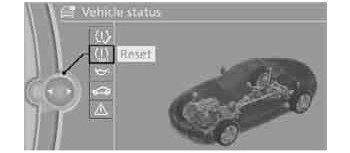
Reset Procedure:
- Using the iDrive MENU button, choose:
- "Vehicle Info" (or My Vehicle)
- "Vehicle status"
- Reset "Tire Pressure Monitor"
- Start the engine (or switch to Drive Readiness position). Do not begin driving.
- Start the reset using "Perform Reset". See Fig 1.
- Start to drive.
- The tires are shown in gray and "Resetting TPM..." is displayed.
After driving a few minutes, the set inflation pressures in the tires are accepted as the target values to be monitored. The system reset is completed during your drive, and can be interrupted at any time. When driving resumes, the reset is continued automatically. On the Control Display, the tires are shown in green and "TPM active" is displayed again.
IMPORTANT:
If a flat tire is detected while the system is resetting and determining the inflation pressures, all tires on the Control Display are displayed in yellow. The message "Low tire!" is shown.
System Reset Failure:
- Message For Unsuccessful System Reset: The warning lamp lights up yellow. A message will appear on the Control Display. Check the tire inflation pressure and reset the system.
- Malfunction:
The small warning lamp flashes in yellow and then lights up continuously; the larger warning lamp comes on in yellow. On the Control Display, the tires are shown in gray and a message appears. No punctures can be detected. This type of message is shown in the following situations:
- If there is a malfunction. Have the system checked.
- If a wheel without TPM electronics has been mounted.
- If TPM is temporarily malfunctioning due to other systems or devices using the same radio frequency.