Installing the instrument cluster (KOMBI)
NOTE:
RISK OF DAMAGE
Damage to the instrument cluster (KOMBI) or the head unit
While releasing and connecting the cable, it could lead to a ground offset. This can generate currents that render the instrument cluster (KOMBI) or the head unit unusable.
Damage to the instrument cluster (KOMBI) or the head unit
While releasing and connecting the cable, it could lead to a ground offset. This can generate currents that render the instrument cluster (KOMBI) or the head unit unusable.
- While releasing: Release APIX data cable (blue) first.
- While connecting: Connect APIX data cable (blue) at the last.
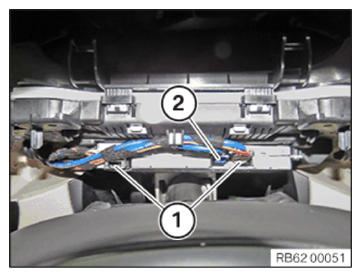
- Connect and lock the connectors (1) to the instrument cluster (KOMBI).
- Connect and lock the blue connector (2)
to the instrument cluster (KOMBI).
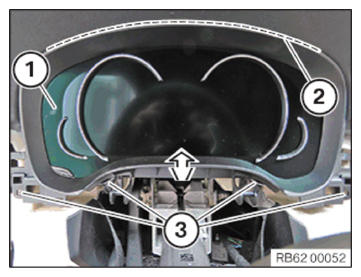
- Feed in instrument cluster (KOMBI) (1) in the marked area (2) .
- Tighten the screws (3)
.TIGHTENING TORQUES SPECIFICATION
Instrument cluster (KOMBI) to support Oval-head screw Tightening torque 1.8 Nm
Follow-up Work
- Fit steering upper section COLUMN SHROUD .
- Install the left instrument PANEL FINISHER .
- Install the left instrument panel SIDE PANEL .
- Install the right instrument PANEL FINISHER .
- Install the right instrument panel SIDE PANEL .
- Connect all battery EARTH LEADS .
- Activate the 48 v ELECTRICAL SYSTEM .