Premium Repair Parts List (PRPL) (SI B07 01 24)
Publication date: 2025-01-07Reference number: SI B07 01 24
PREMIUM REPAIR PARTS LIST (PRPL)
SERVICE CAMPAIGN BULLETIN
| BMW: | G01 X3 Sports Activity Vehicle All vehicles; G20 3 Series Sedan All vehicles; G30 5 Series Sedan Up to July 2020; G30 LCI 5 Series Sedan From July 2020; G05 X5 Sports Activity Vehicle All vehicles; G06 X6 Sports Activity Vehicle All vehicles; G07 X7 Sports Activity Vehicle All vehicles; G70 7 Series Sedan All vehicles |
SERVICE INFORMATION
What's New:
- New models added as of December 14, 2024 AIR release
INFORMATION
With the release of AIR (Aftersales Information Research) V23.4 on December 17, 2023, a new feature has been added which helps greatly with workshop efficiency. This new feature is called Premium Repair Parts List (PRPL) formerly known as GTA (Generic Parts Aftersales).
When viewing Premium Repair instructions for the models listed above, advanced functionality has been added to the "Parts" menu item.
The advantage is that all required parts for a set of Premium Repair instructions are now listed and can be added to the Service Case/shopping basket, for easy viewing by the parts department.
Additional models will be added going forward, at which time this service information bulletin will be updated.
PROCEDURE
Accessing and using PRPL:
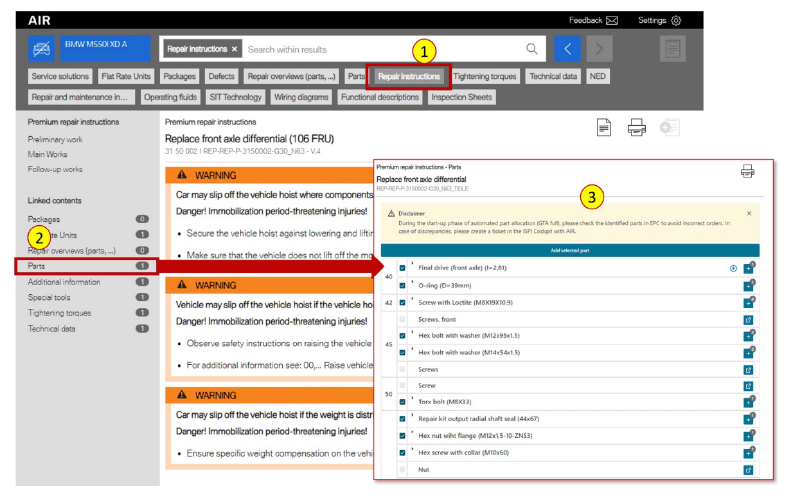
- Once a vehicle has been identified, search for the appropriate repair instructions (1).
- From the "Linked contents" list select "Parts" (2).
- The Premium repair instructions parts list will then be displayed (3).
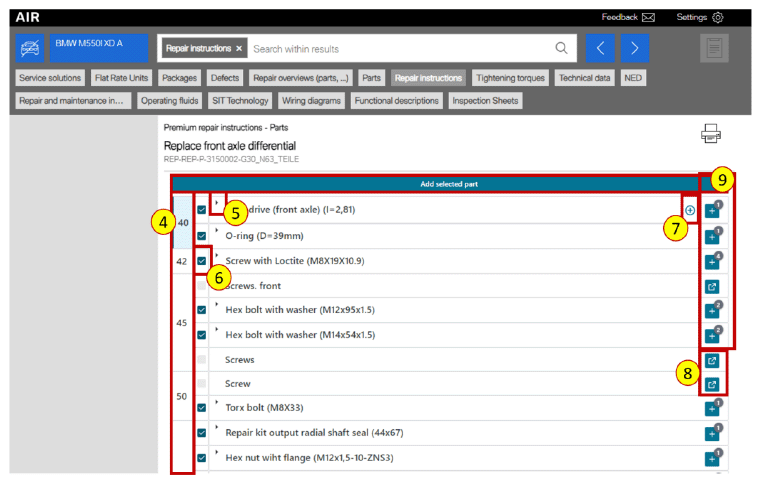
- The number on the left side column (4) of the parts list can be selected and will take you directly to that specific step in the repair manual.
- Selecting the arrow (5) additional parts information will be shown such as the part number and brief description.
- The check boxes (6) indicate which parts will be transferred to the Service Case/shopping basket. By default, all parts that are validated have been checked off. If a box is not checked, then that line needs to be validated individually.
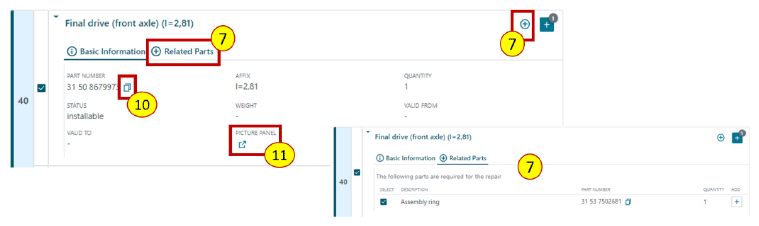
- By selecting this button (7) all related "in conjunction" parts are shown if needed.
- Selecting the picture panel icon (8) for parts that have not been validated will take you directly to the appropriate parts catalog page. Once in the parts catalog you can select the part needed for this repair and transfer it to the Service Case/shopping basket.
- The number (9) next to the picture panel icon will indicate the quantity of that part needed for the repair. With one click of the "Add selected part" button, all selected parts are transferred to the Service Case/shopping basket.
- Selecting button (10) will copy the part number to the clipboard.
- With one click (11) you are brought to the picture panel in the parts catalog.
- Once you have all the parts you need for the repair, the list can be accessed in AWP/AIR Service Case by anyone including within the parts department.
Since this is a new feature in AIR, please provide feedback on any errors using the AIR feedback button. Also review the January 2024 Service Roundtable for a live demo on how to use PRPL.
Comments or questions can be sent to US_Body_Electrical_TS@bmwna.com
Thanks for your feedback and comments.
FEEDBACK REGARDING THIS BULLETIN
| Technical Feedback | To submit feedback for the technical topic of this bulletin: Submit your feedback in the rating box at the top of this bulletin |
| Warranty Feedback | To submit feedback for the CLAIMS section of this bulletin: Submit an IDS ticket to the Warranty Department, or use the chat available in the Warranty Documentation Portal |
| Parts Feedback | To submit feedback for the PARTS section of this bulletin: Submit an IDS ticket to the Parts Department |