Fault Code 804417 Caused By The Remote Key (SI B66 19 18)
Publication date: 2019-01-01Reference number: SI B66 19 18
FAULT CODE 804417 CAUSED BY THE REMOTE KEY
TECHNICAL SERVICE BULLETIN
| BMW: | See The Chart Below |
| GROUP: | Drivers Assistance, Remote Control Systems |
MODELS
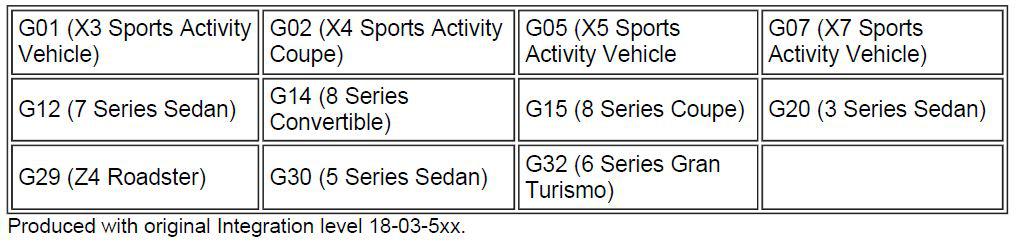
SITUATION
When a short test is performed as part of a workshop visit for an unrelated situation, the following fault code is found stored in the Body Domain Controller (BDC) memory:
- "0x804417 - Motion sensor (MEMS) in key: failure"
MEMS is the chip for the motion sensor in the vehicle remote and/or display key, to prevent vehicle thefts. Keys with MEMS were introduced in all listed vehicles as of the factory I-level 18-03-5xx.
CAUSE
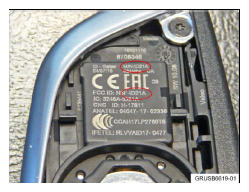
MEMS sensor in the remote key transmitter version 2.1. Remote keys can be differentiated between version 2.1 and the earlier version 2 by removing the back cover.
Carefully check the ID printed in various places (circled). G05 basic remote key shown; other models similar.
- ID21= version 2.1 (contains motion sensor)
- ID2= earlier version (no motion sensor)
The fault code can sometimes be created erroneously. In the case of a fault memory entry, it is not evident whether the fault is erroneous or actual.
CORRECTION
Follow the procedure below to determine if the MEMS contains an actual fault, or if is simply an erroneous fault.
PROCEDURE
Attention: There must be no second remote key within range. If a second key is present, move it at least 5 yards away from the vehicle.
Test sequence:
- No other vehicle remote key is within 5 yards.
- Vehicle is unlocked.
- Deactivate Comfort Access via the iDrive menu path--> Auto -> Settings -> Doors/vehicle access -> Comfort Access -> Deselect:
- Unlock when approaching
- Lock when walking away
- Move at least 5 yards away from the vehicle.
- Lock the vehicle using the remote key's lock button.
- Leave the key on a stationary surface so that it remains motionless for at least 3 minutes.
- After 3 minutes, bring the key to within 1 yard of the side of the vehicle, but do not open/unlock.
- Set the key down motionless for 3 more minutes (e.g., at rear of hood, on roof, etc.)
- After at least 3 minutes, attempt to unlock the vehicle via Comfort Access at the door handle. Do not move the remote key.
- Unlocking should NOT occur if the MEM is functioning properly
- Move the key. Attempt to unlock the vehicle via Comfort Access.
- If the vehicle unlocks, the MEMS is functioning properly
Conclusions:
- If the vehicle unlocked before the key was moved at Step 9, repeat the test.
- If the vehicle can still be opened before the key was moved (at Step 9), it is likely that the MEMS in the key is faulty. Replace the remote key.
- Refer to Repair Instructions 66 12... "Teach in radio remote control/radio remote control with display (BMW display key)"
NOTE: The MEM deactivates the lock/unlock function after approx. 2 minutes with the key stationary. For this reason, the test sequence calls for a 3 minute wait to determine if the MEM is actually faulty or not. - If another remote key is available during this workshop session, repeat the test sequence to confirm proper MEM operation.
- Clear the fault code memory.
PARTS INFORMATION
In case of a faulty MEM in the remote key and/or display key, obtain the part number for the replacement remote key(s) by entering the chassis number in ETK which takes into account specific equipment and/or options.
| Part Number | Description | Quantity |
|---|---|---|
| Refer to ETK | Remote key | 1 |
| Refer to ETK | Display key, if applicable | 1 |
WARRANTY INFORMATION
Covered under the terms of the BMW New Vehicle Limited Warranty for Passenger Cars and Light Trucks.
Select the "Defect Code" below that applies to the type of remote key being replaced.
| Defect Code: | 6135621500 | Radio remote control/key fob transmitter (ID transmitter), basic, no display permanent malfunction |
|---|---|---|
| Or: | ||
| 6612051200 | Radio remote control (ID transmitter) including display permanently failed | |
| Labor Operation: | Labor Allowance: | Description: |
| 00 00 006 | Refer to AIR/KSD2 | Performing "vehicle test" (with vehicle diagnosis system - checking faults) (Main work) |
| Or: | ||
| 00 00 556 | Refer to AIR/KSD2 | Performing "vehicle test" (with vehicle diagnosis system - checking faults) (Plus work) |
| And: | ||
| 61 21 528 | Refer to AIR/KSD2 | Connect an approved battery charger/power supply (indicated in KSD2 as "Charging battery") |
If you are using a Main labor code for another repair, use the Plus code labor operation 00 00 556 instead of 00 00 006.
And, additionally for the:
e-Vehicles
| Labor Operation: | Labor Allowance: | Description: |
|---|---|---|
| 61 25 910 | Refer to AIR/KSD2 | Recharging high-voltage battery unit (to high voltage charging socket) |
And, as necessary:
| And: | ||
| 66 10 000 | Work time (WT) | Work time to check the Motion Sensor (MEMS) function as outlined in the Procedure |
Refer to AIR/KSD2 for the corresponding flat rate unit (FRU) allowances.
Work time labor operation code 66 10 000 is not considered a Main labor operation; however, it does require an individual punch time and an explanation on the repair order and in the claim comments section.