Display Key Is Non-Functional (SI B66 20 17)
Publication date: 2017-11-01Reference number: SI B66 20 17
DISPLAY KEY IS NON-FUNCTIONAL
TECHNICAL SERVICE BULLETIN
| BMW: | G07 X7 Sports Activity Vehicle; G12 7 Series Sedan; G14 8 Series Convertible; G15 8 Series Coupe; G30 5 Series Sedan; G32 640i xDrive Gran Turismo; Produced from July 1st, 2015; Vehicles equipped with option code 3DS (BMW Display Key) |
SERVICE INFORMATION
This Service Information Bulletin (Revision 3) replaces SI B66 20 17 dated October 2019.
What's New (Specific text highlighted):
- Cause
- Correction
- Procedure
- Parts information
SITUATION
The display key is non-functional.
Display Key cannot be charged or switched on.
An incorrect vehicle model appears on the key display.
CAUSE
Possible defective display key battery or display key.
CORRECTION
After verification of complete failure, replace the display key battery or the display key.
PROCEDURE
For conditions that are similar to the situation described, perform the following steps in order to determine whether the current key is functional:
- Perform a soft reset of the display key by pressing and holding the On/Off button for a minimum of 28 seconds.
For display keys produced after 12/2017, a hardware reset should alternatively be performed. To do so press and hold the lock and unlock buttons at the same time for more than 8 seconds.
Does the display key now function properly?
YES - return to customer.
NO - go to next step.
- Try to charge the display key (preferably with the USB cable).
Can the display key now be turned on and off (while connected to the USB cable)?
YES - fully charge the display key and then return to customer.
NO - go to next step.
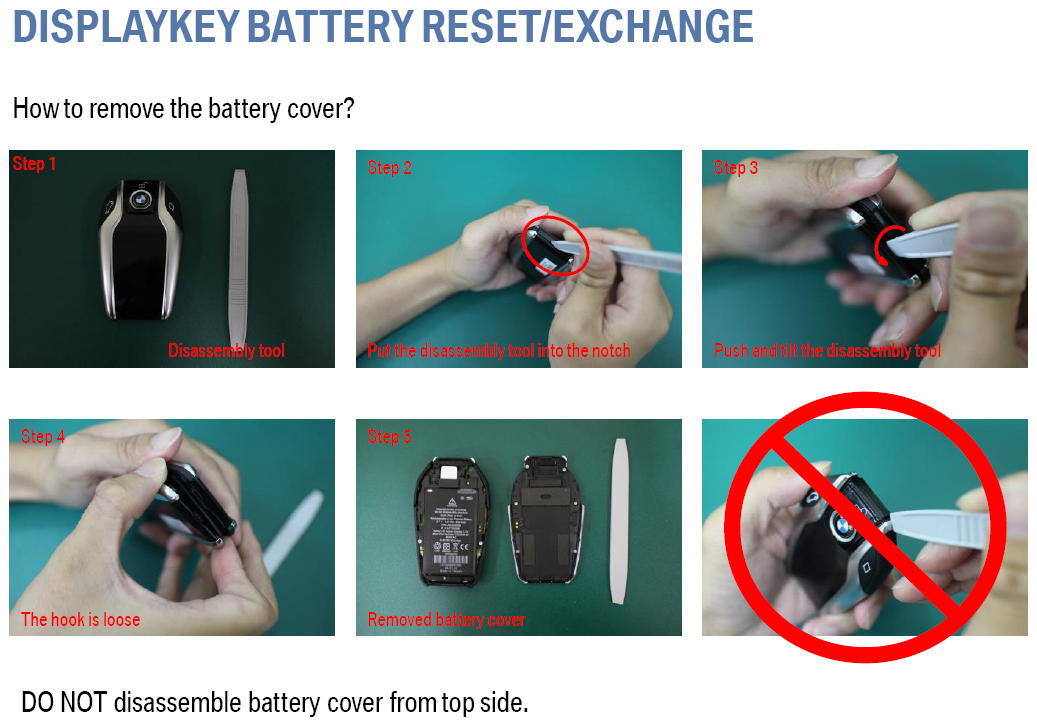
- Remove the battery from the display key (as per instructions in attachment) and then reinsert the battery.
Did this fully reset the electronics and restore functionality?
YES - fully charge the display key and then return to customer
NO - keep the battery housing open and go to next step.
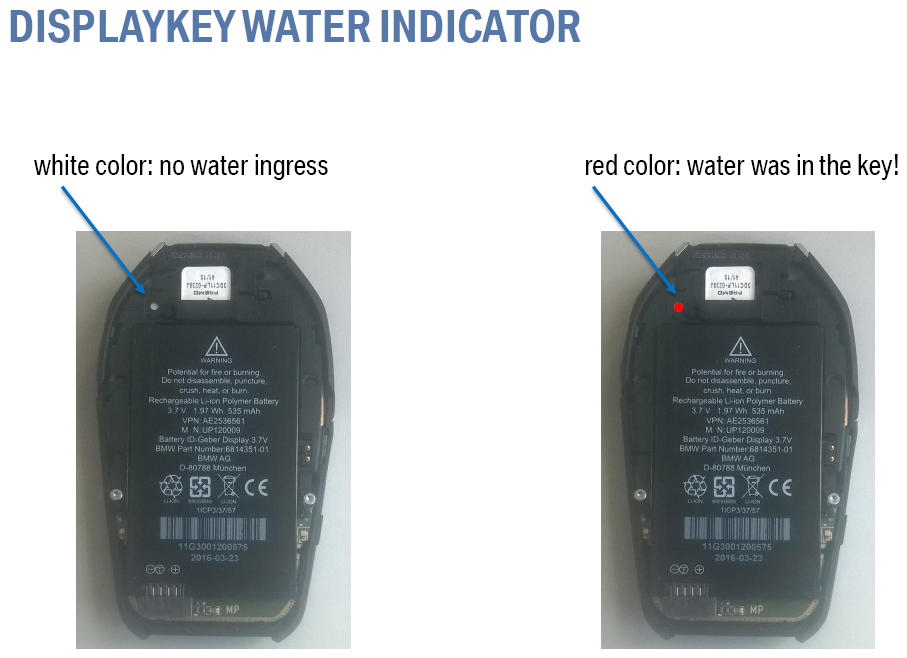
- Examine the moisture indicator above the battery (as per instructions in attachment).
Is the indicator colored red?
YES - the display key has been subjected to excess moisture and is NOT replaceable under warranty.
NO - if the indicator is still white, the display key warranty has not been voided by excess moisture exposure. Go to next step.
- Does the display cannot be charge at all, or discharges very quickly?
YES - replace the display key battery. Refer to REP 66 12 150 "Removing and installing battery pack of BMW display key".
No - Go to next step.
- If the above steps have not corrected the situation, replace the display key.
PARTS INFORMATION
Obtain and confirm the part numbers for your specific vehicle by entering the chassis number in either ETK or AIR which takes into account specific equipment and/or options.
| Part Number: | Description: | Quantity: |
|---|---|---|
| 66 12 9 442 977 | Battery Pack | 1 |
| Refer to ETK | Radio remote control with display | 1 |
WARRANTY INFORMATION
This service information bulletin provides technical, diagnostic and repair-related information.
Supporting Materials
picture as pdf B66 20 17 Attachment Display Key.pdf