Surround View: Parking View Images Displayed Incorrectly (SI B66 17 20)
Publication date: 2020-11-20Reference number: SI B66 17 20
SURROUND VIEW: PARKING VIEW IMAGES DISPLAYED INCORRECTLY
SERVICE CAMPAIGN BULLETIN
| BMW: | See The Chart Below |
SERVICE INFORMATION
What's New (Specific text highlighted):
- Title
- Model - deleted option code 6U3
- Situation - Attachment added
- Procedure
MODEL
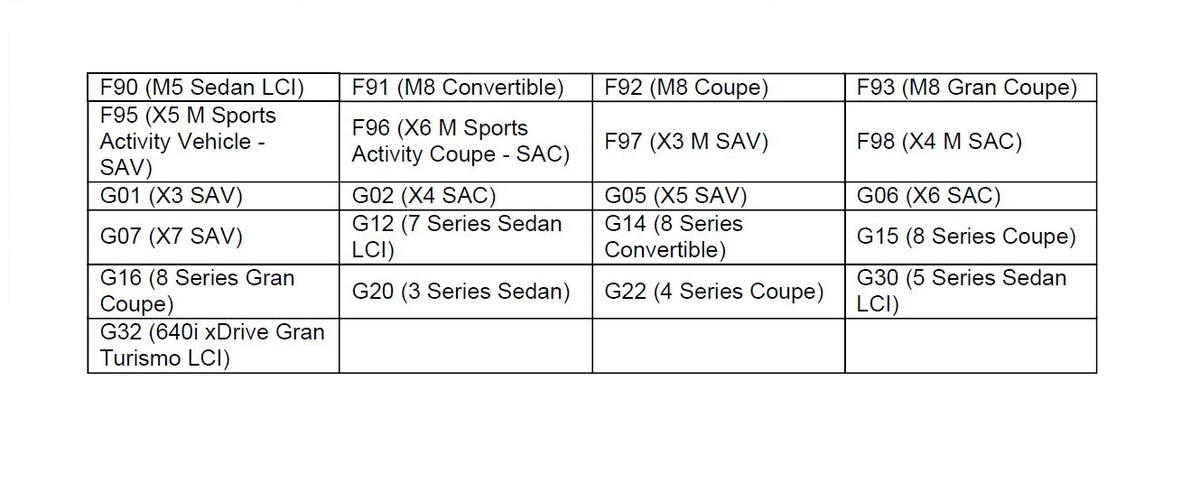
Affected vehicles are equipped with the following option codes:
5DN - Parking Assistance System Plus
SITUATION
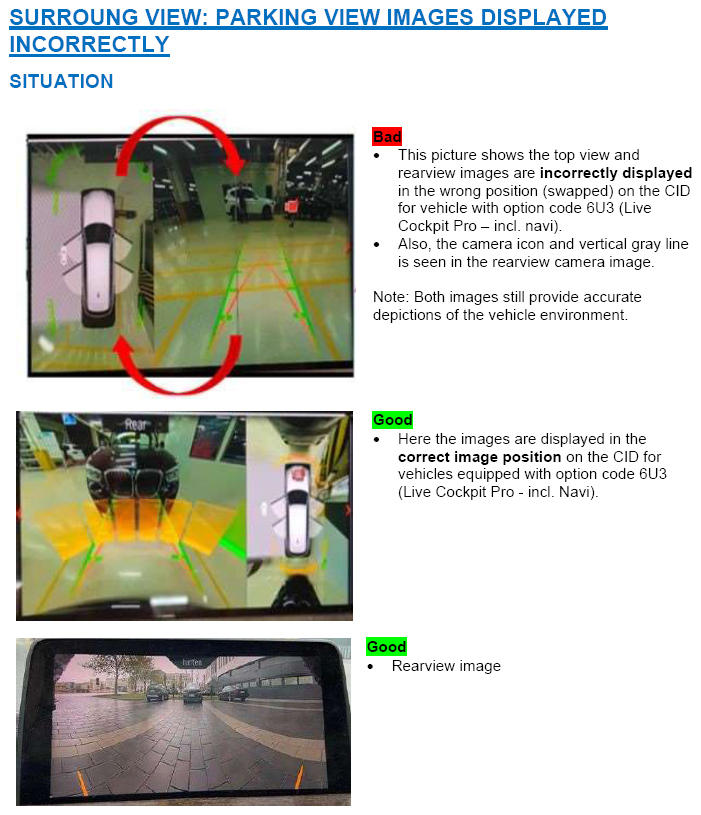
After programming and shifting into reverse, there may be various sporadic concerns regarding the rearview camera and the surround view (top view) camera images in the CID (Central Information Display). Listed below are some possible concerns:
- Images for rear view camera and top view camera are swapped on the display.
- There is a vertical line noticed and/or camera icon randomly located in the rearview camera image.
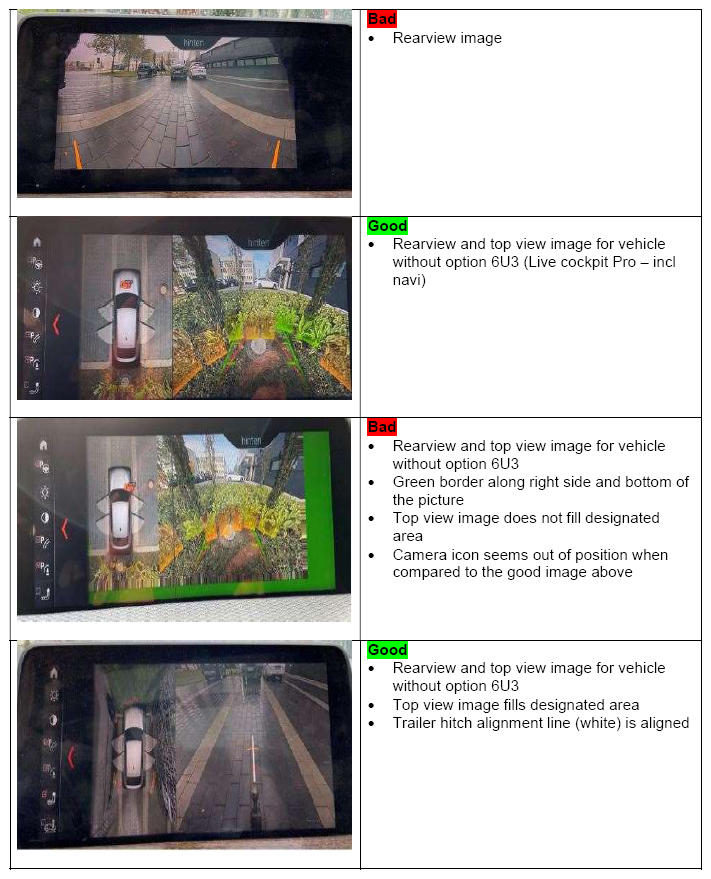
- Partial green border seen around the image
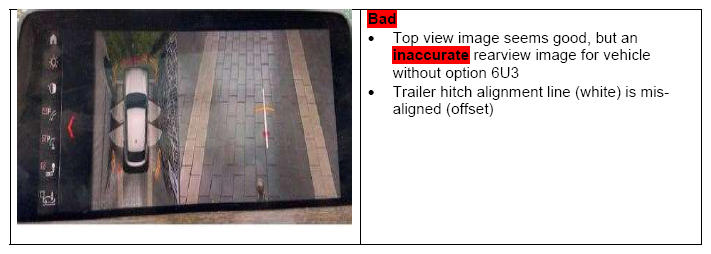
- Trailer hitch alignment line does not line up (offset)
- Blank/Black screen
CAUSE
Software coding error in the ICAM control unit.
CORRECTION
Encode the ICAM control unit again after programming with ISTA 4.25.4x (released October 8, 2020) or higher. Multiple encoding of the ICAM control unit may be required.
Target I-level: S15A-20-07-560 or higher.
PROCEDURE
- After programming, visually check and compare the camera image in the display to the situation.
- If the camera images displayed in the CID match the "bad or inaccurate" pictures in the attached file, then skip step 3 and proceed from step 4.
- If the camera images displayed in the CID match the "good" pictures in the attached file, then no further action is required.
- Connect the vehicle to ISTA.
- Start a new programming session, go to Advanced Tab.
- Select all control units for encoding.
- Calculate and accept measures plan.
- Once the encoding/programming is completed, allow the vehicle to sleep for 5 minutes.
- Reassess the vehicle.NOTE: Camera image in the CID must match the "good" pictures seen in the attachment above in the situation.
- If the image does not match "good" pictures, then recode the ICAM by repeating steps 5 - 9 above.
Note 1: Do not exceed 3 ICAM coding attempts. Submit a TSARA case if the image is not corrected after the 3 coding attempt.
Note 2: The vehicle does not need to go into sleep mode before performing the additional coding attempts.
Note 3: With the release of ISTA 4.27.1x and/or I-level 20-11-540 or higher (expected early December 2020, pending verification) the manual coding of the ICAM control unit will no longer be required.
- If the vehicle's current I-level is already at S15A/S18A-20-11-540 or higher, then-
- Do not program the vehicle
- Perform diagnosis with ISTA and work through related test plan if necessary
- Then reassess the vehicle
Always connect a BMW-approved battery charger/power supply ( SI B04 23 10 ) when performing programming.
For information on programming and coding with ISTA, refer to CenterNet/TIS/Technical Documentation/Programming and Diagnostics/Programming Documentation.
PARTS INFORMATION
Part replacement will not provide a solution and is therefore not permitted.
WARRANTY INFORMATION
During this workshop visit, the affected vehicle may also show one or more programming and encoding Technical Campaign repairs open, the programming and encoding procedure may only be invoiced one time.
Select one of these open Technical Campaigns to perform and submit for updating the vehicle to the required I-level or higher.
Please be sure to also perform any additional work (before and/or after) the selected campaign or other campaign repairs require and/or close the remaining open programming and encoding Technical Campaign repairs as outlined in the corresponding Service Information Bulletin.
Only if the above situation does not apply, the BMW software solution is then:
Covered, either full or partial as described below, under the terms of the BMW New Vehicle Limited Warranty for Passenger Cars and Light Trucks or the BMW Certified Pre-Owned Program as described below.
| Defect Code: | 6653040200 | Control unit TRVC/TRSVC, surround view camera (Rear Side View camera) software error/internal equipment fault |
|---|---|---|
| :- | ||
| Labor Operation | Description | Labor Allowance |
| 00 00 006 | Performing vehicle test (with vehicle diagnosis system - checking faults) (Main work) | Refer to AIR |
| Or: | ||
| 00 00 556 | Performing vehicle test (with vehicle diagnosis system - checking faults) (Plus work) | Refer to AIR |
| And: | ||
| 61 21 528 | Connect an approved battery charger/power supply (in AIR as Recharge vehicle electrical system battery) |
Refer to AIR |
| And: | ||
| 61 00 730 | Programming/encoding control unit(s) (First programming attempt without an open Campaign) | Refer to AIR |
If you are using a Main labor code for another repair, use the Plus code labor operation 00 00 556 instead of 00 00 006.
Refer to AIR for the corresponding flat rate unit (FRU) allowance.
And, additionally for the:
e-Vehicles
| Labor Operation | Description | Labor Allowance |
|---|---|---|
| 61 25 910 | Recharging high-voltage battery unit (to high voltage charging socket) | Refer to AIR |
And, if required:
If the image does not match picture 2 after the first programming attempt, then recode the ICAM again (Repeating steps 5 - 9 , second attempt, under the Defect Code listed above and if applicable, with a reference to the Campaign programming (first attempt) claim submission
| Labor Operation | Description | Labor Allowance |
|---|---|---|
| 61 00 731 | Additional work after 1st termination when programming/encoding (Associated work with job item no. 61 00 730 or the Campaign programming) (Second programming attempt) | Refer to AIR |
And, if also required:
Recode the ICAM again (Repeating steps 5 - 9 , Third and final attempt, under the Defect Code listed above, and if applicable, with a reference to the Campaign programming (first attempt) claim submission and the second attempt)
| Labor Operation | Description | Labor Allowance |
|---|---|---|
| 61 00 732 | Additional work after 2nd cancellation during programming/encoding (Associated work, after and with job item no 61 00 731, 61 00 730 or the Campaign programming) (Third programming attempt) | Refer to AIR |
Programming and Encoding - Vehicle Control Units (RO and Claim Comments Required)
The programming procedure automatically reprograms and encodes all vehicle control modules which do not have the latest software I-level. If one or more control module failures occur during this programming procedure:
Please claim this consequential control module-related repair work (including performing the IRAP Control Unit Recovery procedure first as required, refer to the SIB in AIR) under the defect code listed in this bulletin with the applicable AIR labor operations.
Explain this additional work (The why and what) on the repair order and in the claim comments section
For control module failures that occurred prior to performing this programming procedure:
When covered under an applicable limited warranty, claim the applicable test plan and the corresponding control module-related repair work using the applicable defect code and labor operations in AIR (including diagnosis).
Other Repairs
If other eligible and covered work is performed as a result of either performing the ISTA diagnostics and related test plans or as recommended through the TSARA case (when applicable), claim this work with the applicable or the defect code that applies together with the corresponding labor operations listed in AIR (including diagnosis).
As applicable to your center, please refer to SI B01 01 20 or B01 07 20 for claiming your job/repair work time (WT) and the repair-related explanation procedures.
QUESTIONS REGARDING THIS BULLETIN
| Technical inquiries | Submit feedback at the top of this bulletin |
| Warranty inquiries | Submit an IDS ticket to the Warranty Department or use the chat available in the Warranty Documentation Portal |
| Parts inquiries | Submit an IDS ticket to the Parts Department |
Supporting Materials
picture as pdf B66 17 20 Attachment 1.pdf