CONNECTEDDRIVE/BMW Assist System Diagnosis Information (SI B84 02 14)
Publication date: 2020-03-11Reference number: SI B84 02 14
CONNECTEDDRIVE/BMW ASSIST SYSTEM DIAGNOSIS INFORMATION
TECHNICAL SERVICE BULLETIN
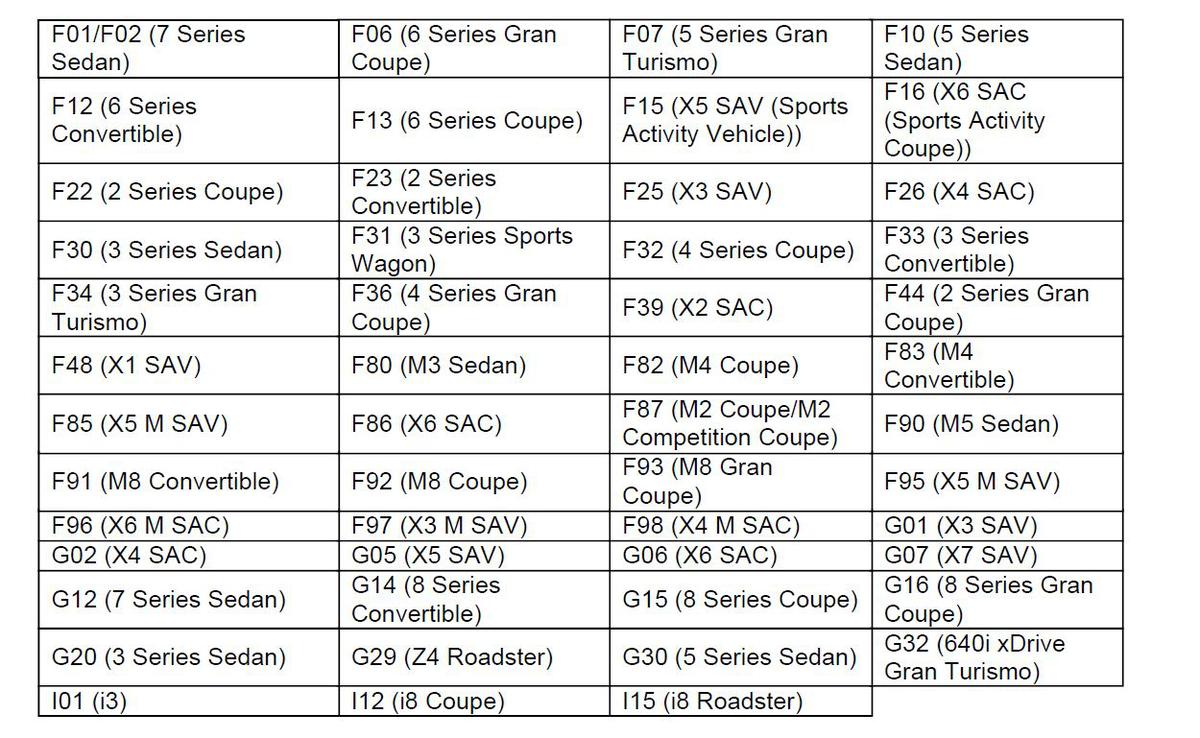
| BMW: | See The Chart Below |
MODEL
SERVICE INFORMATION
This Service Information Bulletin (Revision 7) replaces SI B84 02 14 dated May 2019.
What's New (Specific text highlighted):
- Models added
- Procedure updated to specify TSARA case submission
- Information to include SI B 84 05 19
- Warranty Information updated
- Attachment "SI B84 02 14 Checklist" updated
SITUATION
ConnectedDrive/BMW Assist features are partially or completely inoperative. This Service Information Bulletin:
- Is being published because vehicles are down for an extended period of time when researching system failures with ConnectedDrive or BMW Assist.
- Will assist you both in identifying the issue and providing technical support.
CAUSE
Not enough information is available for BMW NA engineers to assist the technician in diagnosing the root cause.
PROCEDURE
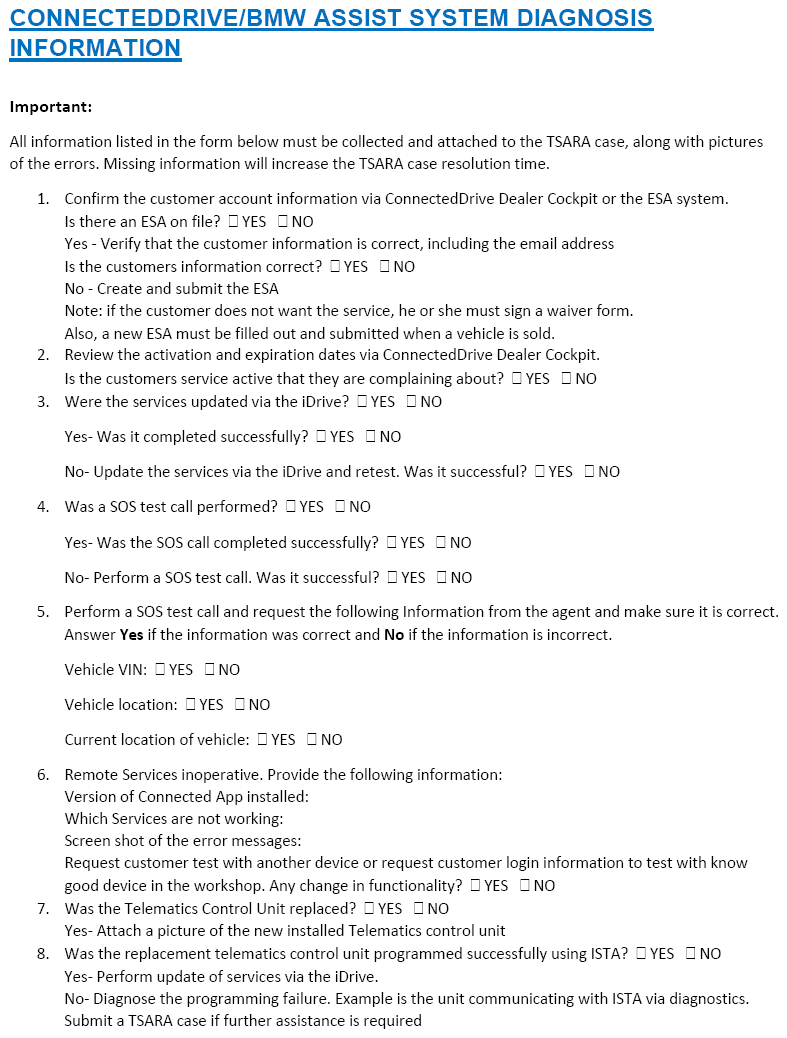
Shorten the research time for the technician by collecting the needed information up front (listed in the form below). This also leads to shortened downtime for the customer.
- Print out the attached checklist in the attachment section.
- Fill in/answer all questions on the checklist during diagnosis.
- If the issue is still not resolved after completing the attached checklist, the technician must create and submit a TSARA case for further assistance.
- The TSARA case subject or title must start with "CD:"
- The TSARA case can be submitted directly to Connected/Digital Services
NOTE: Do not contact the ConnectedDrive support team via telephone or email. These are no longer monitored. - Extremely important: The following information must be included in the TSARA case:
- A picture of the Telematics Control Unit label currently activated and installed in the vehicle.
- The completed checklist as an attachment.
-
NOTE: if the checklist is not completed or missing, it will increase the processing time to resolve the issue.
- The number of days the vehicle has been at the dealer for this issue, or the date the RO was opened.
- Complete details on all repairs that have been performed.
- Which parts have been replaced (include the number if more than one of the same part was replaced)
INFORMATION
Review the bulletins listed below:
- SI B 84 05 19 Launch of Connected Drive Dealer Cockpit. Attachment with FAQs
- The hyperlink below opens the "BMW ConnectedDrive" website: http://www.bmwusa.com/ConnectedDrive
- The hyperlink below opens the webpage which contains the BMW ConnectedDrive "Service Availability Matrix" and the "Service Durations and Renewal" information.
https://www.bmwusa.com/content/dam/bmwusa/connected-drive/pdf/ServiceAvailabilityMatrix.pdf
Some of the more common situations are listed below:
Situation 1: Telematics control unit replaced?
- A: YES.
Was the ISTA programming successful?
YES: " update services" is greyed out and SOS call is not working. Submit a TSARA case with a picture of the sticker on the NEW Telematics unit.
NO: Diagnose why programming failed.
Situation 2: Remote functions inoperative?
- A: Confirm the function is active in the ConnectedDrive Dealer Cockpit tool. (Remote services)
- B:
Check the email address listed on file is correct.
NO: What is the desired email address? Was this provided to the Assist call center?
NOTE: The customer can contact the call center directly to change his or her email address and customer can log into ConnectedDrive Portal to change email address. - C:
Verify customer is using the latest version of the Connected App.
Situation 3: Traffic info not working?
- A:
New offer vehicles (6AC and 6AE option) - Check the following:
- Traffic info is activated in the vehicle via the iDrive
- Verify ConnectedDrive Service Cockpit has a valid subscription for RTTI (Real Time Traffic Information)
- Update services via the iDrive and retest
NOTE: Do not replace parts for this issue.IMPORTANT: HU-H equipped vehicles require a valid account (ESA on file). Verify using in ConnectedDrive Service Cockpit tool.
WARRANTY INFORMATION
This Service Information bulletin provides technical, diagnostic and repair-related information.
Eligible and Covered Work/Repairs
Repairs to correct Connected Drive issues that are caused by verified defect in materials or workmanship are covered under the terms of the BMW New Vehicle Limited Warranty for Passenger Cars and Light Trucks.
To submit a claim, please following the established and applicable warranty policy and procedures (Labor/Part/Sublet - bulk materials) that apply to the repair being performed.
Refer to AIR for the corresponding defect code, flat rate labor operations (including diagnosis) and the flat rate unit (FRU) allowances.
| Defect Code: | Refer to AIR | ||
|---|---|---|---|
| Labor Operation | Description | Labor Allowance | |
| 00 00 006 | Performing vehicle test (with vehicle diagnosis system - checking faults) (Main work) | Refer to AIR | |
| Or: | |||
| 00 00 556 | Performing vehicle test (with vehicle diagnosis system - checking faults) (Plus work) | Refer to AIR | |
| And: | |||
| 61 21 528 | Connect an approved battery charger/power supply (indicated in AIR as Charging battery) | Refer to AIR | |
And, additionally for the:
e-Vehicles
| Labor Operation | Description | Labor Allowance |
|---|---|---|
| 61 25 910 | Recharging high-voltage battery unit (to high voltage charging socket) | Refer to AIR |
And:
| Labor Operation | Description | Labor Allowance |
|---|---|---|
| 84 11 910 | Connected Drive function check | 5 FRU |
Only one Main labor operation code can be claimed per repair visit.
Work time (WT) labor operation codes require individual punch times and explanations on the repair order and in the claim comments section.
Supporting Materials
picture as pdf SI B84 02 14 Checklist.pdf