Instrument Cluster Display Shakes-Shifts To The Left (SI B62 08 18)
Publication date: 2021-03-11Reference number: SI B62 08 18
INSTRUMENT CLUSTER DISPLAY SHAKES-SHIFTS TO THE LEFT
SERVICE CAMPAIGN BULLETIN
| BMW: | See The Chart Below |
SERVICE INFORMATION
This Service Information Bulletin (Revision 5) replaces SI B62 08 18 dated December 2020.
What's New (Specific text highlighted):
- Warranty
MODEL
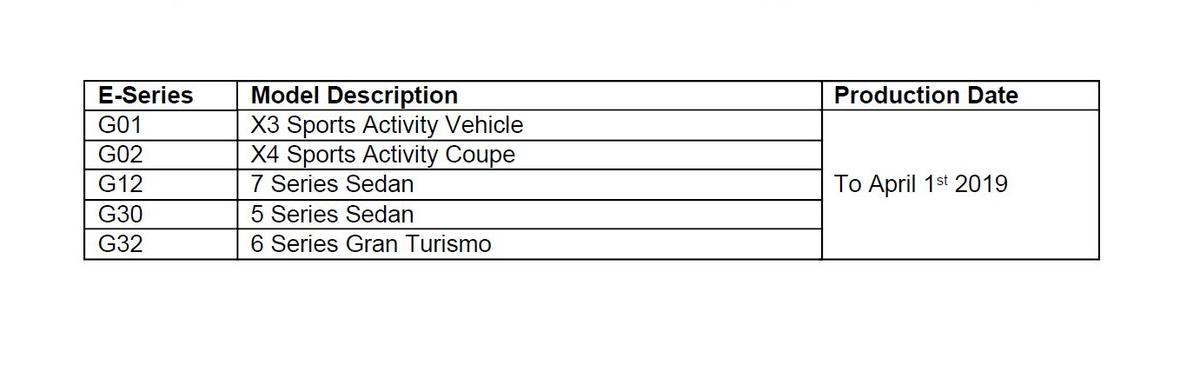
Only vehicles with MID Instrument cluster and or one of the following options:
- 6WD Instrument Cluster with advanced scopes
- 5DF Active Cruise Control with Stop & Go function
- 610 Head-Up Display
- 6WB Multi-Function Instrument Display
- 6U3 BMW Live Cockpit Professional
SITUATION
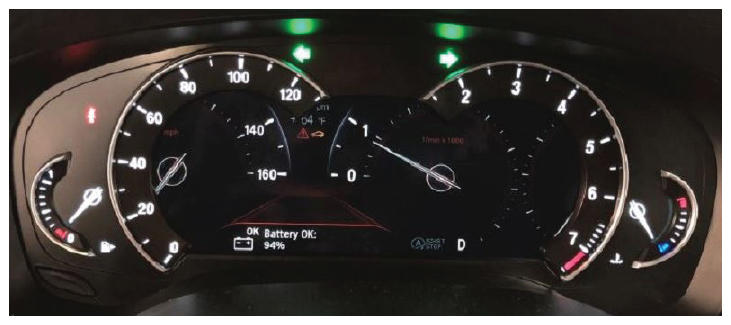
The Instrument cluster intermittently flickers, shakes and has shifted to the left.
The fault is resolved once the vehicle goes into sleep mode.
The fault can reoccur at any point.
CAUSE
Vehicles produced to 01/31/2018:
Problem with the contact at the Automotive Pixel Link connection plug on the instrument cluster.
Vehicles produced after 02/01/2018
Software error in the Instrument cluster (Kombi)
CORRECTION
Vehicles produced to 01/31/2018:
Replace the instrument cluster (Kombi).
Vehicles produced on or after 02/01/2018
Program vehicle and perform ABL Dashboard: "Display jitters/shifts to the left"
PROCEDURE
- Perform diagnosis with the latest version of ISTA, working through test module, if needed.
- Check the vehicle's production date:
Vehicles produced up to 01/31/2018 Replace the instrument cluster then program the vehicle with ISTA 4.26.2x or higher.
Target I Level S15A-20-11-5xx or higherVehicles produced after 02/01/2018: DO NOT replace the instrument cluster. - Program the vehicle with ISTA 4.26.2x or higher, Target I Level S15A-20-11-5xx or higher
- Perform ABL "Dashboard: Display jitters/shifts to the left" to update the firmware in the Kombi.
NOTE: If the vehicle Integration is higher than S15A-20-07-540 then further diagnosis with ISTA is needed.Note that ISTA will automatically reprogram and code all programmable control modules that do not have the latest software.
Always connect a BMW-approved battery charger/power supply ( SI B04 23 10 ).
For information on programming and coding with ISTA, refer to DealerSpeed/TIS/Technical Documentation/Diagnostics and Programming/Programming Documentation.
PARTS INFORMATION
Obtain and confirm the part numbers for your specific vehicle by entering the chassis number in either ETK or AIR which takes into account specific equipment and/or options.
| Vehicles produced up to 01/31/2018: |
| Part Number | Description | Quantity |
|---|---|---|
| Refer to ETK | Instrument Cluster | 1 |
| Vehicles produced after 02/01/2018: |
|---|
| Parts replacement will not provide a solution to this situation. |
WARRANTY INFORMATION
During this workshop visit, the affected vehicle may also show one or more programming and encoding Technical Campaign repairs open, the programming and encoding procedure may only be invoiced one time.
Update the vehicle to the required I-level or higher by performing and submitting for one of the open Technical Campaigns instead.
Please be sure to also perform any additional work (before and/or after) which the campaign repairs require and/or close the remaining open programming and encoding Technical Campaign repairs as outlined in the corresponding Service Information Bulletin.
If the above situation does not apply and/or an instrument cluster replacement is required:
Then the BMW software solution and/or the instrument cluster replacement portion is covered under the terms of the BMW New Vehicle Limited Warranty for Passenger Cars and Light Trucks or the BMW Certified Pre-Owned Program as described below.
| Defect Code: | 6211900300 | G01 G02 G12 G3* Instrument cluster display shaking/displaced |
|---|---|---|
| Labor Operation | Description | Labor Allowance |
| 00 00 006 | Performing vehicle test (with vehicle diagnosis system - checking faults) (Main work) | Refer to AIR |
| Or: | ||
| 00 00 556 | Performing vehicle test (with vehicle diagnosis system - checking faults) (Plus work) | Refer to AIR |
| And: | ||
| 61 21 528 | Support voltage of the vehicle electrical system/recharge vehicle electrical system battery | Refer to AIR |
If you are using a Main labor code for another repair, use the Plus code labor operation 00 00 556 instead of 00 00 006.
And, as necessary:
| Labor Operation | Description | Labor Allowance |
|---|---|---|
| 61 00 006* | Performing vehicle diagnosis - test module | Work time (WT) |
| And/or: | ||
| 62 10 000* | Checking function of the instrument cluster | Work time (WT) |
| Or: | ||
| 00 58 000* | Diagnosis Worktime Flat Rate | 2 FRU |
Work time labor operation codes 61 00 006, 62 10 000 and 00 58 000 are not considered a Main labor operations.
*As applicable to your center, please refer to SI B01 01 20 or B01 07 20 for claiming your diagnosis work time, job/repair work time (WT), RO/Claim WT and/or repair explanation procedures, unless otherwise required by State law.
And, only for:
Applicable vehicles produced up to and including 01/31/2018
| Labor Operation | Description: | Labor Allowance |
|---|---|---|
| 62 11 786 | Replacing instrument cluster (after vehicle diagnosis) | Refer to AIR |
If this work is done in conjunction with performing an open programming and encoding Technical Campaign repair on the vehicle, then only claim the applicable diagnosis work time (WT), labor operation 62 11 768 and the instrument cluster part number under the Defect Code provided above.
And, for:
All applicable vehicles
| Labor Operation | Description: | Labor Allowance |
|---|---|---|
| 61 00 730 | Programming/encoding control unit(s) | Refer to AIR |
Refer to AIR for the corresponding flat rate unit (FRU) allowances.
Programming and Encoding - Vehicle Control Units (RO and Claim Comments Required)
The programming procedure automatically reprograms and encodes all vehicle control modules which do not have the latest software I-level. If one or more control module failures occur during this programming procedure:
Please claim this consequential control module-related repair work (including performing the IRAP Control Unit Recovery procedure first as required, refer to the SIB in AIR) under the defect code listed in this bulletin with the applicable AIR labor operations.
Please explain this additional work (The why and what) on the repair order and in the claim comments section
For control module failures that occurred prior to performing this programming procedure:
When covered under an applicable limited warranty, claim the applicable test plan and the corresponding control module-related repair work using the applicable defect code and labor operations in AIR (including diagnosis).
QUESTIONS REGARDING THIS BULLETIN
| Technical inquiries | Submit feedback at the top of this bulletin |
|---|---|
| Warranty inquiries | Please contact the Warranty department by either using the Live Chat that's available in the Warranty Documentation Portal or through IDS by selecting Coverage, Policy, Coding Questions and Mileage Corrections |
| Parts inquiries | Submit an IDS ticket to the Parts Department |