HEADUNIT Navigation Map Loading And Enabling Process (SI B65 13 12)
Publication date: 2024-02-13Reference number: SI B65 13 12
HEADUNIT NAVIGATION MAP LOADING AND ENABLING PROCESS
SERVICE CAMPAIGN BULLETIN
| BMW: | All Models in the US Market; Produced From 2013 |
SERVICE INFORMATION
This Service Information bulletin (Revison 9) replaces SI B65 13 12 dated December 2023.
What's New (Specific text highlighted):
- Revision of Procedure Section
Affects vehicles equipped with the following head units:
- NBT (HU-H) - Head Unit High/Next Big Thing/Car Infotainment Computer SA 609 - Navigation System Professional
- NBT EVO (HU-H2) - Head Unit High 2/Next Big Thing EVO/Car Infotainment Computer SA 609-Navigation System Professional
- MGU (HU-H3) - Head Unit High 3/Media Graphics Unit/SA - 6U3 Live Cockpit Professional
- MGU21 (HU-H4) - Head Unit High 4/Media Graphics Unit 21/SA - 6U3 Live Dashboard Professional
- MGU22 (HU-H5) - Head Unit High 5/Media Graphics Unit 22/SA - 6U3 Live Dashboard Professional
- ENTRY (HU-B) - Entry Navigation/SA 606 - Navigation Business
- ENTRY NAV EVO (HU-B2) - Entry Navigation EVO/SA 6U2 - Live Cockpit Plus
INFORMATION
The Headunit High (HU-H), also called NBT, began replacing the Car Information Computer (CIC) on certain MY2013 (model year 2013) vehicles with option 609 (as of 7/2012 production). This uses map North America NEXT.
The Headunit High 2 (HU-H2), also called NBT-EVO, superseded the NBT HU and was introduced in 3/2014. This uses map North America EVO.
The Headunit High 3 (HU-H3, also called MGU) superseded the NBT-EVO starting with certain MY2019 vehicles with option code 6U3 Live Cockpit Professional or 6U2 Live Cockpit Plus. This uses map North America LIVE.
The Headunit High 4 (HU-H4, also called MGU21) superseded the MGU starting with certain MY2021 vehicles with option code 6U3 Live Dashboard Professional. This uses map North America JOY.
The Headunit High 5 (HU-H5, also called MGU22) superseded the MGU21 starting with certain MY2023 vehicles with option code 6U3 Live Dashboard Professional. This uses map North America JOY.
The ENTRY Media/Navigation (HU-B) is the low-line business version of the navigation system and was introduced in 3/2014. This uses map North America ROUTE.
The ENTRY NAV EVO (HU-B2) replaced Entry Media/Navigation as the low-line business version and was introduced in certain MY2018 vehicles. This uses map North America WAY.
For details on these various head units refer to SI B65 09 16 .
For information on the Navigation Map enabling procedure during PDI/QC1 refer to SI B65 22 14 .
SITUATION
These head units use a different way of loading navigation system road map data than previous head units and will not rely on DVD discs to load the maps.
For the US market, all vehicles will come pre-loaded from the factory with the latest navigation system road map database version that was available at the time of vehicle production.
Therefore, there will be no physical copy of the navigation system road map data media DVD set or USB stick placed in these vehicles at the Vehicle Distribution Center (VDC).
PROCEDURE
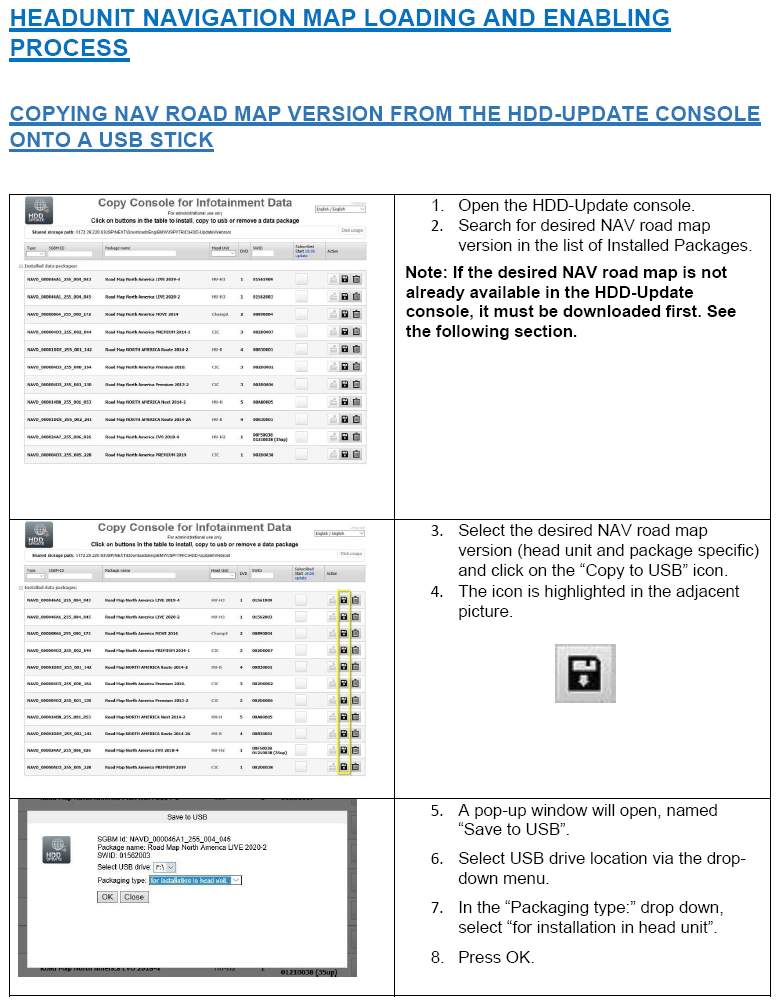
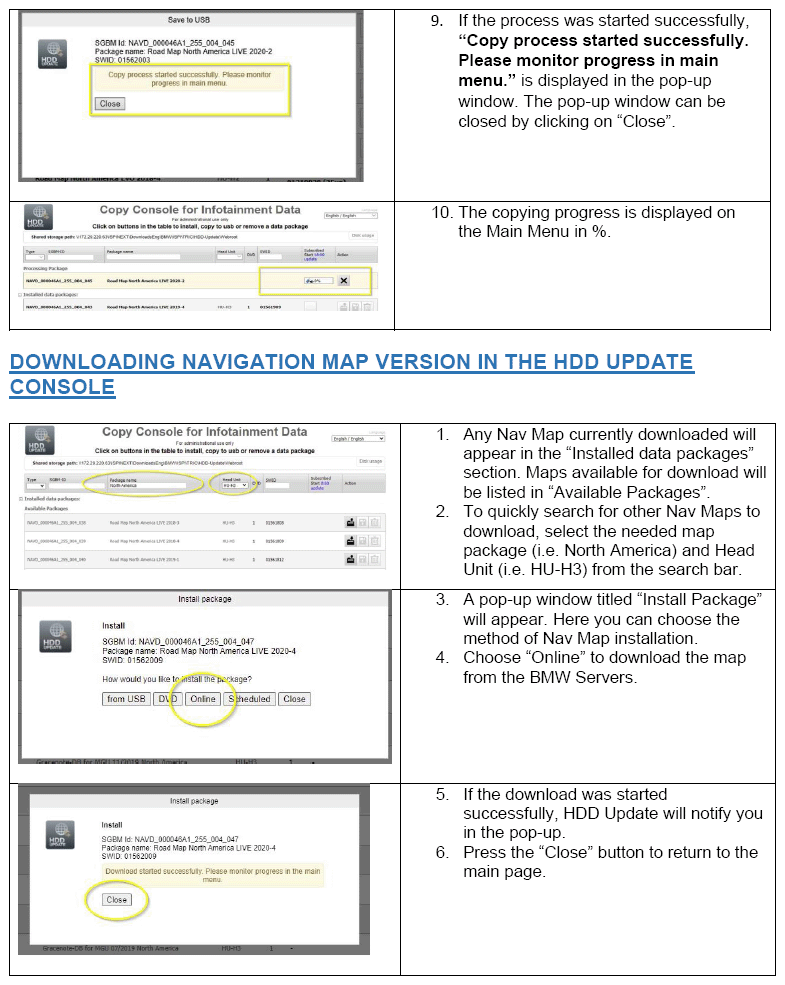
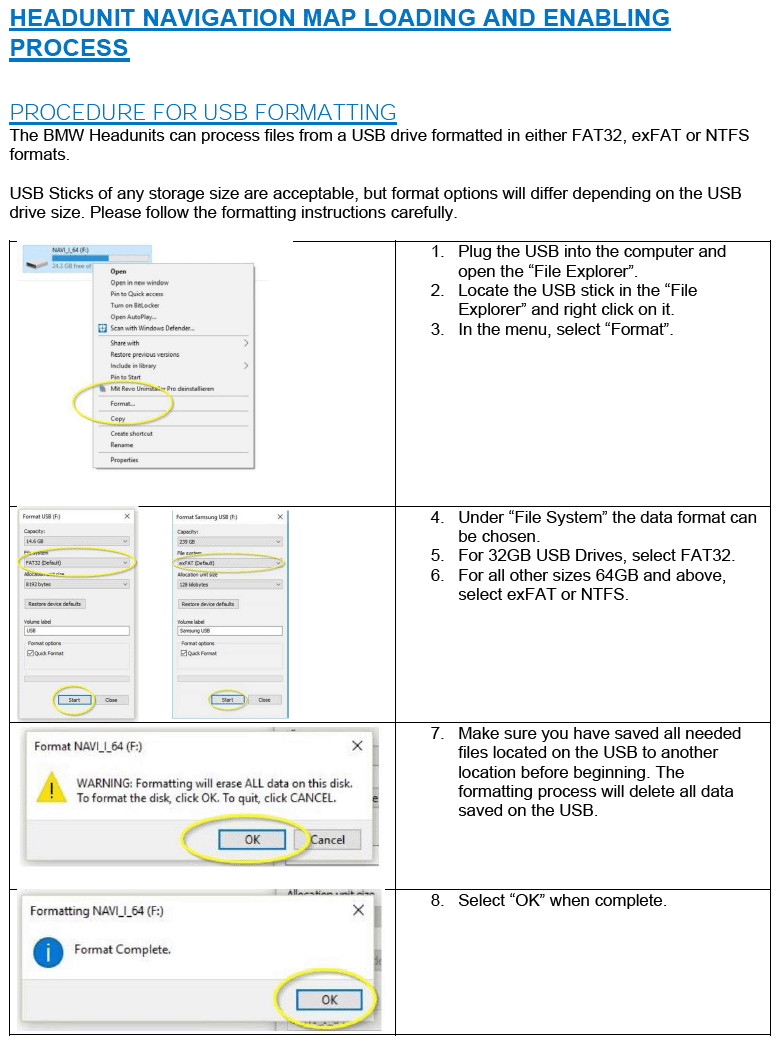
The NAV road map data is accessed through the BMW Group HDD Update application or Copy Console for Infotainment Data. From there it then can be installed onto the head unit in the vehicle, using a properly formatted USB Drive.
- For steps to download the navigation system road map data using the BMW Group HDD Update application, or for information on how to download the map data onto a USB drive; refer to Attachment 2
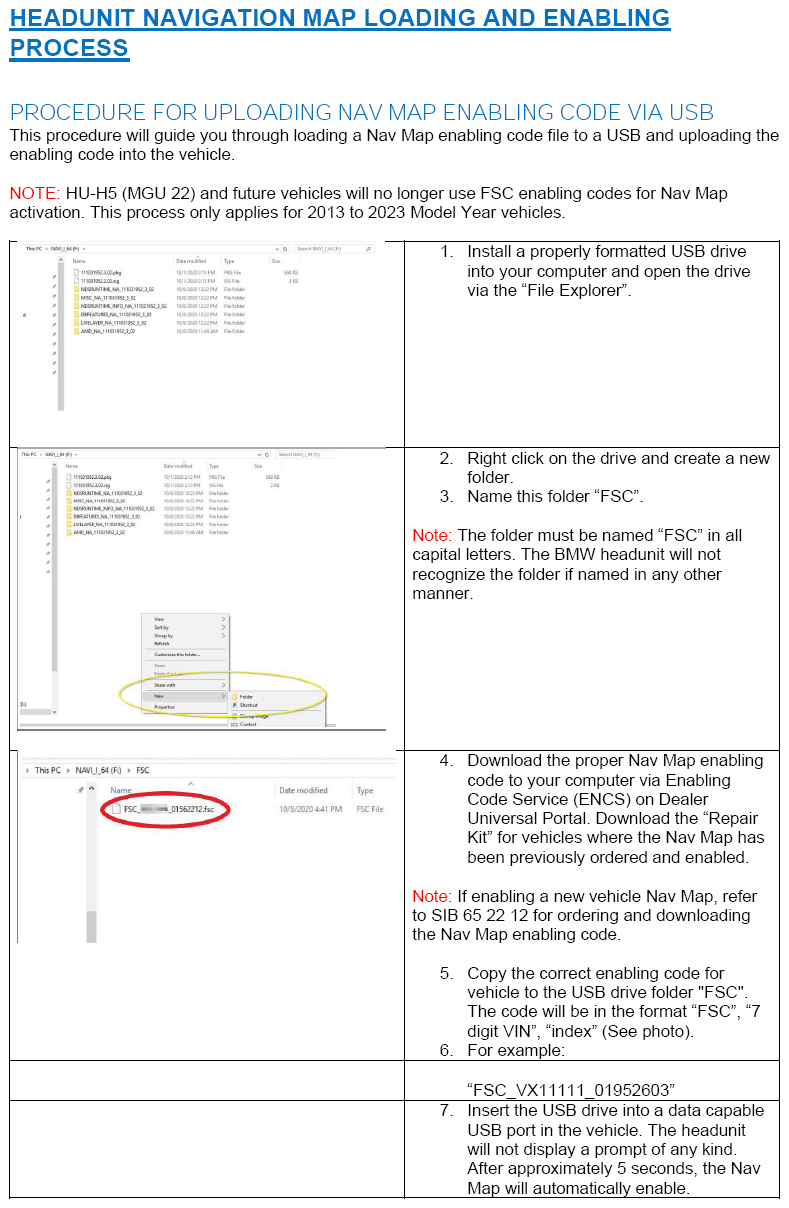
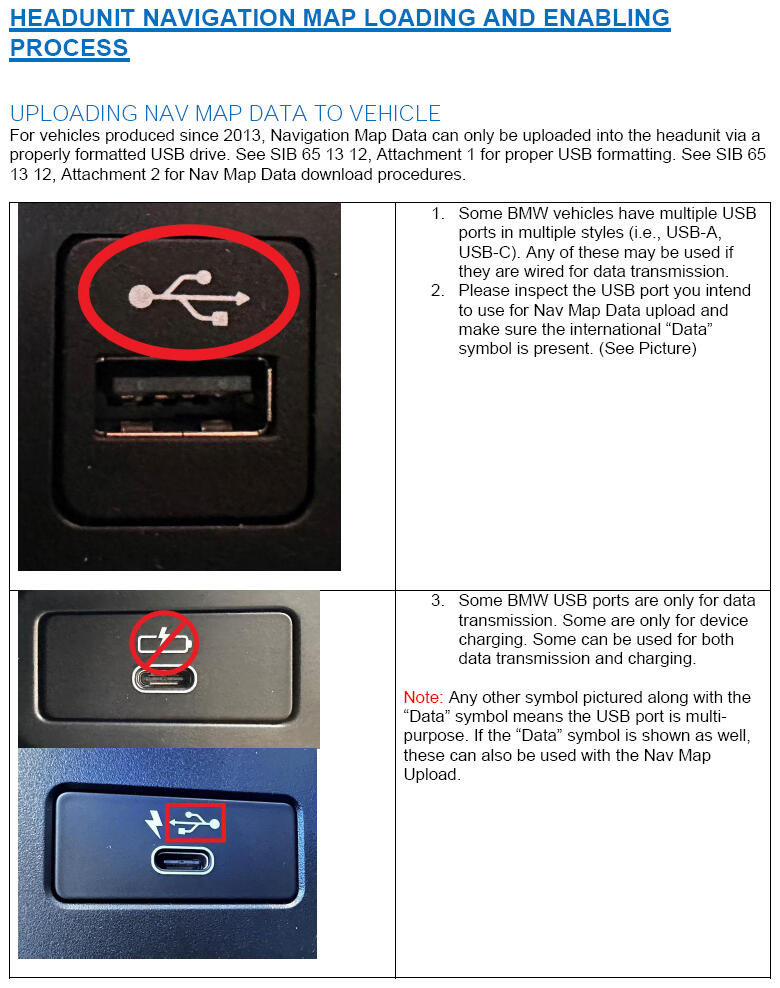
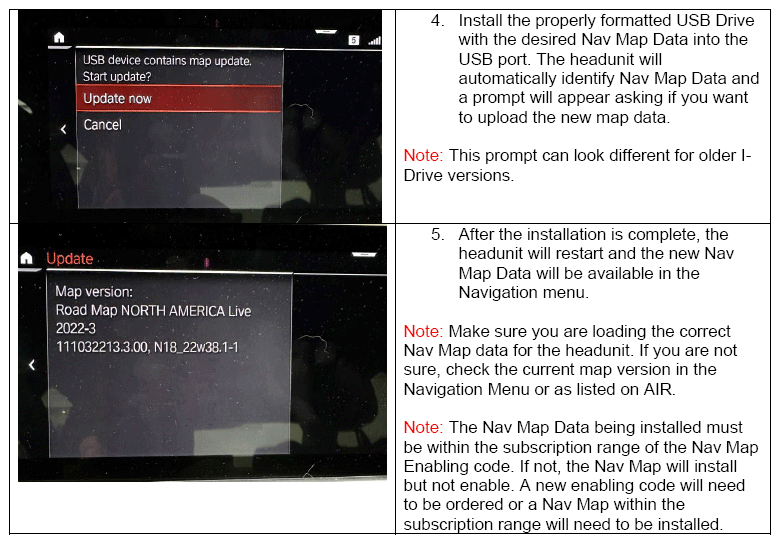
- For information on how to download map data from a USB drive into a vehicle, refer to Attachment 3
- For information on manually enabling a Nav Map in a head unit, refer to Attachment 4
Always identify the head unit's installed NAV road map version before replacing the head unit.
| 1. | To identify the NAV road map version that is currently installed in the vehicle's head unit, access the Nav Map information in the applicable Nav menu in the vehicle. The location of this information will depend on the i-Drive version (i.e. ID6, ID7, ID8). If this is no longer possible, read out the installed NAV road map version information either from:
|
| 2. | If the NAV road map version installed in the replacement HU-H is the same as the one currently installed in the faulty HU-H, the map will be automatically enabled during the vehicle programming/encoding procedure. No further action is necessary. Otherwise, proceed to step 3. |
| 3. | If the NAV road map version installed in the replacement HU-H is not the same,
generally a newer/later version, then:
|
BMW European Delivery Program Vehicles:
We have an agreed process with the BMW Welt delivery center in Munich on how to handle US vehicles at European deliveries:
- The BMW Welt orders the INITIAL enabling code to activate the "NORTH AMERICA" road map which is already installed on the hard disk drive on these vehicles (US specification vehicles). This is free of charge.
- Then they switch the road map over to the test map which is the "EUROPEAN" road map. No additional enabling code is required.
- When the vehicles arrive here in the USA, the Vehicle Distribution Center (VDC) must switch the test map back to the NORTH AMERICA road map. This will not require an enabling code.
Expat Vehicles (Military Sales and US Spec Vehicles from outside of USA):
Some Expat customers may have chosen to NOT have Navigation enabled outside of the US. In the customer's vehicle, this will be easily seen as the navigation screen displaying the "Starting Navigation..." animation. No navigation functions or maps will display. In these cases, the INITIAL navigation enabling code will not have been used yet. For these vehicles, the navigation can be enabled via ISTA using the test plan "Automatically enabling the navigation" - ABL-WAR-AS6100_SWT_UDS_AUTO.
If the Navigation is already active (displaying map data) for another navigation region, then the following steps should be taken:
- For these vehicles, the one-time INITIAL enabling code for the Navigation map was already used to enable the navigation for the previous region.
- When these vehicles arrive here in the USA, the NORTH AMERICA road map must be installed (since the vehicle currently has a different road map installed). This is usually done at an authorized BMW center here in the USA and NOT the VDC. Only European Delivery Program vehicles are handled at the VDCs.
- In these circumstances, a new CONVERSION/RETROFIT (not INITIAL) enabling code is necessary and must be paid for by the customer! Again, the customer receives only ONE enabling code for free, and this is the INITIAL enabling for the initial activation of the Navigation Map. Once that is used, it cannot be ordered/created again.
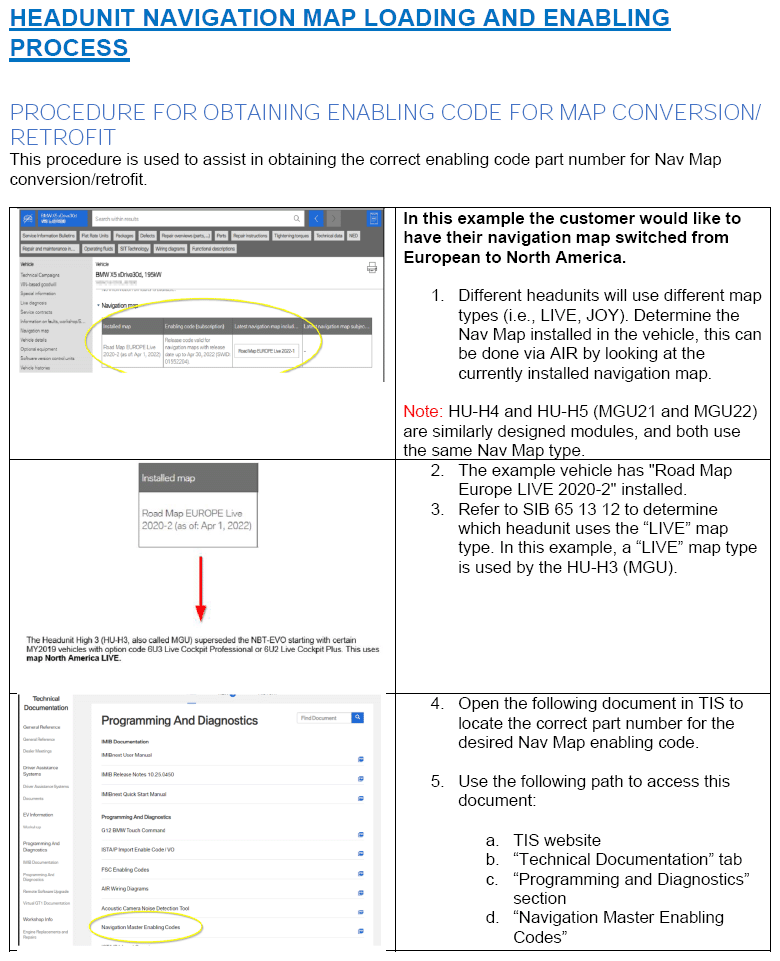
- These part numbers can also be found on the TIS website under the TECHNICAL DOCUMENTATION
tab, PROGRAMMING AND DIAGNOSTICS
section, Navigation Master Enabling Codes.
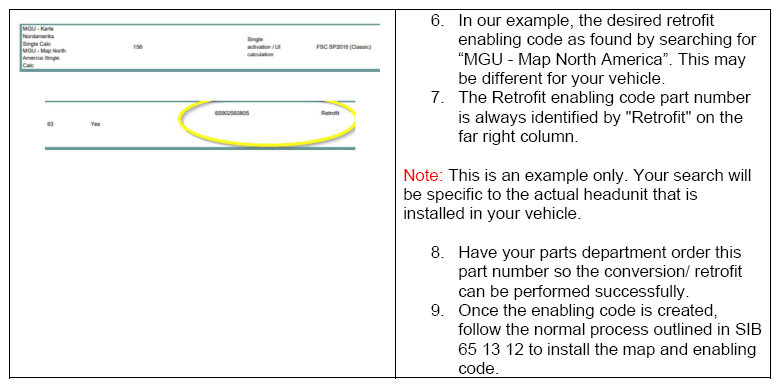
For example: A MGU European road map needs to be retrofitted to North America, you will use the FSC Enabling Codes document to locate "MGU - Map North America Single calc" and use the part number that is for "Retrofit".
- If you need help, please submit a Parts TTS TSARA case to get the correct part number for the required CONVERSION/RETROFIT code.
All Headunits Up To HU-H4
- Select the correct CONVERSION/RETROFIT enabling code for the selected head unit and navigation map combination.
- Place the order of the enabling code with your parts department.
- Download the enabling code to a properly formatted USB Drive via the Enabling Code Service website and install in the vehicle. (see Attachment 1, 4 and 5)
- Install the desired Navigation Maps in the vehicle (see Attachment 2)
For HU-H5 Only
- Select the correct CONVERSION/RETROFIT Feature ID (SFA Token) for the selected navigation map region (i.e., North America).
- Place the order of the Feature ID (SFA Token) for the correct region with your parts department.
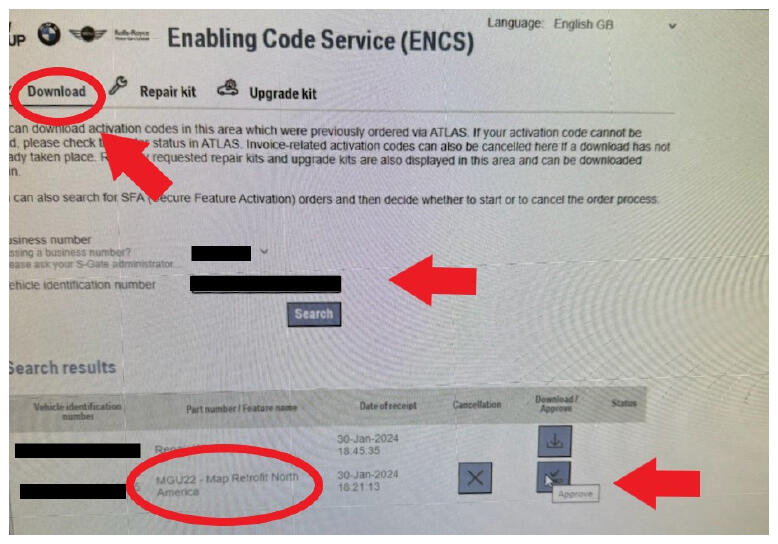
- On the Enabling Code Service (ENCS) website, verify that the ordered Feature ID (SFA Token) is available under the "Download" tab for the correct VIN. Then select "Download/Approve" to Activate the Token in the BMW Backend
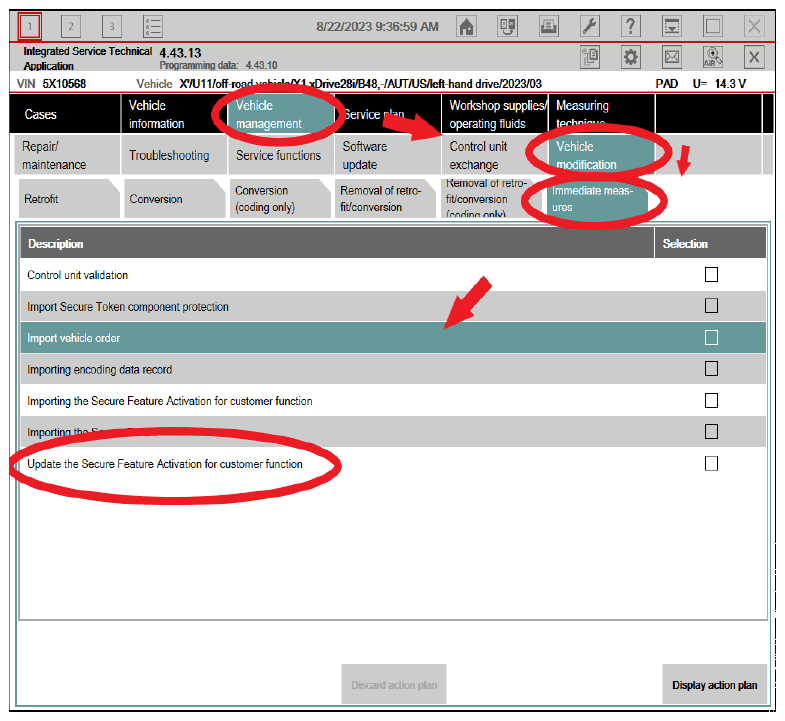
- To install the Feature ID into the vehicle, read out the vehicle with ISTA and go to the programming function "Generate new Secure Tokens for customer functions". To do this in ISTA go to:
- "Vehicle management"
- Vehicle modification"
- "Immediate measures"
- "Update the Secure Feature Activation for customer functions". Then carry out the measures plan.
- After the ISTA procedures are finished, install the corresponding Navigation Maps in the vehicle for the newly installed Navigation Feature ID (SFA Token). If the corresponding Navigation Maps are already installed, no further steps should be necessary. (See Attachment 2 for map installation procedures)
For further details on the various Navigation processes, please refer to the following attachments for
- USB stick formatting - B651312 Attachment 1
- Downloading Nav Maps via HDD Update - B651312 Attachment 2
- Uploading Nav Map Data into a vehicle - B651312 Attachment 3
- Uploading enabling codes for Nav Maps - B651312 Attachment 4
- Obtaining enabling codes for map conversion/retrofit - B651312 Attachment 5
PARTS INFORMATION
Obtain and confirm the part numbers for your specific vehicle by entering the chassis number in either ETK or AIR which takes into account specific equipment and/or options.
| Part Number | Description | Quantity |
|---|---|---|
| Refer to ETK | Head Unit | 1 |
And, if
PROCEDURE STEP 3B APPLIES (ENABLING CODE)
| Part Number | Description | Quantity |
|---|---|---|
| Refer to ETK | En.cd.HU-B2 NAV map N.America Way update | 1 |
CLAIM INFORMATION
In conjunction with an applicable and covered head unit (HU-H) replacement, Procedure step 3B (Enabling Code part number) is covered under the terms of the BMW Limited Warranty that applies.
| Defect Code: | Refer to AIR | Defect Code that applies to the repair work which necessitated the head unit (HU-H) replacement (Primary or Consequential with a Covered Repair) |
FEEDBACK REGARDING THIS BULLETIN
| Technical Feedback | To submit feedback for the technical topics of this bulletin: Submit your feedback in the rating box at the top of this bulletin |
| Warranty Feedback | To submit feedback for the CLAIMS section of this bulletin: Submit an IDS ticket to the Warranty Department, or use the chat available in the Warranty Documentation Portal |
| Parts Feedback | To submit feedback for the PARTS section of this bulletin: Submit an IDS ticket to the Parts Department |
Supporting Materials
picture as pdf B65 13 12 Attachment 2.pdf
picture as pdf B65 13 12 Attachment 4.pdf
picture as pdf B65 13 12 Attachment 1.pdf
picture as pdf B65 13 12 Attachment 3.pdf
picture as pdf B65 13 12 Attachment 5.pdf