BMW Group WARRANTYAPP Procedure And Technician Administrative Payments (SI B01 01 23)
Publication date: 2024-07-31Reference number: SI B01 01 23
BMW GROUP WARRANTYAPP PROCEDURE AND TECHNICIAN ADMINISTRATIVE PAYMENTS
SERVICE CAMPAIGN BULLETIN
| BMW: | All Models |
SERVICE INFORMATION
This Service Information bulletin (Revision 03) supersedes SI B01 01 23 dated January 2024
What's New:
- The Situation, Correction, and the Claim Information sections have been updated.
SITUATION
The BMW Group WarrantyApp offers the following features:
- Picture Documentation (PD)
- Warranty Workflows (WF)
- Access to vehicle-specific media history via the search function
- Parts Replacement Manual
- Digital Core Return
- Emission Portal Access (Coming Soon, Q3 2025)
- Wheel Lock Detection/Identification (Coming Q2 2025)
The PD feature can be used for all types of repairs: claim submissions, customer pay and/or internal.
For limited warranty, goodwill and program repairs, PD will support the technicians repair order documentation and is not a form of approval for warranty repairs from BMW NA.
A WF will either approve or deny warranty coverage as result of the submitted workflow.
Completing WF and specific PD cases will be required as part of the repair order documentation process for applicable clams under the BMW limited warranties, other coverages, and programs including dSa/Regional Goodwill.
Some PD categories and WFs will require in-app shop foremen or other responsible center management employee approval before work is carried out by utilizing in-app workflows and notifications. For PD, this will eliminate the need for shop foremen or other responsible center management employee approval and a signature on the RO.
Whether a PD or WF requires in-app shop foreman or other responsible center management employee approval or not will be indicated after the PD case or WF is submitted by the technician. It will also be indicated on the PD and WF lists that are published as an addendum with the monthly TC list.
In the unlikely event that a PD category or a WF covers a component that is also listed for TeileClearing, TC takes precedence, and this bulletin does not apply. Please be aware that most TC listed components are model-specific, while most picture documentation categories are not.
In the event a required PD category applies to an add-on repair or a consequential damage category, it must be documented as either an add-on repair or consequential damage repair.
Using the app to submit any inappropriate, profane, defamatory, infringing, obscene, indecent, or unlawful images, videos, or other material or information is strictly prohibited.
CAUSE
For applicable claim submissions, the WarrantyApp allows your center to provide media content to the BMW Warranty and Engineering departments that will help in identifying the cause of defects in materials and workmanship.
CORRECTION
All required Picture Documentation and visible add-on repair authorizations must be digitally processed through the WarrantyApp prior to the time of repair and/or a part replacement. These are eligible for the 1 FRU compensation unless an alternate procedure applies.
Warranty defines a visible defect as seen by the naked eye/visible when a photo is taken.
Examples of visible defects:
- Leaking Components
- Upholstery/Trim defects
Examples of non-visible defects (Photos Not Required):
- Illuminated Check Engine Light or Other Warning Indicators
- Check control Messages
- Engine or Drivetrain Noises
- Noises are not defects-Noises are symptoms of defects.
For each applicable claim-related repair line item, productive technicians that perform the picture documentation or warranty workflow procedure using the app will be eligible for a one (1) Flat Rate Unit (FRU) administrative payment as listed below:
| Procedure | Applicable Categories | Administrative Payment |
|---|---|---|
| Required picture documentation: Warranty Workflows with or without shop foremen or other responsible center management employee approval required | All required categories listed as "reimbursable" on the Picture Documentation list. | YES |
| Required picture documentation | Visible add-on repair(s) | YES |
| Required picture documentation | Consequential damage, ELITE shop sign-off | NO |
| Optional picture documentation | Non-visible Add-on repairs, noteworthy Vehicle Condition, Miscellaneous, Internal Foreman Review Required | NO |
For additional policy information regarding optional Add-On Signoffs, please review Section 5 Page 15 in the WPPM.
The administrative payment is in addition to the corresponding repair order's claim submission line-item flat rate labor operation codes that are being invoiced for diagnosing and repairing the vehicle under BMW limited warranties, goodwill and coverage programs.
PROCEDURE
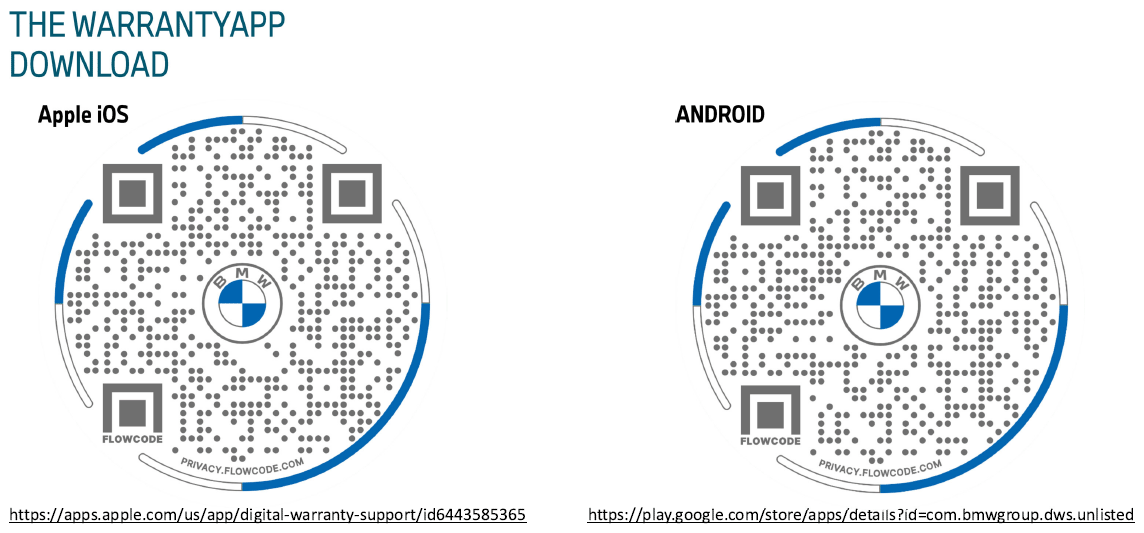
If necessary, please refer to the attachment to scan and download the app.
For the installation and user guide information, refer to the Warranty Picture Documentation folder that is in the Warranty Documentation Portal.
USING THE BMW GROUP WARRANTYAPP
Unless otherwise specified, only one (1) picture or video (when required) is sufficient to document a defect or issue.
For larger components, we recommend a minimum of two (2) pictures or videos as follows:
- Complete component (wide scale) view, and a
- Area-specific detail (close-up scale) view of the defect or issue.
COMMENTS AND/OR ANNOTATIONS
In addition to the captured media, inserting comments and/or annotations are not required unless otherwise specified. However, this addition information is helpful in supporting your claim submission.
BMW GROUP WARRANTYAPP WORKFLOW NOTIFICATIONS
Until further notice, one of the following messages will display in the mobile app to communicate to your center the results of your workflow:
| Results: | The replacement of the component is covered under warranty. Subject to claim review/part inspection." |
| Or: | |
| Results: | The replacement of the component is not covered under warranty. Please consult with your foreman before proceeding." |
In the in the mobile app's Web Application and in the Workflow Status View, a simple "Accepted" or "Rejected" message will be shown.
PARTS INFORMATION
As applicable, obtain and confirm the part numbers for your specific vehicle by entering the chassis number in either ETK or AIR which considers specific equipment and/or options.
CLAIM INFORMATION
When a qualifying PD or WF is performed in conjunction with a covered repair, the corresponding technician administrative payment is covered under the terms of the BMW New Vehicle Limited Warranty for Passenger Cars and Light Trucks, or the BMW coverage program that applies, including DSA/Regional Goodwill.
| Repair Code: | MG SG XX XX XX | Claim with the Defect Code "number" that applies to the work that necessitated a WarrantyApp procedure to be performed |
In addition to the applicable diagnosis and repair flat rate labor operation codes
| Labor Operation | Description (Associated Work) | Labor Allowance |
|---|---|---|
| 00 58 999 | Lump-sum fee for photo documentation* | 1 FRU |
(*) Unless the specific repair action provides an alternate flat rate labor operation code to use and submit for performing this work procedure instead.
CLAIM REPAIR COMMENTS
Unless otherwise required by State law, in the RO technician notes and the claim comments, please reference the submitted "PD" or "WF" (For example: PD submitted or WF submitted).
The Warranty Department reviews all required cases to ensure that the Picture Documentation requirement is being followed.
Claims without the required clear Picture Documentation will be subject to review and possible debit.
In the unlikely event the WarrantyApp is unavailable, the PD/WF requirement will be waived. Please retain supporting documentation of the error for claim submission related inquiries.
FEEDBACK REGARDING THIS BULLETIN
| Technical Feedback | To submit feedback for the technical topics of this bulletin: Submit your feedback in the rating box at the top of this bulletin |
| Warranty Feedback | To submit feedback for the CLAIMS section of this bulletin: Submit an IDS ticket to the Warranty Department, or use the chat available in the Warranty Documentation Portal |
| Parts Feedback | To submit feedback for the PARTS section of this bulletin: Submit an IDS ticket to the Parts Department |
Supporting Materials
picture_as_pdf B010123 App Scan Codes (01_2023).pdf
Attachment to SI B01 01 23 (01/2023)