BMW Maintenance Program Upgrade (MPU) Contracts: Pre-RDR Vehicle Enrollments (SI B01 05 21)
Publication date: 2024-07-26Reference number: SI B01 05 21
BMW MAINTENANCE PROGRAM UPGRADE (MPU) CONTRACTS: PRE-RDR VEHICLE ENROLLMENTS
SERVICE CAMPAIGN BULLETIN
| BMW: | All Models |
SERVICE INFORMATION
This Service Information bulletin (Revision 01) supersedes SI B01 05 21 dated February 2021
What's New:
- Service Information Bulletin title updated.
- Extended Service Contract (ESC) related Information and screen shots have been removed from the complete bulletin.
- BMW Retail Sales Reporting Standard requirement statement has been added.
SITUATION
Since February 8, 2021, with the VCS 2.0 enhancements, your center has been able to enroll and print:
- Maintenance Program Upgrade (MPU) contract without first having to RDR the "New Vehicle."
A New Vehicle is one without in-service date, and it has less than 300 miles on the odometer.
This new process allows you to enroll eligible vehicles into the newly created Queued contract status without having to RDR the vehicle first.
The system will use the enrollment date of the vehicle as the presumptive in-service date. All eligibility criteria for the MPU will be based on this date.
Please keep in mind, if the vehicle is ultimately RDR'd outside of the eligibility window for these MPU pre-RDR enrollments, the vehicle will not be enrolled.
Once the vehicle's RDR is completed, the Warranty Vehicle Inquiry will be updated with the corresponding in-service date. The in-service date is used to determine the Effective Date and No coverage as of date for the program(s) enrolled.
History will not reflect Queued contracts and will only be updated there once the vehicle has been properly RDR'd.
IMPORTANT NOTE: - BMW Retail Sales Reporting
To comply with BMW's Retail Sales Reporting Standards, the vehicle's RDR must be submitted to BMW NA at the actual occurrence of the vehicle delivered to the customer.
If a vehicle is enrolled prior to RDR, as noted above, the enrollments will become a "queued contract" that will require additional center action.
CAUSE
This new enhancement was created to address the related feedback we have received from you and to support the ease of doing business initiative.
CORRECTION
Follow the instructions in the PROCEDURE section below for entering pre-RDR MPU enrollments.
PROCEDURE
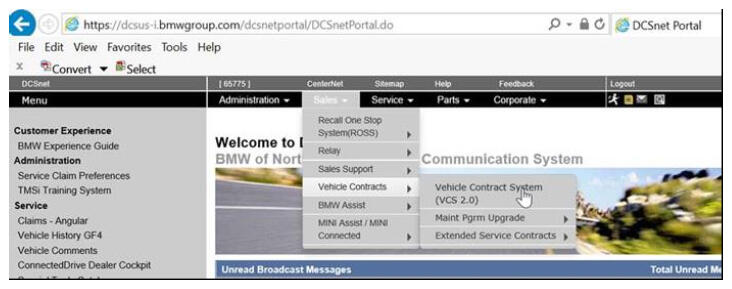
To begin the pre-RDR MPU enrollment process, please proceed to VCS 2.0.
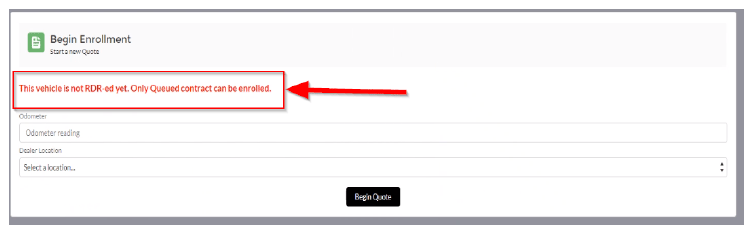
If the vehicle has not been RDR'd (no in-service date/customer information), you will see the following message on the screen.
Please proceed to enter odometer mileage and location, then click on Begin Quote . You will be able to see all eligible programs as normal.
Since there is no RDR reported customer, this information will be blank, it must be filled in to continue this enrollment process.
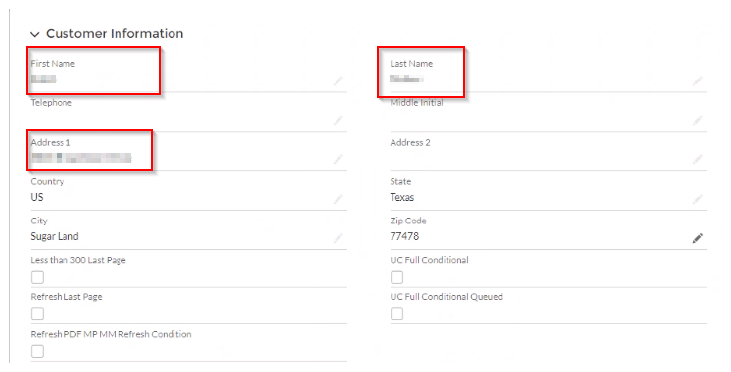
If there is no customer information available, the pre-RDR enrollment cannot processed.
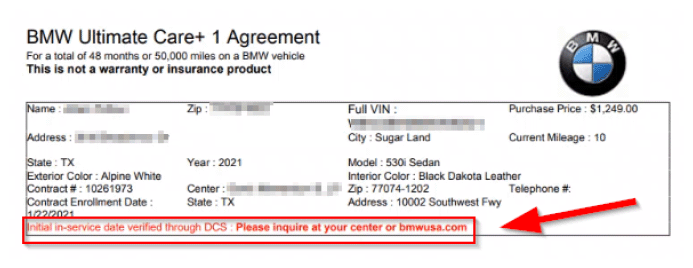
Once the vehicle has been enrolled, you will be able to print a PDF for the MPU contract found in the Notes and Attachments section of VCS 2.0.
There will be no In-service date available until the vehicle is RDR'd, instead you will see a disclaimer.
Once the enrollment is completed, these contracts then can be seen in the Current Contracts section of VCS 2.0 only.
These contracts will not show in the Warranty Vehicle Inquiry until after the vehicle has been RDR'd.
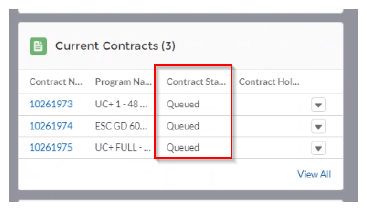
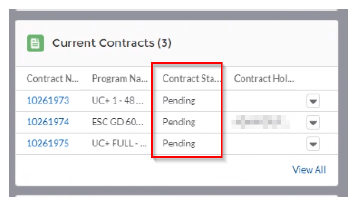
Once the vehicle is RDR'd, the contracts will flip from Queued to Pending as shown above. The contracts can now be viewed both in the VCS 2.0 and the Warranty Vehicle Inquiry.
A new MPU contract PDF will be generated, it will now include the vehicle's corresponding in-service date.
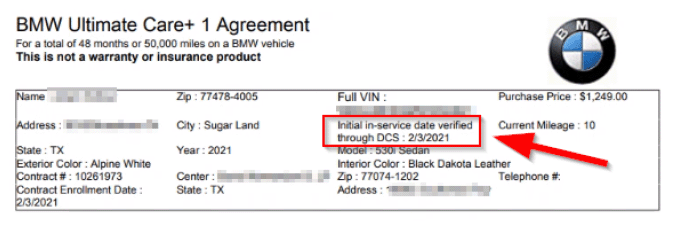
Please provide the customer their copy of the updated version(s) of the contract(s) for their records.
If the vehicle is RDR'd and certain criteria does not match, the contract will remain in the Queued status, for example:
- The enrollment AG dealer code does not match RDR'd AG dealer code
- Full name and address on enrollment do not match RDR full name and address
It is important to make sure when a Queued contract is enrolled, that the corresponding RDR information matches it completely.
If a Queued MPU contract already exists, no other corresponding contracts can be enrolled.
If this situation occurs, the following message will display.
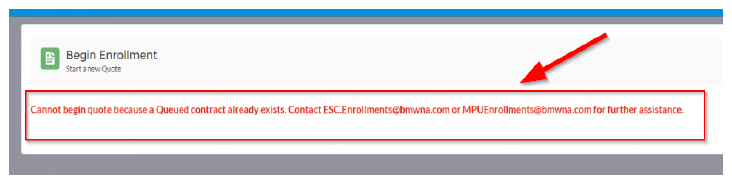
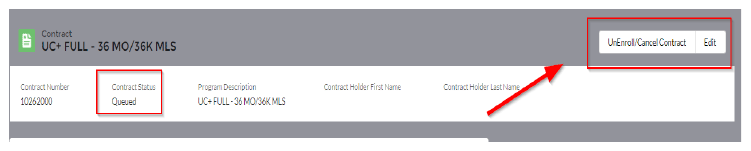
If you need to remove a Queued contract, please use the Unenroll function in VCS 2.0.
Once these Queued contracts have been removed, you will be able to re-enroll the MPU program contract on the vehicle.
PARTS INFORMATION
Not applicable.
CLAIM INFORMATION
A BMW Maintenance Program Upgrade contract either provides additional coverage to the standard maintenance program coverage and/or extends the time and mileage limits of that coverage.
FEEDBACK REGARDING THIS BULLETIN
| Technical Feedback | To submit feedback for the technical topic of this bulletin: Submit your feedback in the rating box at the top of this bulletin |
| Warranty Feedback | To submit feedback for the CLAIMS section of this bulletin: Submit an IDS ticket to the Warranty Department, or use the chat available in the Warranty Documentation Portal |
| Parts Feedback | To submit feedback for the PARTS section of this bulletin: Submit an IDS ticket to the Parts Department |