What's New In ISPI Next - Release 20.2 (SI B05 01 20)
Publication date: 2020-09-22Reference number: SI B05 01 20
WHAT'S NEW IN ISPI NEXT - RELEASE 20.2
TECHNICAL SERVICE BULLETIN
| BMW: | All Models |
SITUATION
ISPA NEXT - OPTIMIZED HANDLING OF TECHNICAL CAMPAIGNS (1/2)
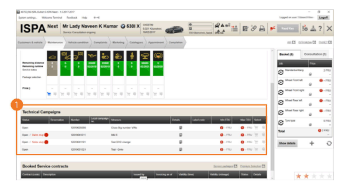
The user interface has been adjusted in the "Technical Campaigns" and "Teleservice Status" tables.
- The "Price" column is no longer displayed in the "Technical Campaigns" and "Teleservice Status" tables.
ISPA NEXT - OPTIMIZED HANDLING OF TECHNICAL CAMPAIGNS (2/2)
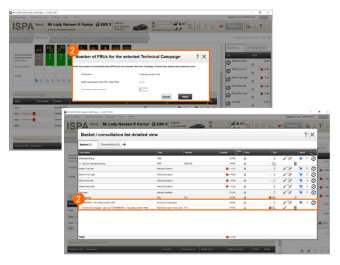
- Furthermore, price queries are no longer sent if the flat rate unit is "zero". This improves the loading time.
Benefit to the Service Center:
- Simplified handling of Technical Campaigns.
- Improved performance in the area of Technical Campaigns.
ISPA NEXT - CREATING JOBS MANUALLY (1/2)
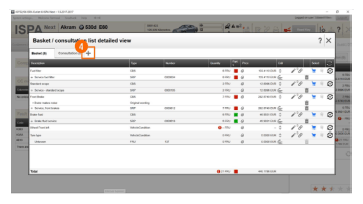
You can easily create jobs and complaints manually with just a click in ISPA.
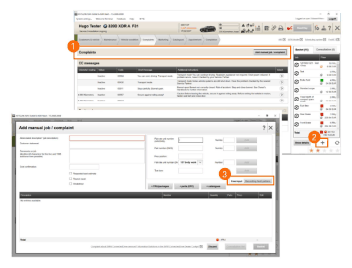
- The list of complaints has been removed from the "Complaints" tab in the Guided Tour. The "Add manual job/complaint" button has been added instead. Click on the button to create the jobs and complaints manually.
- You can also add manual jobs and complaints at any time by clicking the "+" symbol below the shopping cart.
- Manual input has been simplified and brought into focus. You can switch between manual input and the recording of the fault pattern here.
ISPA NEXT - CREATING JOBS MANUALLY (2/2)
- You can now also click the "+" symbol from within in the detailed shopping cart to add a manual job or a complaint. The dialogue for creating a manual job or complaint also opens here again.
Benefit to the Service Center:
- Simple creation and addition of jobs and complaints.
ISPA NEXT - SHOPPING BASKET SELECTOR
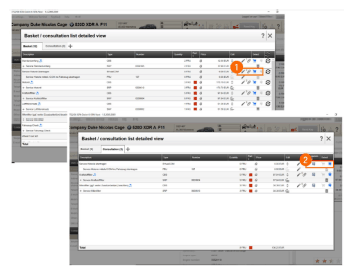
You can now decide with a click whether an item should be added to the shopping cart or the consultation list or removed from one of the two lists.
- Select the shopping basket icon to add the item to the basket.
- Select the speech bubble to add the item to the consultation list.
Benefit to the Service Center:
- Simplified method for adding items to the shopping basket and consultation list.
ISPA NEXT - OPENING SERVICE CASES WITH A DOUBLE CLICK
Service Cases can now be opened with a double click. This function is available in the following steps:
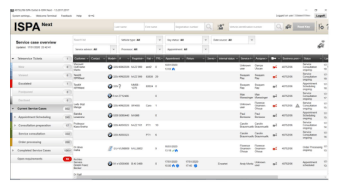
- All pages of the Service Case overview
- Results of the DMS search
- KeyPool
- Opening another outlet
- Briefing Screen tables
- Compact shopping basket*
- Detailed shopping basket*
*opens edit dialogue
Benefit to the Service Center:
- Simpler/faster editing of Service Cases.
ISPA NEXT - ADD FILES TO THE SHOPPING CART
You can now add attachments directly to the detailed shopping cart and the consultation list. Attachments can thus be added not only to a Service Case, but also to a selected job.
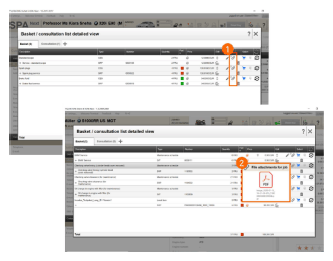
- Click the paper clip to upload a document. This opens a window from which the desired file can be selected. Click "Open" to add the file to the selected job in the shopping basket or in the consultation list.
- The file type and file name are displayed via mouseover.
Benefit to the Service Center:
- Adding files is easier.
ISPA NEXT - PRINTOUT CHANGES
The Print Center in ISPA Next has been improved and adapted.
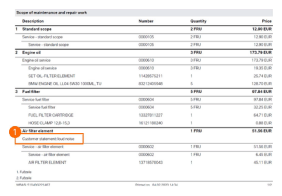
- It is now easier to find the "customer's own words" in the "repair order" printout, because it is explicitly marked.
Benefit to the Service Center:
- Better visibility of the "Customer statement" on the printout.
ISPA NEXT - EXTENDED COST ESTIMATE SELECTION (1/2)
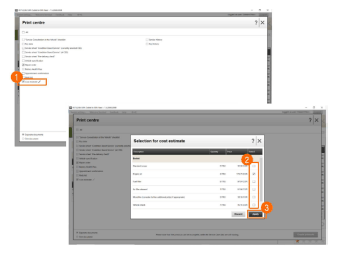
From the Print Center the service employee can now decide for themselves which jobs should be included in the cost estimate.
- The service advisor can click the pen symbol next to the cost estimate to select the jobs to be displayed in the cost estimate.
- The jobs with the "Cost estimate desired" check mark in the Job Details window are selected by default. Further jobs can be selected, or jobs already selected can be deselected. The check mark cannot be changed for disabled jobs.
- Click "Apply" to save the changes.
ISPA NEXT - EXTENDED COST ESTIMATE SELECTION (2/2)
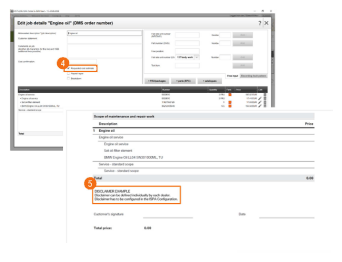
- Jobs already in the shopping cart can be added to the cost estimate by giving them a check mark.
- On the printout, you will find the disclaimer for the cost estimate. It can be stored in ISPA configuration in the printouts area for individual retailers.
Benefit to the Service Center:
- Jobs in the shopping basket and the consultation list can be printed on the cost estimate as required.
- The employee can control which jobs should be included in the cost estimate.
ISPA NEXT - OPTIMIZED APPOINTMENT FILTER
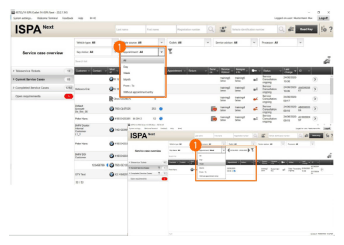
- The "Appointment" filter in the Service Case Overview is now extended and simplified. When selecting "Day", "Week" or "Month", additional arrows are displayed for a fast switchover.
Benefit to the Service Center:
- Simplified and optimized handling of appointment filter.
ISPA NEXT - CONFIGURATION OF TELESERVICE DISPLAY
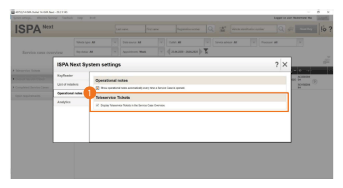
- The system settings in ISPA Next now have an option for displaying Teleservice Tickets. When the display is deactivated, the whole "Teleservice Ticket" area in the Service Case Overview is not displayed.
Benefit to the Service Center:
- Individual selection option for displaying Teleservice Tickets.
- Optimized display in case of unused Teleservice Tickets.
ISPA NEXT - EXTENDED FLAT RATE UNIT DISPLAY IN SERVICE CASE OVERVIEW
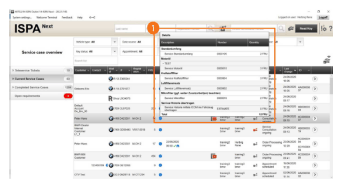
- Clicking the information symbol in the FRU (Flat rate unit) column in the Service Case Overview now also displays the job comment and the customer statement.
Benefit to the Service Center:
- Important information for fast retrieval displayed in the Service Case Overview.
ISPA NEXT - SENDING DOCUMENTS BY EMAIL (OUTLOOK)
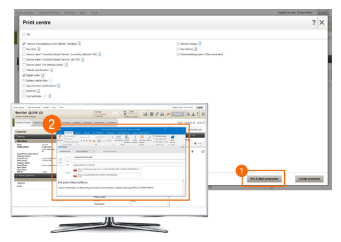
- Printouts can be sent by e-mail in the ISPA Next Print Center. If you click the "Send by e-mail" button, a new Outlook e-mail is generated with the following content:
- To: Customer email address as saved in the Service Case.
Re: Documents for vehicle identification number
Text: Dear Sir or Madam, we are hereby sending you the requested information about your vehicle (vehicle identification number).
- The e-mail information can be changed.
- Microsoft Outlook must be installed.
Benefit to the Service Center:
- Display of important information for quick retrieval in the Service Case Overview.
ISPA NEXT - DISPLAY FILTERED CASE COUNTS
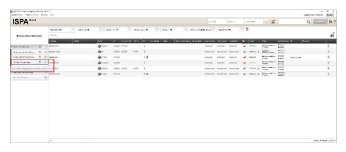
- The filtered Service Case counts are now displayed in the sidebar of the Service Case Overview.
- The number of Service Cases included in the selection/filter are displayed via mouseover for each process step (Appointment Scheduling, Service Consultation, etc.).
Benefit to the Service Center:
- User can focus on cases related to the current filter.
- Particularly useful when RKR Batch is activated.
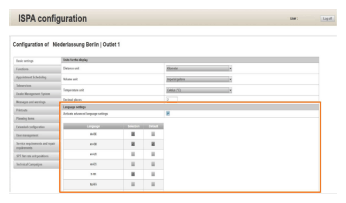
ISPA CONFIGURATION - ADVANCED LANGUAGE SETTINGS
A new "Language settings" section has been added to the ISPA configuration.
ALERT : Do not activate or otherwise attempt to try out this new functionality, which is an Outlet-level setting. This is currently not supported in the US market.
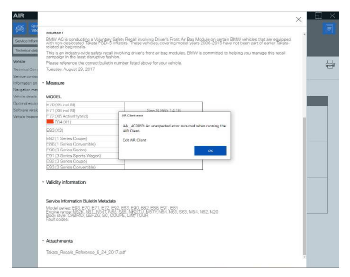
AIR - Service Interruption-RESOLVED with 20.2
AIR - Service Information Bulletins with attachments may cause AIR Client to crash.
- Issue is related to the file size of the attachment.
- Larger attachments cause the failure; however, the maximum openable size is unknown at this time.
- The issue was identified and fixed in the 20.2 ISPI release.