Vehicle Does Not Start Battery Totally Discharged (SI B61 04 19)
Publication date: 2020-07-21Reference number: SI B61 04 19
VEHICLE DOES NOT START BATTERY TOTALLY DISCHARGED
SERVICE CAMPAIGN BULLETIN
| BMW: | See The Chart Below |
SERVICE INFORMATION
This Service Information Bulletin (Revision 3) replaces SI B61 04 19 dated June 2020.
What's New (Specific text highlighted):
- Procedure
MODEL
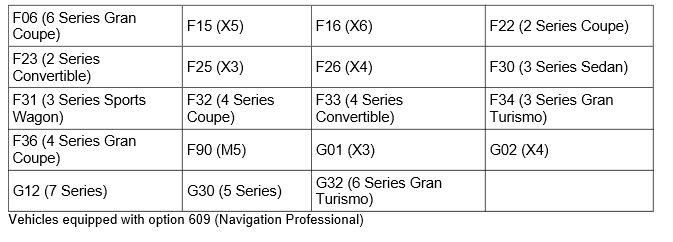
SITUATION
The customer's vehicle does not start due to a totally discharged battery.
The following Check Control Messages can also be displayed:
- 229: Start engine. Battery totally discharged
And/or:
- 415: Start engine. Energy management
Either one or both of the following faults code will also be stored:
- Head Unit High (HU-H): B7F856 - DVD drive hardware fault.
And:
- Body Domain Controller (BDC): 80402F - battery totally discharged.
CAUSE
Software error in the Head Unit High:
- Gasoline engines
up to an I-level lower than 18-11-510
Or:
- Diesel engines up to an I-level lower than 19-07-500 (available July 2019)
CORRECTION
Program the vehicle
PROCEDURE
- In case of a customer complaint, run diagnosis with ISTA and work through the corresponding test module if necessary.IMPORTANT: Carry out the test module and check function of DVD drive with a suitable medium.
Carry out a parts replacement only after the vehicle software has been updated and the test plan indicates a component replacement is necessary. - Are fault codes B7F856 - DVD drive hardware failure and 80402F - Battery totally discharge both stored?
No: Perform standard troubleshooting along with Energy Diagnosis to determine the cause of the discharged battery.
Yes: Proceed to the next step.
- Program the vehicle using ISTA:
Gasoline engines - program with ISTA 4.16.1x (I-Level 19-03-5xx) or a more recent version.
Diesel engines - program with ISTA 4.18.1x (I-level 19-07-51x) available July 2019.
Note that ISTA will automatically reprogram and code all programmable control modules that do not have the latest software.
Always connect a BMW-approved battery charger/power supply (SI B04 23 10 ).
For information on programming and coding with ISTA, refer to CenterNet/TIS/Technical Documentation/Diagnostics and Programming/Programming Documentation
WARRANTY INFORMATION
Covered, now for gasoline engine vehicles and for the diesel engine vehicles when BMW software solution becomes available, under the terms of the BMW New Vehicle Limited Warranty for Passenger Cars and Light Trucks.
| Defect Code: | 6512580200 | Head Unit High HU-H software error/internal device fault |
|---|---|---|
| Labor Operation: | Labor Allowance: | Description: |
| 00 00 006 | Refer to AIR | Performing vehicle test (with vehicle diagnosis system - checking faults) (Main work) |
| Or: | ||
| 00 00 556 | Refer to AIR | Performing vehicle test (with vehicle diagnosis system - checking faults) (Plus work) |
| And: | ||
| 61 21 528 | Refer to AIR | Connect an approved battery charger/power supply (indicated in AIR as Charging battery) |
And, additionally for the:
e-Vehicles
| Labor Operation: | Labor Allowance: | Description: |
|---|---|---|
| 61 25 910 | Refer to AIR | Recharging high-voltage battery unit (to high voltage charging socket) |
And, as necessary:
| Labor Operation: Labor Allowance: Description: | |
|---|---|
| 65 50 050 Work time (WT) | Checking function of central information display (test module, troubleshooting/after vehicle diagnosis) |
| And, if necessary: 61 20 502 Work time (WT) | Performing vehicle battery energy diagnosis (after vehicle diagnosis |
And, if necessary:
| Labor Operation: | Labor Allowance: | Description: |
|---|---|---|
| 65 50 558 | Refer to AIR | Replacing Central Information Display (after vehicle diagnosis) |
And/or:
| Labor Operation: | Labor Allowance: | Description: |
|---|---|---|
| 61 00 730 | Refer to AIR | Programming/encoding control unit(s) |
If you are using a Main labor code for another repair, use the Plus code labor operation 00 00 556 instead of 00 00 006.
Refer to AIR for the corresponding flat rate unit (FRU) allowances.
Work time labor operation code 65 50 050 is not considered a Main labor operation; however, it does require an individual punch time and an explanation on the repair order and in the claim comments section.
And, as applicable:
Consequential Repair
When additional work and/or parts, which directly relate to and are required to properly perform the repair described in this Service Information bulletin, claim these items under the defect code listed above together with the corresponding labor operations if applicable (including any additional diagnosis) that are listed in AIR.
Please explain the reason for this consequential repair work (the why and what) on the repair order and in the claim comments section.
Programming and Encoding - Vehicle Control Units
During the same workshop visit, if a vehicle also requires another Technical Campaign or repair that also includes programming and encoding the control units, the programming procedure may only be invoiced one time.
- The programming procedure automatically reprograms and encodes all vehicle control modules which do not have the latest software i-level. If one or more control module failures occur during this programming procedure:
- Please claim this consequential control module-related repair work under the defect code listed in this bulletin with the applicable AIR labor operations.
Please explain this additional work (The why and what) on the repair order and in the claim comments section.
- For control module failures that occurred prior to performing this programming procedure:
- When covered under an applicable limited warranty, claim this control module-related repair work using the applicable defect code and labor operations (including diagnosis) in AIR.
QUESTIONS REGARDING THIS BULLETIN
| Technical inquiries | Submit feedback at the top of this bulletin |
| Warranty inquiries | Submit an IDS ticket to the Warranty Department |
| Parts inquiries | Submit an IDS ticket to the Parts Department |