BMW Back-End Connection: Dealer Demo, Fleet Vehicles And The BMW Id (SI B65 07 25)
Publication date: 2025-03-21Reference number: SI B65 07 25
BMW BACK-END CONNECTION: DEALER DEMO, FLEET VEHICLES AND THE BMW ID
SERVICE CAMPAIGN BULLETIN
| BMW: | All Models |
SITUATION
Information on the different categories of vehicle connection to BMW data services and how they function.
INFORMATION
In the age of vehicle connectivity, more and more functions in BMW vehicles are being provided through aback-end connection to BMW Data Services. In this bulletin, we will cover the different types of connection categories and the role of the BMW ID in authorizing this connection.
In current BMW vehicles, many functions require communication to BMW Data Services to operate. This includes (but is not limited to) Real Time Traffic Information (RTTI), Automatic Time Zone Setting, Weatherapp, and Connected Drive Store. In the Head Unit 6 (HU-H6) and later head units, even map data to the Navigation app requires connection to BMW Data Services.
So why is the BMW ID needed at all? To answer this question, we need to understand the role of data privacy and how seriously BMW takes this role.
Data Privacy is one of BMW's biggest concerns in the digital age. Because of this, BMW has taken many steps to ensure that no data can be sent to OR collected from a vehicle without direct customer consent. This consent is given when a customer links a BMW ID to a vehicle. But what about a new vehicle? Or a loaner/rental vehicle? To understand this, we need to mention some different data programs for BMW.
- Dealer Demo Program
The Dealer Demo Program is designed to allow unrestricted data exchange between dealer inventory new vehicles and BMW Data Services before a BMW ID can be mapped to a vehicle (before customer purchase). Since these vehicles are NOT in customer hands, data privacy is not a concern.
Dealer Demo allows all vehicle functions to be active that require a data exchange with BMW Data Services, including map data with HU-H6, before the retail sale to the customer. It was created to make sales demonstrations or customer test drives possible BEFORE mapping a BMW ID would be possible(unsold new vehicles).
This program is automatically activated by the BMW back-end and requires no dealer action at all. This program is activated from the production date of the vehicle and runs until it expires 12 months later. This time frame was determined to allow sufficient demo time until the possible sale for inventory new vehicles. After Dealer Demo expires, no data will be able to be sent to or collected from a new vehicle without mapping a BMW ID.
There are two additional ways that Dealer Demo could be cancelled for a vehicle:
- By the submission of a Retail Delivery Report (RDR) by the sales department once a vehicle is sold. This starts the "In Service" date for the vehicle and begins the "Digital Premium" demo (HU-H6 only), the vehicle warranty; as well as ends the Dealer Demo. This is by design as Dealer Demo is only meant for unsold new vehicles.
- By mapping a BMW ID to an inventory vehicle. The act of mapping a BMW ID automatically sets the "In Service" date and ends the Dealer Demo, even if the vehicle is unsold. Removal of the BMW ID later or reset of the Head Unit will not reactivate the "Dealer Demo".
Dealer Demo CANNOT be reactivated or extended by BMW, so a technician should NEVER map a BMW ID to an unsold new vehicle. Once cancelled, Dealer Demo is deactivated permanently.
If you have an unsold new inventory vehicle where Dealer Demo is NOT active and it is under 12 month sold, the most likely reason is that the vehicle was previously mapped to a BMW ID. Reach out to Technical Service if you need any assistance.
Used vehicle inventory or Certified Pre-Owned inventory DO NOT APPLY. Used vehicle inventory or Certified Pre-Owned inventory are subject to the same data restrictions as customer-owned vehicles, even though they are dealer-owned. These vehicles will need to be mapped to a BMW ID in order to activate data exchange for demo or test drive. This BMW ID can be a dealer-created BMW ID. It does not need to be attached to an individual. Used vehicles CANNOT be included in the Dealer Demo Program.
- Fleet Group Vehicles
Rental Companies, Corporate Fleets, or individual dealerships can order vehicles specifically as "Fleet" vehicles (rental vehicles/demo vehicles/loaner vehicles). Based on the retail type of the vehicle, these vehicles are classified into the "Fleet" group in the BMW vehicle file automatically. "Fleet" group vehicles cannot be mapped to a BMW ID through the vehicle or through the My BMW app. Each vehicle must be initially mapped by a business or dealer email/BMW ID via the Electronic Subscriber Agreement (ESA) process.
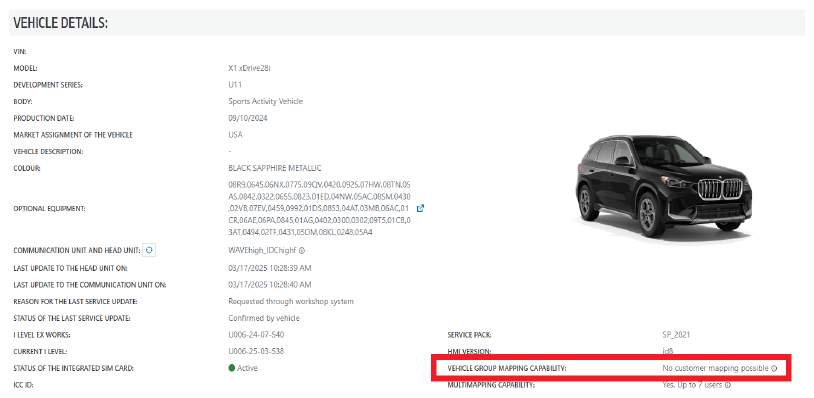
"Fleet" Status can be seen in the Connected Drive Dealer Cockpit. Under the selection "Vehicle Group Mapping Capability", it shows "No customer mapping possible"
Any vehicle NOT in "Fleet" status will show "No Restrictions" instead.
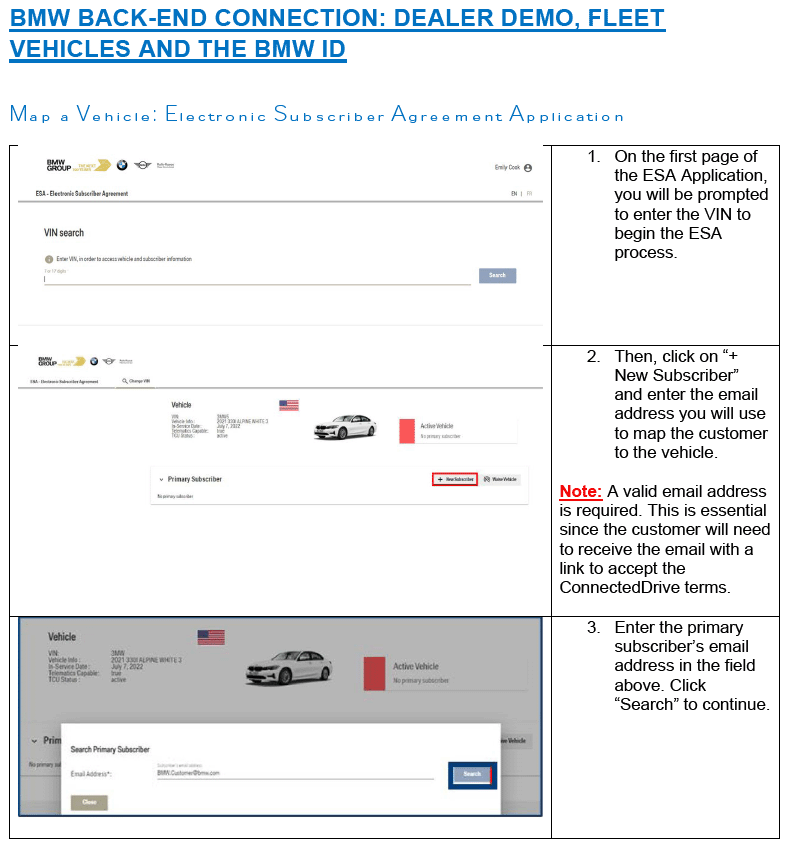
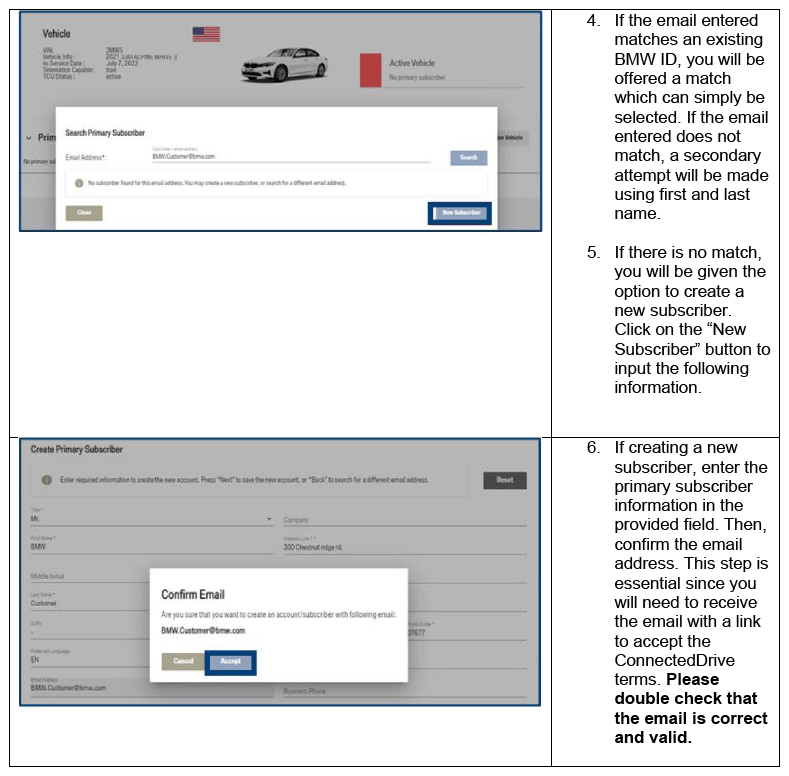
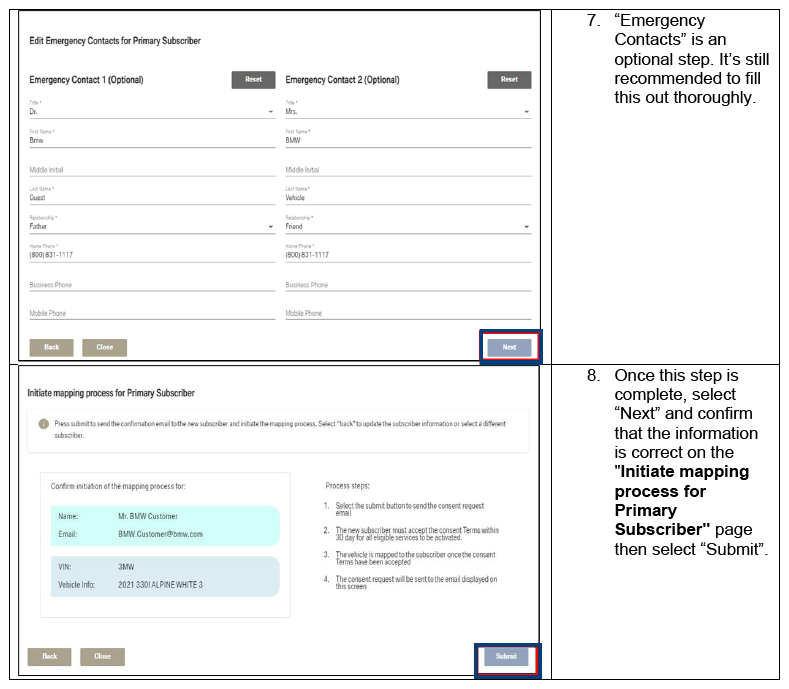
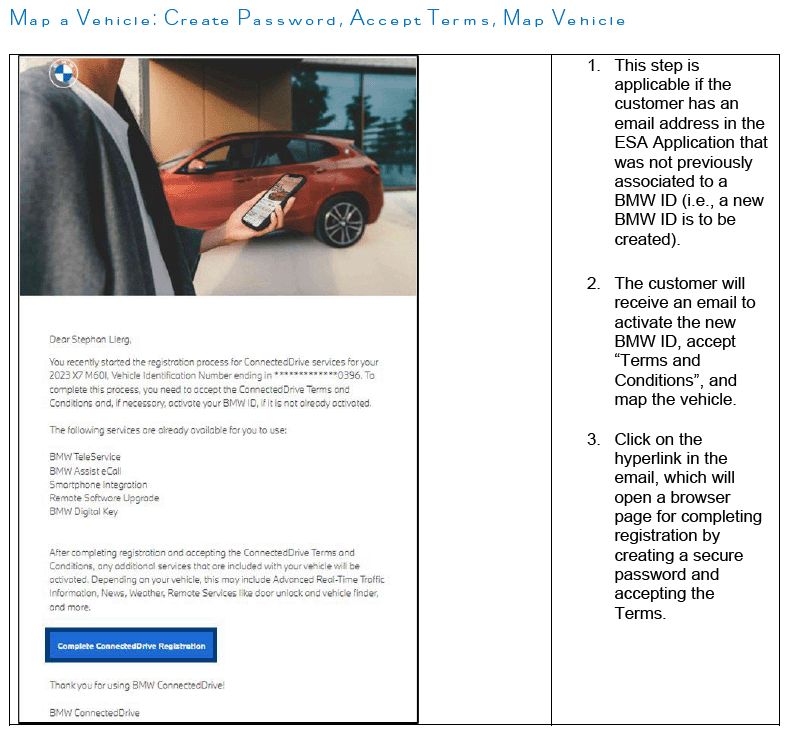
In order to authorize data exchange in these vehicles, they need to be mapped to a company BMW ID or email address via the Electronic Subscriber Agreement (ESA) process when placed into service. If this step is NOT performed, then any systems that require a back-end connection will not operate AND no other BMW ID will be able to be entered via the vehicle. Please reference Attachment 1 for the steps of this process.
Once a "Fleet" vehicle is mapped to a BMW ID or email address via the ESA process, other drivers can indeed add a secondary BMW ID to a vehicle. These secondary IDs will NOT be truly mapped and will only allow for the download of presets and seat positions. These secondary BMW IDs can be removed easily as they are not truly mapped to the back-end or the vehicle.
Dealerships need to note that once fleet service is over, these vehicles need to be removed from "Fleet" status before they are sold. If not, any customer that purchases these vehicles will be UNABLE to map their BMW ID to the vehicle moving forward.
- BMW ID
Once a vehicle has an "In Service" date, Dealer Demo is deactivated and all data transmissions to and from a vehicle are stopped. At this point all vehicles, whether customer vehicles OR "Fleet" vehicles, MUST be fully mapped to allow for data transmission moving forward.
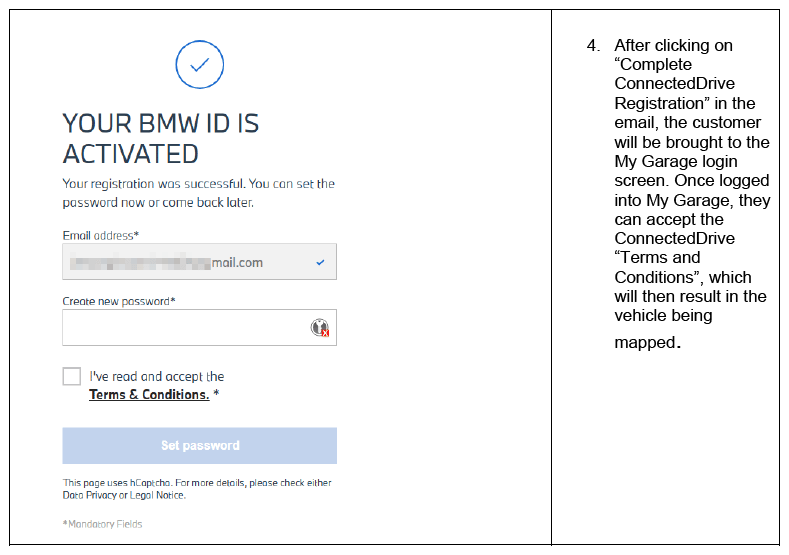
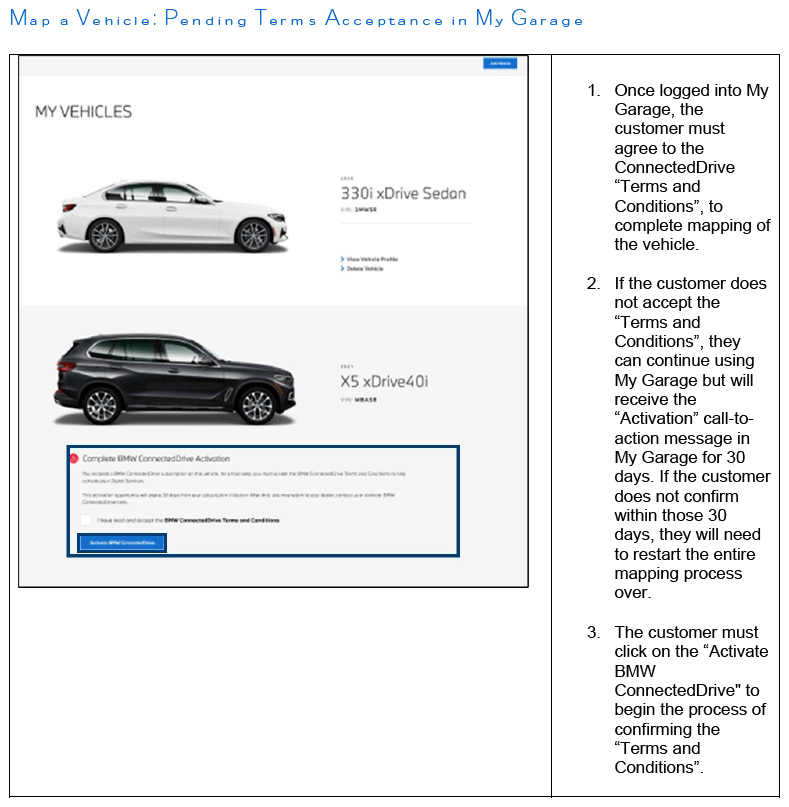
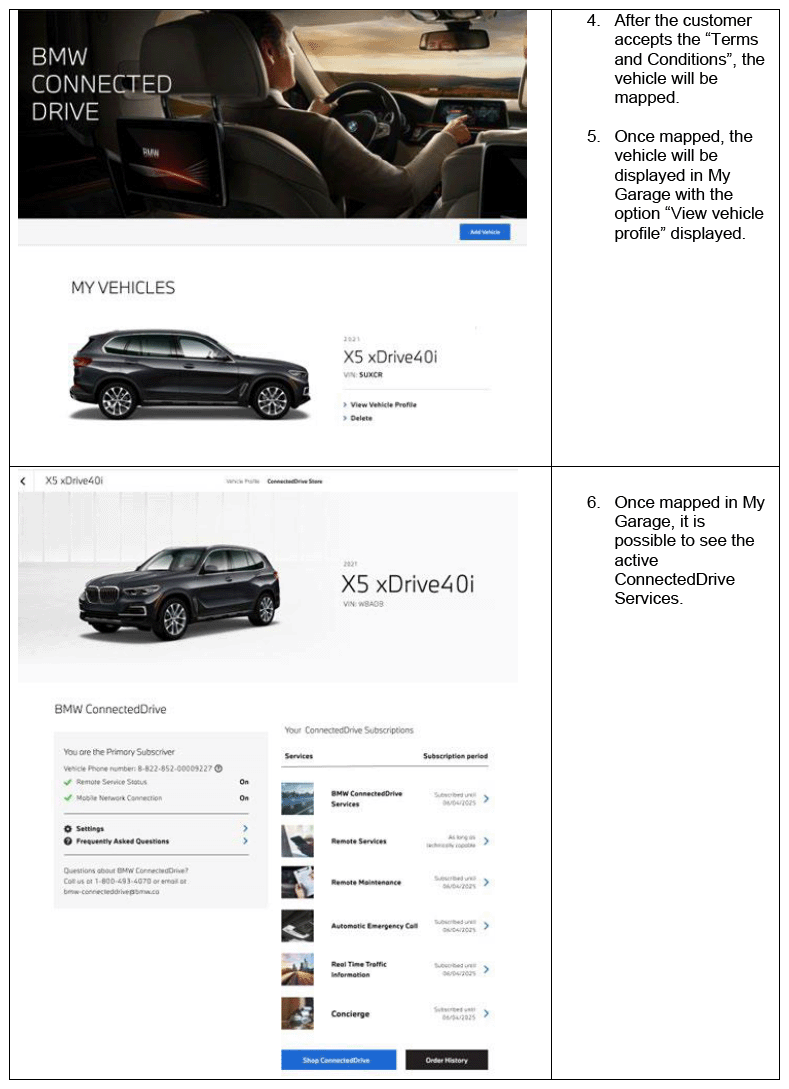
Fully mapping a BMW ID into a vehicle is a multi-stage process. Simply inputting a BMW ID into a vehicle or in the My BMW app is not enough to fully map a vehicle.
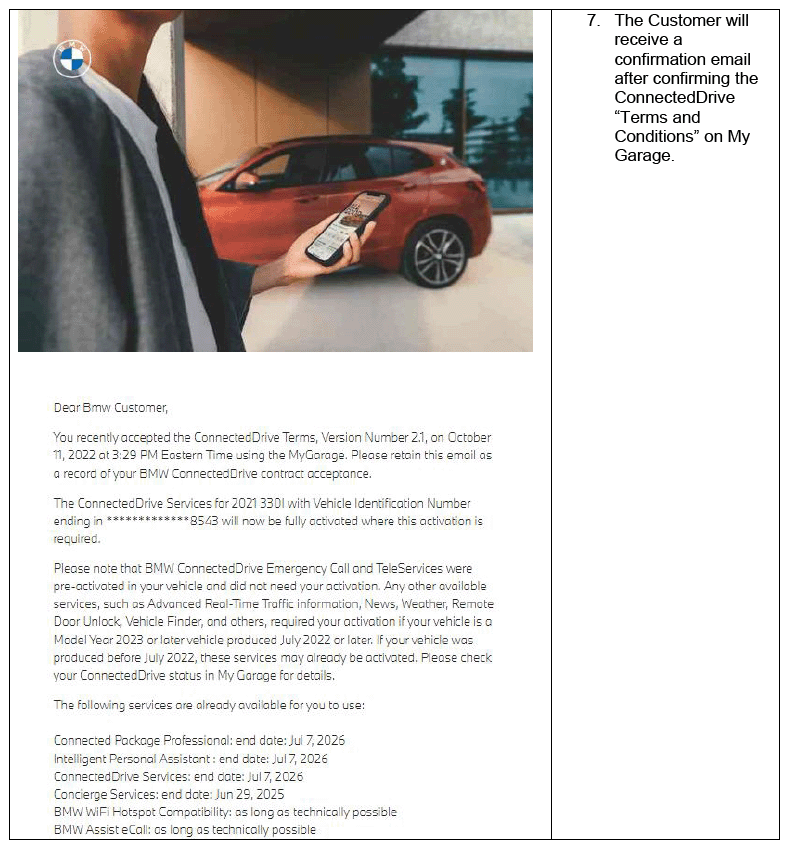
This can be misleading, as a BMW ID can APPEAR to be mapped once inputted in a vehicle. Seat positions will load and vehicle presets will download, but data privacy requirements are not yet met. The second step of BMW ID mapping is to accept the BMW "Terms and Conditions". This agreement is the authorization to allow data to be sent to and collected from the vehicle. Without it, no data can be transmitted even if a BMW ID has begun the mapping process and is shown in the vehicle.
The BMW ID mapping status can be seen in the vehicle using the BMW ID app. The status of the BMWID is shown differently in different operating systems, so please pay attention to head unit installed.
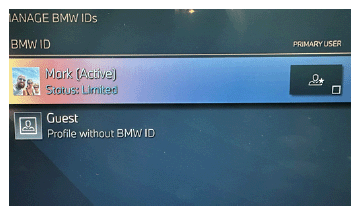
In Operating System 8 and 8.5, if the "Terms and Conditions" have not been "Accepted", the BMW ID will be listed as "Limited".
No data exchange is possible with BMW Data Services.
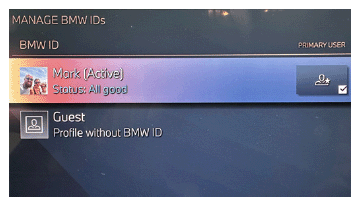
If "Terms and Conditions" have been accepted, the BMW ID will be listed as "All Good".
Data can be exchanged with BMW Data Services.
In Operating System 9, the BMW ID status is not as clear.
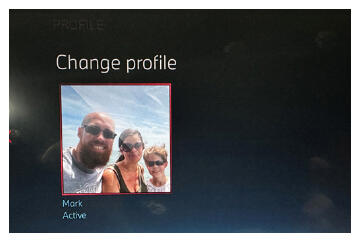
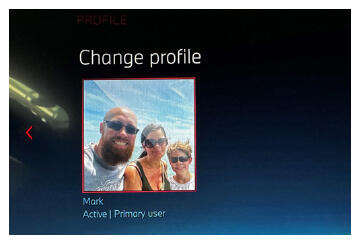
Any BMW ID that has begun the mapping process will show as "Active", even if the "Terms and Conditions" are NOT accepted.
No data exchange is possible with BMW Data Services.
Only after "Terms and Conditions" are accepted, will a BMW ID be listed as "Primary".
Data can be exchanged with BMW Data Services.
If there is NOT a "Primary" BMW ID linked to an OS 9 vehicle, then "Terms and Conditions" have NOT been accepted.
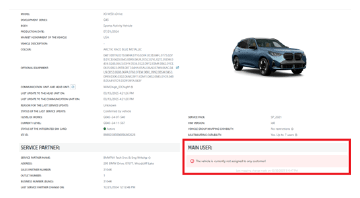
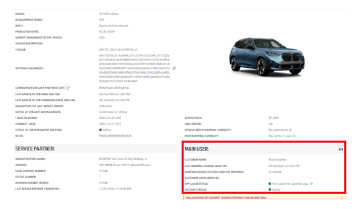
This status can also be seen in the Connected Drive Dealer Cockpit under the selection "Main User:".
This section will show the primary mapped BMW ID and the "Account Status".
If a BMW ID is NOT fully mapped, the "Main User" section will show no assigned customers.
Once the BMW ID is FULLY mapped to a vehicle, the customer data will be visible in the Dealer Cockpit under the "Main User" section.
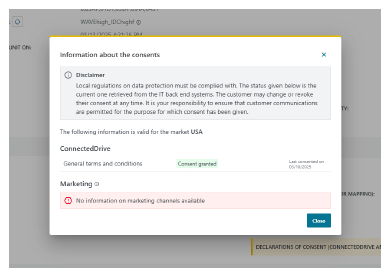
In addition, if you select the "Declarations of Consent (Connected Drive and Marketing)" tab in the "Main User" section, the date the "Terms and Conditions" were accepted can be shown.
- Troubleshooting
- If any customer vehicle enters the dealership with a connection issue to BMW Data Services, the first step of diagnosis MUST be to check the mapping status of the BMW ID. Often an in complete mapping of the BMW ID can be the cause and should be a quick fix.
- If the vehicle is a dealership demo/loaner or a rental agency vehicle, check the status of the vehicle group in the Connected Drive Dealer Cockpit. If the vehicle is a "Fleet" group vehicle, it must be mapped correctly by the owning business via the ESA process. If the ESA is NOT done, the vehicle will not accept ANY BMW ID.
- If the BMW ID cannot be entered via the vehicle or the My BMW app, the vehicle may have once been a "Fleet" group vehicle that was since sold to a customer. Check the mapping status in the Connected Drive Dealer Cockpit to make sure. If the vehicle is still in the "Fleet" group and should not be, please open a "Standard" TSARA Case under the "Connected/Digital Services" area and start the process to change the vehicle group.
- Used vehicle inventory or Certified Pre-Owned inventory are subject to the same data restrictions as customer-owned vehicles, even though they are dealer owned. These vehicles will need to be mapped to a BMW ID in order to activate data exchange for demo or test drive. This BMW ID can be a dealer-created BMW ID. It does not need to be attached to an individual. Used vehicles CANNOT be included in the Dealer Demo Program.
FEEDBACK REGARDING THIS BULLETIN
| Technical Feedback | To submit feedback for the technical topic of this bulletin: Submit yourfeedback in the rating box at the top of this bulletin |
| Warranty Feedback | To submit feedback for the CLAIMS section of this bulletin: Submit an IDS ticket to the Warranty Department, or use the chat available in the Warranty Documentation Portal |
| Parts Feedback | To submit feedback for the PARTS section of this bulletin: Submit an IDS ticket to the Parts Department |
Supporting Materials
picture_as_pdf B65 07 24 Attachment 1.pdf