Recall 21V-096: Rearview Camera (SI B66 02 21)
Publication date: 2021-04-30Reference number: SI B66 02 21
RECALL 21V-096: REARVIEW CAMERA
SERVICE CAMPAIGN BULLETIN
| BMW: | See The Chart Below |
SERVICE INFORMATION
This Service Information bulletin (Revision 3) replaces SI B66 02 21 dated March 2021
What's New:
- Attachment: Updated FAQ
Please perform the procedure outlined in this Service Information on all affected vehicles before customer delivery. In the event the customer has already taken delivery of the vehicle, please perform the procedure the next time the vehicle is in the shop.
MODEL
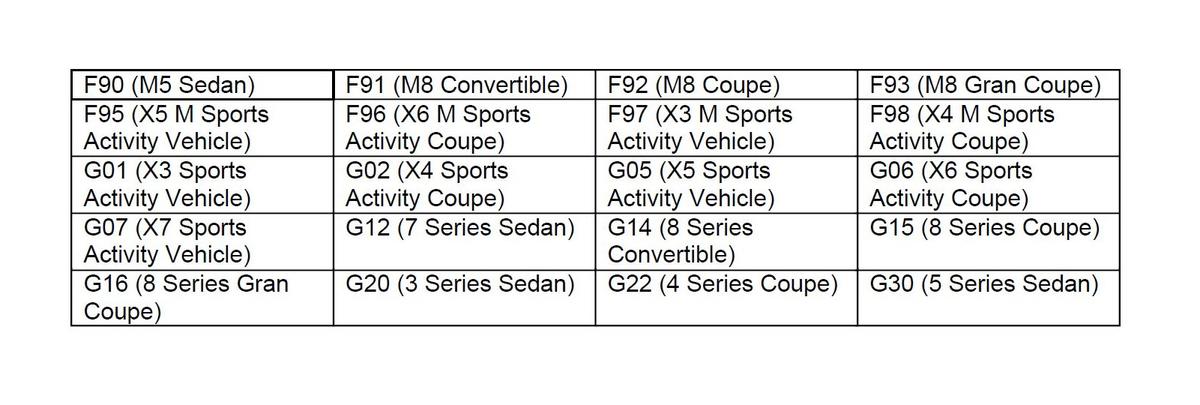
AFFECTED VEHICLES
Vehicles which require this Recall Campaign to be completed will show it as "Open" when checked either in AIR, the "Service Menu" of DCSnet (Dealer Communication System), ISPA Next or Warranty Vehicle Inquiry.
SITUATION
BMW AG is conducting a Voluntary Non-Compliance Recall (effective February 22, 2021) on certain Model Year 2019-2021 BMW vehicles that were produced between October 12, 2017 and November 26, 2020.
The Recall Notice and Q&A have been attached for further information.
Due to a software error, in certain cases the rearview camera image may not meet a Federal requirement. When shifting into Reverse gear, in some cases a small portion of the rearview image may be slightly obscured (due to left/right swapped images), or the screen may not illuminate. The affected vehicles must be checked and re-coded if needed as outlined in the procedure below.
There are two scenarios depending on vehicle equipment. These are as follows:
- Vehicle(s) equipped with option 6U3
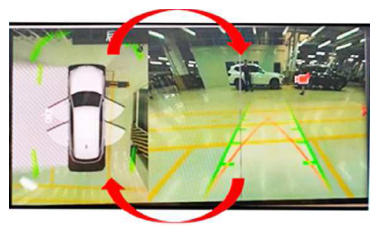
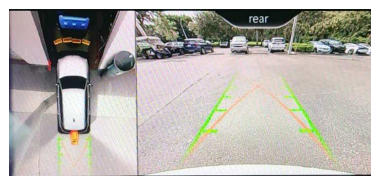
(Live Cockpit Pro - incl. Navi): When shifting into reverse, the rearview image and the Surround view (top view) image in the CID (Central Information Display) may be swapped
. Follow procedure "A" below.
Picture 1.
The images are displayed in the correct image position on the CID for vehicles equipped with option code 6U3.
Picture 2.
Shows a possible failure in vehicles equipped with option 6U3.
The top view and rearview images are incorrectly displayed in the wrong position (swapped) on the CID.
NOTE: The camera icon is in the correct location, however it seems out of place due to wrong image location. - Vehicle(s) without option 6U3:
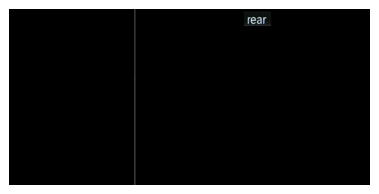
When shifting into reverse, the concern is that the CID is blank or there's a black screen (no images are displayed). Follow procedure "B" below.
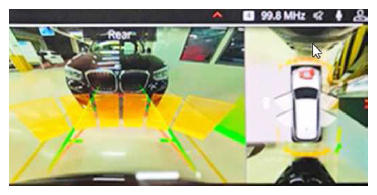
Picture 3.
Shows the correct image display for vehicles without option code 6U3.
NOTE: The correct image layout for vehicles without option code 6U3 is opposite to the layout for vehicles with option code 6U3 (seen in Picture 1 above).Picture 4.
Shows the black screen (no camera image displayed) for vehicles without option code 6U3.
CAUSE
Software coding error in the ICAM control unit with Integration Level-
- S15A-19-11-555 to S15A-20-07-565
- S18A-19-11-565 to S18A-20-07-565
CORRECTION
Encode the ICAM using ISTA 4.27.1x or higher (released December 2020).
Target I-levels:
- S15A-20-11-542 or higher
- S18A-20-11-542 or higher
PROCEDURE
Depending on the vehicle options, follow procedure "A" for vehicles with option 6U3 or procedure "B" without option 6U3
- Vehicle(s) equipped with SA 6U3
(Live Cockpit Pro - incl. Navi; aka MGU (Media Graphics Unit)):
- Visually check and compare the camera image in the display to pictures 1 and 2 above in the situation.
- If the camera image displayed in the CID match picture 1, then no further repairs are required.
- If the camera image displayed in the CID match picture 2, then complete the steps listed below.
- Connect the vehicle to ISTA 4.27.1x or higher.
- Start a new programming session, go to Advanced Tab.
- Select all control units for encoding.
- Calculate and accept measures plan.
- Once the encoding/programming is completed, follow the rework list.
- Depending on the rework list, if necessary, perform vehicle test and delete the error memory (faults).
- Allow the vehicle to sleep for 5 minutes.
- Reassess the vehicle.NOTE: Camera image in the CID must match the picture 1 seen in the situation above.
- If the image does not match picture 1, then recode the ICAM by repeating steps 5 - 9 above.
- Vehicle(s) equipped without SA 6U3:
- Select reverse gear and check that the camera image is displayed in the CID.
- If the camera image is displayed in the CID (reference picture 3 in Situation above), no further repairs are required.
- Only if the CID is blank or black (reference picture 4 in Situation above - camera images are not displayed) should the remaining steps listed below be completed.
- Connect the vehicle to ISTA 4.27.1x or higher and start a new programming session.
- Then go to "Advanced Tab".
- Select all control units for encoding.
- Calculate and accept measures plan.
- Once the encoding/programming is completed, follow the rework list.
- Depending on the rework list, if necessary, perform vehicle test and delete the error memory (faults).
- Allow the vehicle to sleep for 5 minutes.
- Reassess the vehicle.NOTE: Camera image must be displayed in the CID as shown in picture 3 seen in the situation above.
- If the CID is blank or black and the camera image is not displayed, then recode the ICAM by repeating steps 5 - 9 above.
Always connect a BMW-approved battery charger/power supply ( SI B04 23 10 ) when performing programming.
For information on programming and coding with ISTA, refer to CenterNet/TIS/Technical Documentation/Programming and Diagnostics/Programming Documentation.
PARTS
No parts are required.
WARRANTY INFORMATION
During this workshop visit, the affected vehicle may also show one or more programming and encoding Technical Campaign repairs open, the programming and encoding procedure may only be invoiced one time.
Select one of these open Technical Campaigns to perform and submit for updating the vehicle to the required I-level or higher.
Please be sure to also perform any additional work (before and/or after) the selected campaign or other campaign repairs require and/or close the remaining open programming and encoding Technical Campaign repairs as outlined in the corresponding Service Information Bulletin.
Reimbursement for this Service Action will be via normal claim entry utilizing the applicable work package information below that applies:
| Defect Code: | 0066490100 | - |
Completion before the first vehicle delivery to a customer or the vehicle is already in the workshop
| Work Pkg | Labor Operation | Description (Plus work) | Labor Allowance |
|---|---|---|---|
| # 1 | 00 70 753 | Visual inspection for correct image layout in CID (coding not required). | 3 FRU |
| Or | |||
| #2 | 00 70 754 | Visual inspection for correct image layout in CID before and after ICAM coding (includes connecting an approved battery charger/power supply and performing a vehicle test). | 9 FRU |
| Or: | |||
| #3 | 00 70 755 | Visual inspection for correct image layout in CID before and after ICAM coding, recode and recode camera system (includes connecting an approved battery charger/power supply and performing a vehicle test). Re-check. | 15 FRU |
| Or | |||
| # 4 | 00 70 756 | Programming and encoding the vehicle control units was performed in conjunction with another campaign/repair prior to or during this workshop visit (vehicle is already at the specified Target integration level or higher, no repair is necessary) | 1 FRU |
Or:
| Work Pkg | Labor Operation | Description (Main work) | Labor Allowance |
|---|---|---|---|
| # 5 | 00 70 223 | Visual inspection for correct image layout in CID (coding not required). | 5 FRU |
| Or: | |||
| # 6 | 00 70 224 | Visual inspection for correct image layout in CID before and after ICAM coding (includes connecting an approved battery charger/power supply and performing a vehicle test). | 10 FRU |
| Or | |||
| # 7 | 00 70 225 | Visual inspection for correct image layout in CID before and after ICAM coding, recode and recode camera system (includes connecting an approved battery charger/power supply and performing a vehicle test). Re-check. | 17 FRU |
| Or | |||
| # 8 | 00 70 226 | Programming and encoding the vehicle control units was performed in conjunction with another campaign/repair prior to this workshop visit (vehicle is already at the specified Target integration level or higher, no repair is necessary) | 1 FRU |
Only one of the flat rate labor operation codes listed above can be used for claim submission/reimbursement purposes. Also, only one Main work flat rate labor operation code can be claimed per workshop visit.
Claim Repair Comments
Only reference the SIB number and the work package (Pkg) number performed in the RO technician notes and the claim comments (For example: B66 14 20 WP 1), unless otherwise required by State law.
And, as applicable:
Alternative Mobility Solution (AMS) for Vehicle Owners (RO and Claim Comments Required)
This Recall repair qualifies for Alternative Mobility Solution (AMS) expense reimbursement, claim this item under the Defect Code noted above as follows:
Sublet Code 2 - Itemize the AMS sublet amount on the repair order and in the claim comment section.
Please refer to SI B01 29 16 for additional information.
Programming and Encoding - Vehicle Control Units (RO and Claim Comments Required)
The programming procedure automatically reprograms and encodes all vehicle control modules which do not have the latest software I-level. If one or more control module failures occur during this programming procedure:
- Please claim this consequential control module related IRAP recovery procedure (when applicable as required)/repair work under the defect code listed in this bulletin with the applicable AIR labor operations.
Please explain this additional work (The why and what) on the repair order and in the claim comments section
For control module failures that occurred prior to performing this programming procedure:
- When covered under an applicable limited warranty, claim the applicable test plan and the corresponding control module-related repair work using the applicable defect code and labor operations in AIR (including diagnosis).
As applicable to your center, please refer to SI B01 01 20 or B01 07 20 for claiming your diagnosis work time (WT), WT and repair explanation procedures.
Reimbursement of Prior Customer-Pay Repairs (TREAD Act)
With this Safety Recall Campaign, with respect to the issue be addressed on the Affected Vehicles, a reimbursement request for a qualifying prior customer-pay repair is not likely.
However, if you should receive a reimbursement request from a customer for a repair that may qualify in addressing the issue described in this bulletin, please contact the Warranty department (include a legible copy of the invoice) through IDS by selecting Coverage, Policy, Coding Questions and Mileage Corrections. The Warranty department will respond to your inquiry accordingly.
QUESTIONS REGARDING THIS BULLETIN
| Technical inquiries | Submit feedback at the top of this bulletin |
| Warranty inquiries | Please contact the Warranty department by either using the Live Chat that's available in the Warranty Documentation Portal or through IDS by selecting Coverage, Policy, Coding Questions and Mileage Corrections |
| Parts inquiries | Submit an IDS ticket to the Parts Department |
Supporting Materials
picture as pdf B66 02 21 Recall Notice.pdf
picture as pdf B66 02 21 2021-BMW-MY2019-21-VariousModels-RearviewCamera-FAQ-(26April2021).pdf