Battery Load Test: Procedure
Do not check or charge a Battery -A- when the visual indicator has >>no color or is bright yellow<<. Jump starting must not be used!
There is a risk of explosion during testing, charging or jump starting.
These Batteries -A- must be replaced.
The Battery -A- temperature must be at least 10 °C (50 °F).
- Turn off the ignition and all electrical equipment.
- Remove the key.
-- Check the visual indicator on Batteries -A- with visual indicator. Refer to BATTERY, CHECKING, VEHICLES WITH BATTERY MONITORING CONTROL MODULE J367 OR ENERGY MANAGEMENT CONTROL MODULE J644 AND DATA BUS ON BOARD DIAGNOSTIC INTERFACE J533 .
-- Switch on the :VAS5097A . Refer to Battery Tester with Printer .
-- Determine the cold crank amps according to specifications on the Battery -A- in ampere (A) according to DIN and determine the :VAS5097A adjustment range using the table. Refer to COLD CRANK AMPS TABLE .
If the Battery -A- does not state this value in DIN but rather in IEC or EN/SAE, then convert the value using the table (refer to COLD CRANK AMPS TABLE ) or the table on the :VAS5097A .
-- Set the cold crank amps with the cold crank amps selector switch. Refer to Battery Tester with Printer .
-- Set the measuring range (80 to 379 A or 380 to 499 A) using the ON/OFF switch. Refer to Battery Tester with Printer .
Batteries -A- with cold crank amps greater than 499 A according to DIN can be tested with the setting for 499 A according to DIN.
-- Connect the red terminal (+) to the positive terminal of the Battery -A-.
-- Connect the black terminal (-) to the negative terminal for the Battery -A-.
Make sure the test terminals make good contact!
Note TPL 2012182 for the :VAS5097A .
-- Using the sliding switch, select the test clamp connection point. Refer to Battery Tester with Printer .
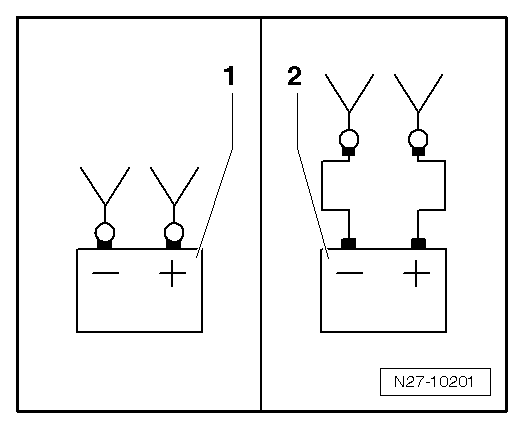
- Direct connection to the Battery -A-
- Connection on the battery jump start terminal
-- Check if the cold crank amps indicated on the Battery -A- matches the selected value on the :VAS5097A .
-- Press the Start -button. Refer to Battery Tester with Printer .
The green LED lights up. Refer to Battery Tester with Printer . The test program runs automatically. The test results are output through the printer. Refer to BATTERY LOAD TEST RESULTS . If the :VAS5097A does not start, (the LED does not come on and there is no print out), then charge the Battery -A-. Refer to BATTERY, CHARGING .
-- Switch off the :VAS5097A . Refer to Battery Tester with Printer .
-- Remove the test terminals.
The test is over after approximately 20 seconds.
The results of the test are output through the printer.
Only perform the test once. Repeating the test will not produce accurate results.
The :VAS5097A needs 30 minutes to cool off before it is ready for the next measurement.