PROTECTIVE HOUSING FOR Auxiliary Battery -A1-, REMOVING AND INSTALLING, 0K4 AND VH0: Removing
-- Remove the Auxiliary Battery -A1-. Refer to Auxiliary Battery -A1-, REMOVING AND INSTALLING, (VH0 + 0K4) .
-- Remove the bolts -4 and 6-.
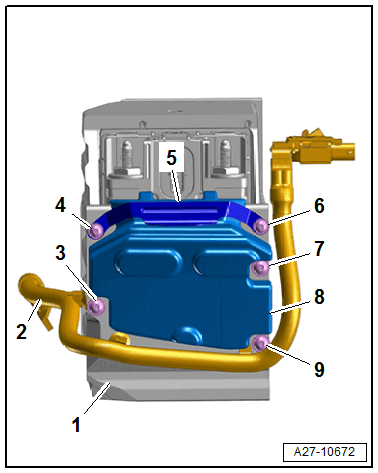
-- Remove the front crashpad -8- with retaining bracket -5-.
-- Free up the ground cable -2- with the Battery Monitoring Control Module -J367- on the protective housing.
-- Remove the bolts -3, 7 and 9-.
-- Remove the cover plate -1-.
-- Remove the pressure vent tube -5- by pressing the catches on both sides in direction of -arrows-.
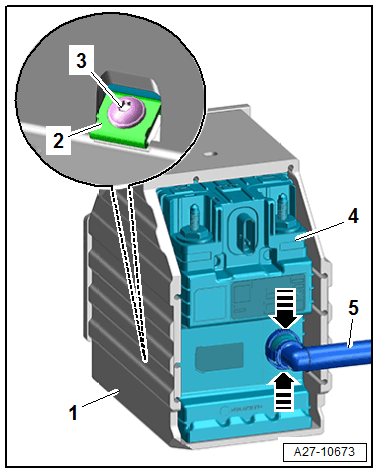
-- Loosen the bolt -3- for the retaining bracket -2- four turns.
-- Remove the Auxiliary Battery - A1- -4- from the housing -1-.
- Follow the disposal regulations for batteries when disposing of them. Refer to BATTERY .