BATTERY, CHARGING WITH Battery Charger :VAS5095A: Procedure
-- Turn off the ignition and all electrical consumers and remove the ignition key.
-- Check the battery type setting on the battery type switch. Refer to Battery Charger . The battery type switch must be set to 2.4V/C (Volts/Cell).
-- Connect the red charge terminal (+) to the positive terminal of the Battery -A-.
On vehicles with a Start/Stop function and an installed Battery Monitoring Control Module -J367-, the black charge terminal (-) must be connected to the body ground. The Start/Stop system will malfunction when it is connected to the Battery -A- negative terminal.
-- Connect the black charge terminal (-) to the negative terminal of the Battery -A- /negative connector.
-- Switch on the :VAS5095A . Refer to Battery Charger .
Charge current displays. Refer to Figure -2- and -3- light up yellow. The Battery -A- is partially charged (approximately 90 %) when only the yellow LED -3- is on.
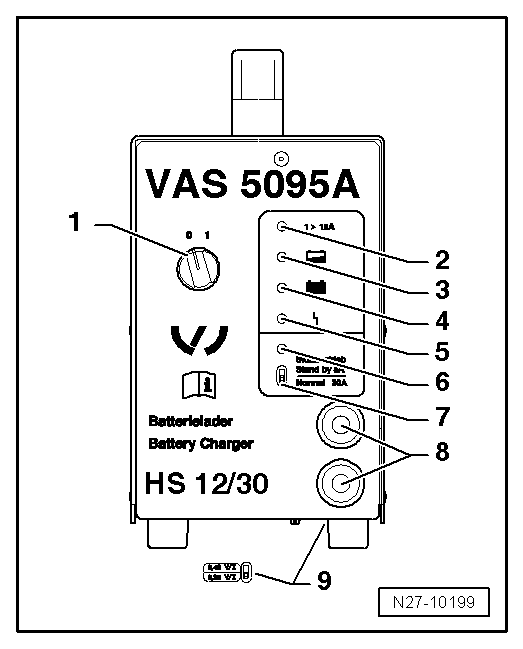
If the green LED. Refer to Figure -4- is also on, then the :VAS5095A has switched to maintenance charging. The Battery -A- is charged.
-- Switch off the :VAS5095A . Refer to Battery Charger .
-- Remove the charging clamps from the battery terminals.