Battery Charger :VAS5900 SERVICE CHARGE: Procedure
-- Turn off the ignition and all electrical consumers and remove the ignition key.
-- Connect the :VAS5900 to the power supply. The last selected mode is shown on the display. Refer to Battery Charger .
-- Set the battery type with the INFO button.
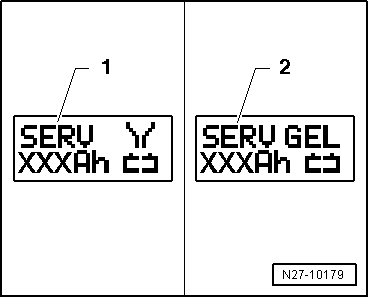
The symbol -1- for "service charge of wet batteries" or the symbol -2- for "service charge of Gel/Absorbent Glass Mat (AGM) batteries" is indicated in the display.
-- Set the battery capacity (Ah) on the Battery -A- to be charged with the corresponding ↑ button or ↓ button.
-- Connect the red charge terminal (+) to the positive terminal of the Battery -A-.
On vehicles with a Start/Stop function and an installed Battery Monitoring Control Module -J367-, the black charge terminal (-) must be connected to the body ground. The Start/Stop system will malfunction when it is connected to the Battery -A- negative terminal.
-- Connect the black charge terminal (-) to the negative terminal of the Battery -A- /negative connector.
The :VAS5900 recognizes the nominal voltage of the connected Battery -A- (6 V/12 V/24 V) and begins the charging process automatically.
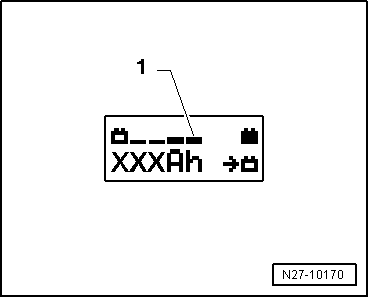
The :VAS5900 begins the "final charging" when the charge level is approximately 80 to 85 % of the battery voltage. The fourth bar is indicated on the display -1-. The Battery -A- is now ready to be used.
A successful "service charge" depends on the degree of sulfation on the Battery -A-.
Possible malfunctions and how they are handled
- Displayed voltage does not match the nominal voltage:
-- Hold down the ↑ button or ↓ button until the charging process begins.
- Displayed battery voltage does not match the nominal voltage - the charging process has already begun:
-- Press the START/STOP button two times.
-- Hold down the ↑ button or ↓ button until the charging process begins.
- The charger does not recognize a Battery -A-, when the battery voltage is less than 2 V:
The display remains unchanged.
The set operating mode and Ampere-hours (Ah) are displayed.
Battery -A- charging, ending
-- Press the START/STOP -button.
-- Remove the charging clamps from the battery terminals.
-- Disconnect the :VAS5900 from the power.