Driver Assistance Systems Front Camera, Removing And Installing: Installing
Install in reverse order of removal and note the following:
- Replace the silicone pad.
- The camera field of vision on the inside of the windshield must not be fogged up or dirty.
-- Remove the silicone pad -3- from the front camera -2- without leaving any residue.
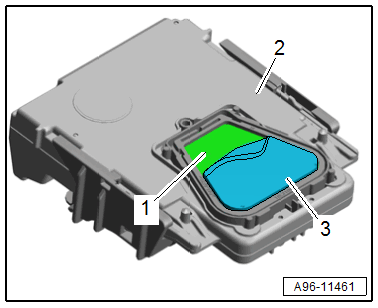
-- Clean the adhesive surface -1- on the front camera with a lint-free towel. Do not damage or shift the adhesive surface -1- and the plastic frame while doing this.
-- Remove the protective film -1- from the silicone pad -2-.
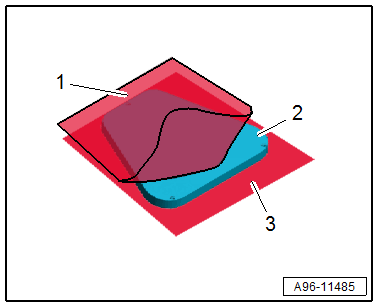
-- The clear protective film -3- remains on the silicone pad as an assembly aid.
-- Position the silicone pad -2- on the front camera -3- using the clear protective film -1-.
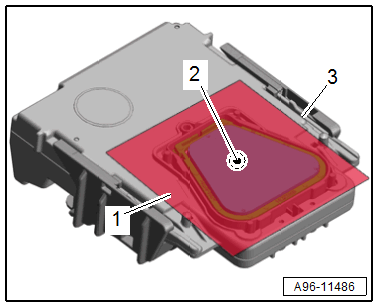
-- Press the silicone pad through the protective film onto the front camera free of bubbles.
- The air bubbles will disappear after several minutes - do not actively press.
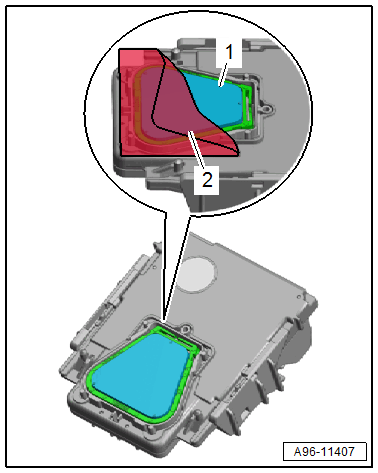
-- Remove the protective film -2- from the silicone pad -1-.
TIP:
To avoid contaminating the silicone pad, remove the protective film just before installing it.
-- Connect the connector.
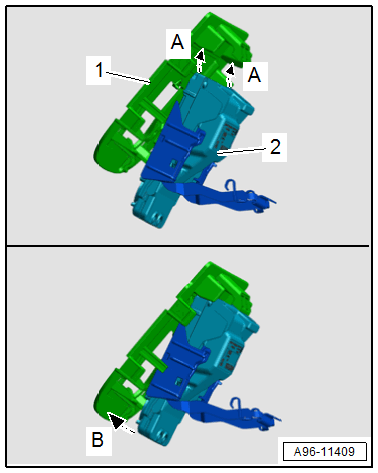
-- Insert the front camera -2- in the mount -1- -A arrows-.
-- Push the front camera using light force onto the mount -arrow B-.
TIP:
If not all bubbles are removed then pressing on the silicone pad, the bubbles will be pushed out on the windshield when locking the front camera due to contact pressure. The silicone pad is designed so that any air pockets will be diffused by the silicone pad.
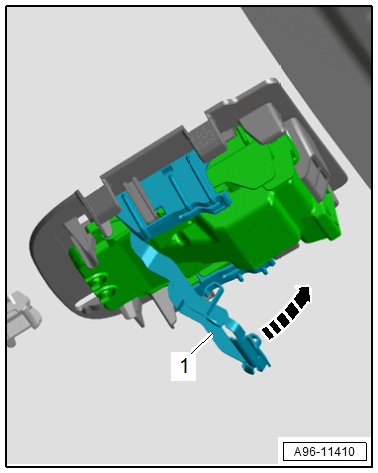
-- Press the front camera against the windshield and close the securing clip -1- in the direction of the -arrow-.
-- Make sure that all four sides engage with the retaining plate.
- To prevent malfunctions in the assistance systems, the driver assistance systems front camera must not have any embedded objects or bubbles between it and the windshield.
-- Calibrate the driver assistance systems front camera. Refer to DRIVER ASSISTANCE SYSTEMS FRONT CAMERA, CALIBRATING .