Multimedia Display Unit 3 -Y31- / Multimedia Display Unit 4 -Y32-, REMOVING AND INSTALLING: Removing
-- Turn off the ignition and all electrical equipment and remove the ignition key.
-- Release the catches -3- on the Multimedia Display Unit 4 Bracket -R316- -2- in the direction of the arrow -A-.
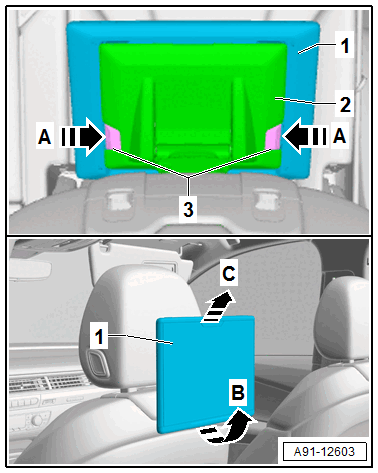
-- At the same time, remove the Multimedia Display Unit 4 -Y32- -1- from the Multimedia Display Unit 4 Bracket -R316- -2- in direction of arrow -B-.
-- Remove the Multimedia Display Unit 4 -Y32- -1- in direction of arrow -C- from the Multimedia Display Unit 4 Bracket -R316- -2-.