Overview - Luggage Compartment Side Trim Panel, AVANT
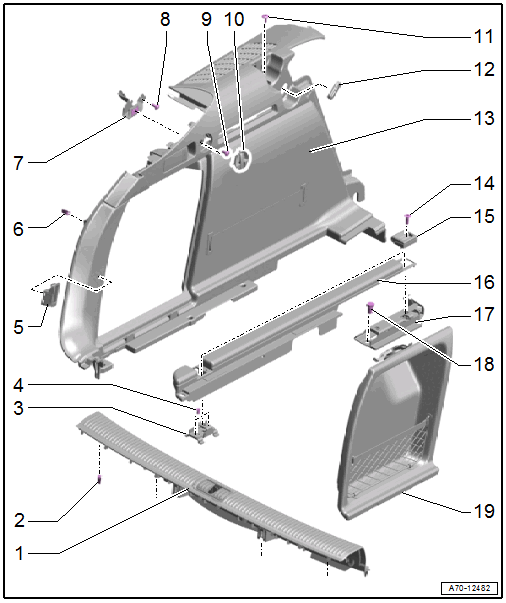
- Lock Carrier Trim Panel
- Removing and installing. Refer to LOCK CARRIER TRIM PANEL, REMOVING AND INSTALLING .
- Must engage in the pins
- Press on until it engages audibly
- Stretch the lip of the rear lid seal over
- Clip
- Replace damaged or deformed clips
- Insert in the trim panel
- Remove any clips remaining in the mounting points using the Omega Clip Tool:T40280 and insert them into the trim panel for installation.
- Quantity: 4
- Tie Down Bracket
- Equipped on some models
- Removing and installing. Refer to TIE DOWN BRACKET, REMOVING AND INSTALLING .
- Bolt
- 9 Nm
- Quantity: 2
- Trailer Hitch Button Trim
- Equipped on some models
- Removing and installing. Refer to COMPONENT LOCATION OVERVIEW - CONTROLS IN LUGGAGE COMPARTMENT .
- Clip
- Replace damaged or deformed clips
- Insert in the trim panel
- Remove any clips remaining in the mounting points using the Omega Clip Tool:T40280 and insert them into the trim panel for installation.
- Quantity: 2
- Bracket
- Removing and installing. Refer to LUGGAGE COMPARTMENT SIDE TRIM PANEL, REMOVING AND INSTALLING, AVANT .
- Bolt
- 4 Nm
- Bolt
- 4 Nm
- Bag Hooks
- Removing and installing. Refer to BAG HOOK, REMOVING AND INSTALLING .
- Bolt
- 1.5 Nm
- Rubber Grommet
- For the screen separator bracket
- Slide over the bracket and insert into the trim panel
- Luggage Compartment Side Trim Panel
- Removing and installing. Refer to LUGGAGE COMPARTMENT SIDE TRIM PANEL, REMOVING AND INSTALLING, AVANT .
- Press on until it engages audibly
- Stretch the lip of the rear lid seal over
- Bolt
- 20 Nm
- Tie Down
- Equipped on some models
- Removing and installing. Refer to TIE DOWN, REMOVING AND INSTALLING .
- Quantity: 2
- Luggage Compartment Floor Support
- Not for g-tron
- Removing and installing. Refer to LUGGAGE COMPARTMENT SUPPORT, REMOVING AND INSTALLING .
- Tie Down Bracket
- Equipped on some models
- Removing and installing. Refer to TIE DOWN BRACKET, REMOVING AND INSTALLING .
- Bolt
- 55 Nm
- Service Cover