SEVERELY DISCHARGED BATTERY, CHARGING WITH Battery Charger :VAS5903: Procedure
-- Turn off the ignition and all electrical consumers and remove the ignition key.
-- Connect the :VAS5903 to the power supply. The last selected operation mode is shown on the display. Refer to Battery Charger .
-- Set the battery type with the INFO button.
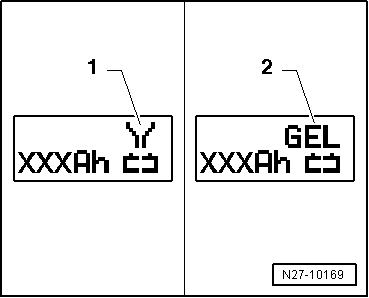
The symbol -1- for "service charge of wet batteries" or the symbol -2- for "service charge of Gel/Absorbent Glass Mat (AGM) batteries" is indicated in the display.
-- Set the battery capacity (Ah) on the Battery -A- to be charged with the corresponding ↑ button or ↓ button.
-- Connect the red charge terminal (+) to the positive terminal of the Battery -A-.
On vehicles with a Start/Stop function and an installed Battery Monitoring Control Module -J367-, the black charge terminal (-) must be connected to the body ground. The Start/Stop system will malfunction when it is connected to the Battery -A- negative terminal.
-- Connect the black charge terminal (-) to the negative terminal of the Battery -A- /negative connector.
-- Press the START/STOP button for about 5 seconds. The menu selection "Charging severely discharged batteries/Support mode" is activated.
-- Press the corresponding ↑ -button or ↓ button to adjust the battery voltage (6 V/12 V/24 V).
If no button is touched within five seconds, the :VAS5903 will return to the main menu (operating mode selection).
-- Select the battery voltage by pressing the START/STOP button.
Then the inquiry about the correct polarity of the charging clamps is made.
-- Check correct polarity connection of charger clamps.
-- Confirm charging clamps are connected to correct poles via START/STOP button.
The :VAS5903 starts to charge the severely discharged Battery -A-.
Battery -A- charging, ending
-- Press the START/STOP -button.
-- Remove the charging clamps from the battery terminals.
-- Disconnect the :VAS5903 from the power.