Driver Side Instrument Panel Cover, Removing And Installing: Removing
-- Remove the driver side instrument panel side cover. Refer to INSTRUMENT PANEL SIDE COVER, REMOVING AND INSTALLING .
-- Equipped on some models: open the storage compartment cover -1- and remove the screws -B arrows-.
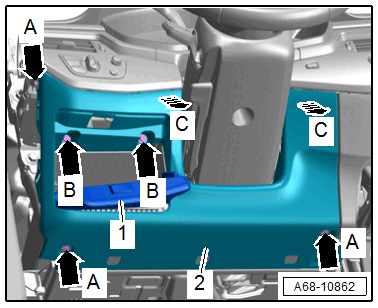
-- Remove the bolts -A arrows-.
-- Unclip the driver side instrument panel cover -2- from the instrument panel by hand in direction of -C arrows-.
-- Remove the driver side instrument panel cover.
-- Remove the screw -arrow A-.
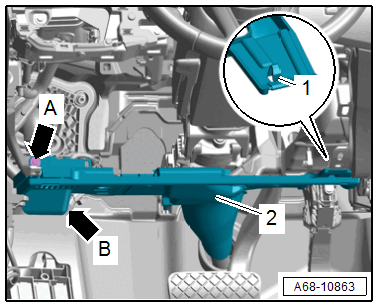
-- Using a screwdriver, release the retainer -1- and pull the driver side lower instrument panel cover -2- out of the mount -arrow B- toward the rear.
-- Disengage the diagnostic connection on the instrument panel cover.
-- Equipped on some models: disconnect the connectors for the footwell lamp, parking aid warning buzzer and the emergency call speaker.
-- Remove the storage compartment if necessary.