93 PSS: Warning Message: "Electrical System: Fault. Please Contact Workshop" (E-Tron Gt) (GROUP 91, NO. 25-40)
Reference number: GROUP 91, NO. 25-40
Supersedes refnos: 2073582/1, 2073582/2, GROUP 91, NO. 24-94
93 PSS: WARNING MESSAGE: "ELECTRICAL SYSTEM: FAULT. PLEASE CONTACT WORKSHOP" (E-TRON GT)
TECHNICAL SERVICE BULLETIN
| AUDI: | 2018-2026 All Audi Vehicles |
| GROUP: | 91 - Radio, Telephone, Board Computer, Multi-Function Indicator (MFI) |
SERVICE INFORMATION
91 25 40 2073582/2 April 10, 2025. Supersedes Technical Service Bulletin Group 91 number 24-94 dated April 4, 2024, for reasons listed below.
| Model(s) | Year | VIN Range | Vehicle-Specific Equipment |
|---|---|---|---|
| All Audi Vehicles | 2018 - 2026 | All | Not applicable |
CONDITION
| Revision | Date | Purpose |
|---|---|---|
| 2 | - | Revised header (Add Model Year, updated PR Codes.) Revised Condition (Updated Workshop findings) Revised Service (Updated instructions) Revised Warranty (Updated Claim Types, and Labor Operations) |
| 1 | 04/04/2024 | Initial publication |
Customer states:
- The customer can no longer reliably connect their iPhone to Apple CarPlay™.
- Automatic (re)connection of Apple CarPlay™ does not work.
- Connecting Apple CarPlay™ manually only works sporadically.
- Connecting via USB cable works as expected.
Workshop findings:
- This customer complaint can be reproduced using the customer's phone.
- When tried with other Apple devices, connection is possible, and Apple CarPlay™ works reliably.
- The customer's phone can also be paired with other comparable vehicles.
TECHNICAL BACKGROUND 1
Complaints regarding Apple CarPlay™ pairing can be caused by various MMI or phone settings, as well as limitations with the phone's software. We therefore recommend you always verify the complaint using the newest phone software.
PRODUCTION SOLUTION
Not applicable.
SERVICE
In the MMI:
Delete all phone pairings: Press and hold on the affected phone in the Audi smartphone interface, a window will then open with further information and the option to delete the connection.
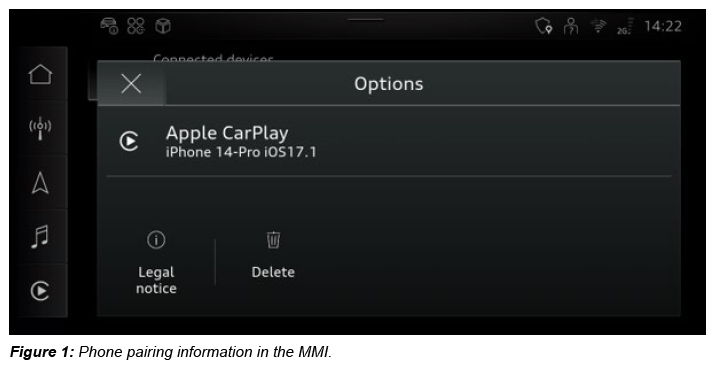
In the MMI via the connection manager, check whether the Wi-Fi hotspot name matches the Bluetooth name of the MMI (1).
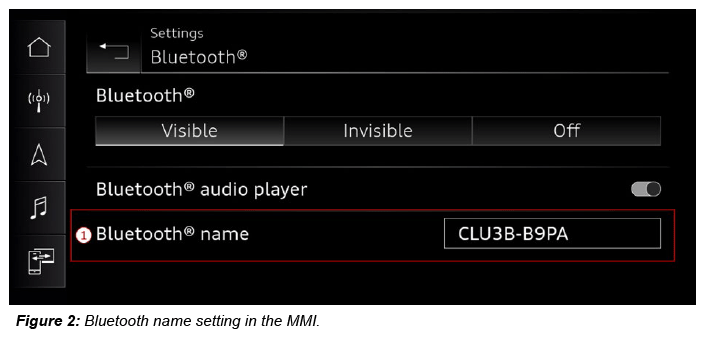
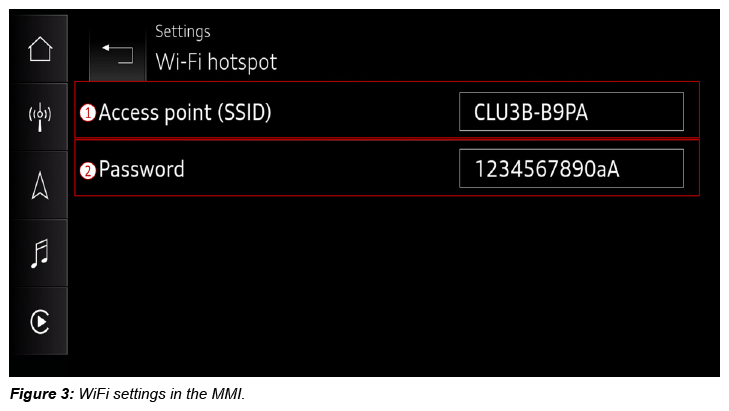
If the Bluetooth name and the SSID do not match exactly, match them up. Make sure that the name is unique (e.g., Do not just use 'AUDI'). A password must also be set for the WiFi hotspot (2).
On the phone:
Delete BOTH (2.4GHz and 5GHz) vehicle Wi-Fi hotspots from the phone under Settings>Wi-Fi>Edit (top right)>remove vehicle hotspots from the list of known networks.
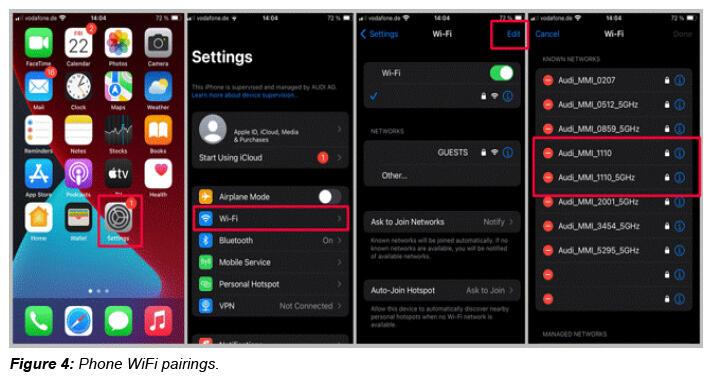
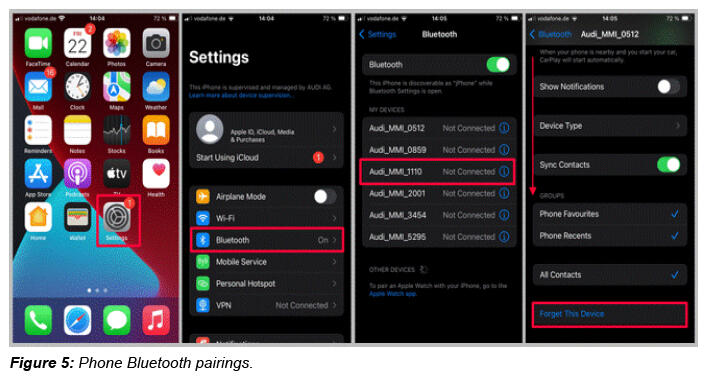
Delete the vehicle Bluetooth pairing under Settings>Bluetooth>blue "i" next to the device>select "Forget this device" .
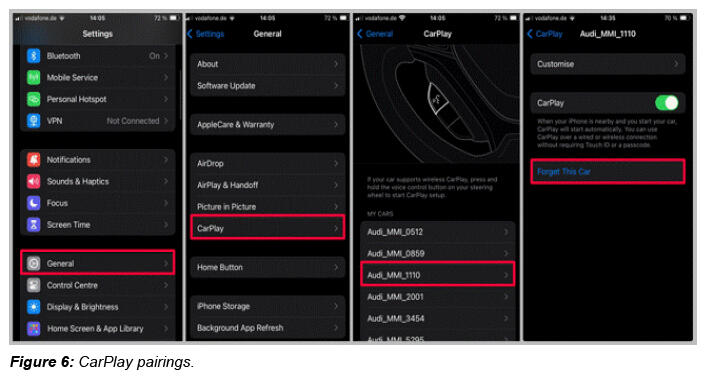
Delete the vehicle CarPlay settings under Settings>General>CarPlay>select the vehicle>select "Forget this car ".
Check carefully that all steps above have been performed. Then re-pair the phone to the vehicle via the ASI tile in the MMI.
It can also be helpful to reset the network settings after an IOS update or when switching to a new iPhone and transferring the data from the old device.
Settings>>General>>Transfer or Reset iPhone>>Reset>>Reset Network Settings
Check all the steps above carefully. Then set up CarPlay again for the iPhone in the vehicle.
WARRANTY
| Claim Type: |
|
||
| Service Number: | 9109 | ||
| Damage Code: | AD39 | ||
| Labor Operations: | Check display and operating unit | 9196 0199 | 20 TU |
| GFF | No allowance | 0 TU | |
| Claim Comment: | As per TSB 2073582/2 | ||
All warranty claims submitted for payment must be in accordance with the Audi Warranty Policies and Procedures Manual . Claims are subject to review or audit by Audi Warranty.
ADDITIONAL INFORMATION
All part and service references provided in this TSB (2073582 ) are subject to change and/or removal. Always check with your Parts Department and/or ETKA for the latest information and parts bulletins. Please check the Repair Manual for fasteners, bolts, nuts, and screws that require replacement during the repair.
©2025 Audi of America, Inc. All rights reserved. The information contained in this document is based on the latest information available at the time of printing and is subject to the copyright and other intellectual property rights of Audi of America, Inc., its affiliated companies, and its licensors. All rights are reserved to make changes at any time without notice. No part of this document may be reproduced, stored in a retrieval system, or transmitted in any form or by any means, electronic, mechanical, photocopying, recording, or otherwise, nor may these materials be modified or reposted to other sites, without the prior expressed written permission of the publisher.