91 MIB3: MMI Sidebar Missing (GROUP 91, NO. 25-42)
Reference number: GROUP 91, NO. 25-42
Supersedes refnos: 2071928/2, GROUP 91, NO. 23-40
91 MIB3: MMI SIDEBAR MISSING
TECHNICAL SERVICE BULLETIN
| AUDI: | 2021 A8 e quattro; 2021-2022 A4, A4 allroad, S4, A5, A5 Cabriolet, A5 Sportback, S5, S5 Sportback, RS 5, RS 5 Sportback, A6, A6 allroad, S6, RS 6 Avant, A7, A7 e quattro, S7, RS 7, A8, S8, e-tron, e-tron Sportback, Q5, Q5 e quattro, Q5 Sportback, SQ5, SQ5 Sportback, Q7, SQ7, Q8, SQ8, and RS Q8; 2022 A3, S3, RS 3, e-tron GT, RS e-tron GT, Q3, Q4 e-tron, and Q4 Sportback e-tron |
| GROUP: | 91 - Radio, Telephone, Board Computer, Multi-Function Indicator (MFI) |
SERVICE INFORMATION
91 25 42 2071928/2 April 14, 2025. Supersedes Technical Service Bulletin Group 91 number 23-40 dated October 30, 2023, for reasons listed below.
| Model(s) | Year | VIN Range | Vehicle-Specific Equipment |
|---|---|---|---|
| A8 e quattro | 2021 | All | Not Applicable |
| A4, A4 allroad, S4, A5, A5 Cabriolet, A5 Sportback, S5, S5 Sportback, RS 5, RS 5 Sportback, A6, A6 allroad, S6, RS 6 Avant, A7, A7 e quattro, S7, RS 7, A8, S8, e-tron, e-tron Sportback, Q5, Q5 e quattro, Q5 Sportback, SQ5, SQ5 Sportback, Q7, SQ7, Q8, SQ8, and RS Q8 | 2021 - 2022 | ||
| A3, S3, RS 3, e-tron GT, RS e-tron GT, Q3, Q4 e-tron, and Q4 Sportback e-tron | 2022 |
CONDITION
| Revision | Date | Purpose |
|---|---|---|
| 2 | - | Revised header (Added PR codes) |
| 1 | 10/30/2023 | Initial publication |
Customer states:
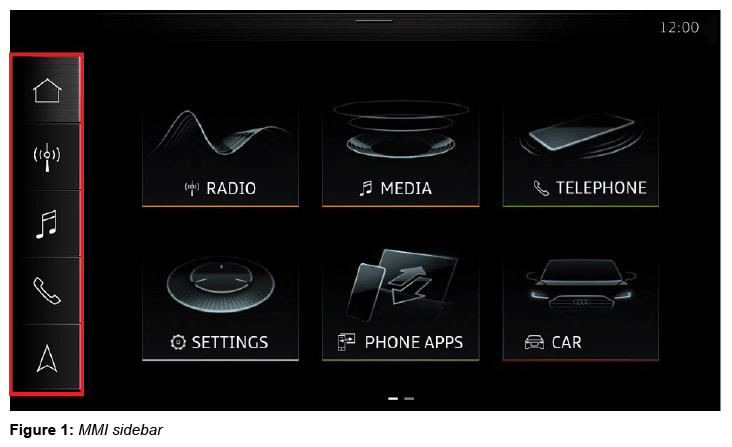
The sidebar in the MMI (see Figure 1 ) is permanently missing.
The MMI starts directly into the settings menu, making it impossible to use the infotainment system as intended.
TECHNICAL BACKGROUND 1
A software related issue may cause the sidebar to disappear.
PRODUCTION SOLUTION
New information electronics software for MY23.
SERVICE
Required equipment:
MIB3 script on USB flash drive (see Required Parts and Tools or download the software from MirrorServer using the SD Creator Program).
| Step | Action |
|---|---|
| 1. | Turn on the ignition. |
| 2. | Wait approximately 5 minutes (to ensure the MIB has started fully). |
| 3. | Insert the USB stick into the USB port on the affected vehicle. |
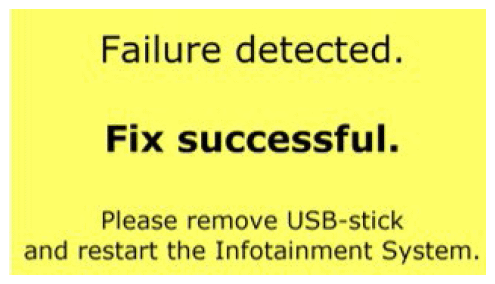
| 4. | Wait until the following message is displayed: |
| 5. | Turn off the ignition and lock the doors. |
| 6. | Wait approximately 5 minutes (ensure that the vehicle enters sleep mode). |
| 7. | Unlock the vehicle doors again. |
| 8. | Remove the USB stick from the USB port. |
| 9. | Turn on the ignition. |
| 10. | Wait approximately 5 minutes (to ensure the MIB has started fully). |
| 11. | Re-insert the USB stick into the USB port on the affected vehicle. |
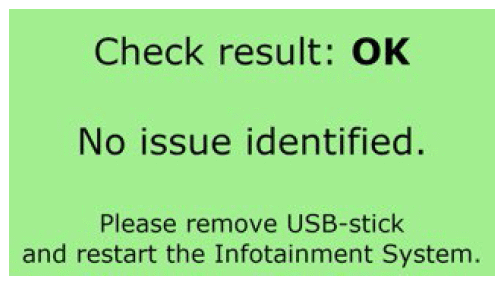
| 12. | Check if the following message is displayed to ensure that no software issues are detected: |
| 13. | Remove the USB stick from the USB port. |
Feedback documentation for this procedure via SVM code is not necessary.
WARRANTY
| Claim Type: |
|
||
| Service Number: | 9196 | ||
| Damage Code: | 0039 | ||
| Labor Operations: | Program display and operating unit | 9196 2599 | 30 TU |
| Check vehicle (bus sleep mode) | 0689 0199 | 10 TU | |
| Claim Comment: | As per TSB 2071928/2 | ||
All warranty claims submitted for payment must be in accordance with the Audi Warranty Policies and Procedures Manual . Claims are subject to review or audit by Audi Warranty.
REQUIRED PARTS AND TOOLS
| Model | USB Flash Drive | Quantity |
|---|---|---|
| A3/A4/A5/A6/A7/A8/Q3/Q4/Q5/Q7/Q8/e-tron/e-tron GT | 8WD906961 | 01 (Shop tool) |
ADDITIONAL INFORMATION
The following Technical Service Bulletin(s) will be necessary to complete this procedure:
- TSB 2047812: 00 SD Creator: how to set up and use the SD Creator for obtaining vehicle software updates via the MirrorServer.
All part and service references provided in this TSB (2071928 ) are subject to change and/or removal. Always check with your Parts Department and/or ETKA for the latest information and parts bulletins. Please check the Repair Manual for fasteners, bolts, nuts, and screws that require replacement during the repair.
©2025 Audi of America, Inc. All rights reserved. The information contained in this document is based on the latest information available at the time of printing and is subject to the copyright and other intellectual property rights of Audi of America, Inc., its affiliated companies, and its licensors. All rights are reserved to make changes at any time without notice. No part of this document may be reproduced, stored in a retrieval system, or transmitted in any form or by any means, electronic, mechanical, photocopying, recording, or otherwise, nor may these materials be modified or reposted to other sites, without the prior expressed written permission of the publisher.