91 MIB: MMI Navigation Map Update "How-To Guide" - Potential Customer Concerns (GROUP 91, NO. 23-83)
Reference number: GROUP 91, NO. 23-83
Supersedes refnos: 2037809, 2037809/1, 2037809/10, 2037809/2, 2037809/3, 2037809/4, 2037809/5, 2037809/6, 2037809/7, 2037809/8, 2037809/9, GROUP 91, NO. 14-54, GROUP 91, NO. 16-33, GROUP 91, NO. 17-68, GROUP 91, NO. 19-23, GROUP 91, NO. 19-74, GROUP 91, NO. 20-11, GROUP 91, NO. 20-72, GROUP 91, NO. 22-89
91 MIB: MMI NAVIGATION MAP UPDATE "HOW-TO GUIDE" - POTENTIAL CUSTOMER CONCERNS
TECHNICAL SERVICE BULLETIN
| AUDI: | 2014-2024 All Audi Vehicles |
| GROUP: | 91 - Radio, Telephone, Board Computer, Multi-Function Indicator (MFI) |
SERVICE INFORMATION
91 23 83 2037809/10 March 23, 2023. Supersedes Technical Service Bulletin Group 91 number 22-89 dated March 15, 2022, for reasons listed below.
| Model(s) | Year | VIN Range | Vehicle-Specific Equipment |
|---|---|---|---|
| All Audi Vehicles | 2014 - 2024 | All | With MIB1, MIB2, MIB2+, and MIB3 |
CONDITION
| Revision | Date | Purpose |
|---|---|---|
| 10 | - | Revised Condition (Added info about traffic online) |
| 9 | 03/15/2022 | Revised Technical Background (Updated Note for myAudi customer downloads & Added OTA Strategy) |
| 8 | 03/02/2021 | Revised Service (Added Note on MIB3 NavDBs) |
The customer states one of the following concerns:
- The navigation map does not show the latest roads or points of interest.
- The map download provided by the myAudi website (www.audiusa.com/myAudi) cannot be performed.
- The customer does not know how to obtain the map update data or update the map database.
- The MMI is slow to respond or freezes during the map update.
- For vehicles with MIB2, the MMI over-the-air (OTA) map update does not allow for a full map update and shows greyed-out regions.
- The customer is concerned that the OTA map update will consume too much data from the Audi connect data subscription.
- The navigation map no longer shows online traffic flow with an active Audi connect subscription.
- The navigation no longer shows live traffic incidents with an active Audi connect subscription.
TECHNICAL BACKGROUND
The new MIB navigation system is the first system that allows the customer to update the vehicle's navigation system independently. The map update is only available in the MMI via an OTA update (as of March 2020). There is no OTA option in the MMI for the 2015-2016 Audi A3 with MIB1. Thus the map data can only be updated using the SD card method (see attachment "MIB Map Update Strategy.pdf").
Map Updates via SD Card:
For MIB1 & MIB2 vehicles, map updates are free for the first 2 1/2 years after the vehicle's production date . The vehicle is automatically activated from the factory to allow the customer to update the MMI navigation with the next five releases within the next 2 1/2 years. This means the customer can update the MMI with the same release as many times as they want. Release schedules for map updates are approximately CW22 and CW45 of each year.
The customer can update the MMI as many times as they like during the current release period. For instance, if the customer decides to perform the partial update via the Over-the-Air method in the MMI, the customer can later decide to perform the complete update using the same map data for the current release for free. This only counts as a single update since the update data is from the same release. The five updates are related to the release schedules, not the user's attempts to update the MMI.
Once the period of 2 1/2 years after the vehicle's production date has passed, map updates will no longer work in the MMI. The last available update for the customer's car will always remain available for download via the myAudi portal (after Q2 2021).
MIB1 & MIB2 Customers (not available for MIB2+ & MIB3) will be able to purchase activations via Audi accessories to allow the MMI to be updated to the latest map update. This activation will allow the current release and the forthcoming release to be available to the customer (see attachment "MIB Map Update Strategy.pdf"). Please talk to your parts department to find out which activations are available for purchase by the customer. The dealer can purchase the map data on an SD card.
Map Updates via Over-The-Air (OTA) Update:
MIB1: OTA is not available.
MIB2: OTA is available on some vehicles, starting with MY17 (excludes TT, R8, and A6/A7 C7PI). The updates are pushed out in waves to all the vehicles in the USA market. These waves occur around CW22 and CW45 of each year. As a result, some cars may have push notifications, and some may not. The navigation map activations must be valid to see the OTA notification for the released map update. Customers can select the regions they choose for updates.
MIB2+: OTA is available if the customer has an active Audi connect subscription. The updates are rolled out four times a year, starting with CW12, CW24, CW36, and CW48. Customers cannot choose the regions. They will automatically receive updates to the three nearest regions the vehicle is operated within.
MIB3: OTA is available if the customer has an active Audi connect subscription. The updates are rolled out monthly. These updates are only for the regions within which the vehicle is regularly driven. If the vehicle is driven outside the home region and the ignition is turned on/off at least eight times, the next OTA update will include this new region. Up to five separate smaller regions can be updated, and the updates are incremental.
"Incremental" means that one small regional update can include an update to only an immediate metro area and does not include updates to the remaining home State.
Tip: Map activations should always be performed before updating the map data. Doing so will ensure the navigation system is always available and the correct map data is installed. DO NOT install the map data via the red engineering menu of the MMI until AFTER the map activation is performed via ODIS >> Flash.
The customer must NEVER be charged for the map data on the SD card. The dealer should consider this as a shop tool and purchase it for the service department to use. This map data from the parts department can only be installed using the RED ENGINEERING MENU of the MMI. The customer only purchases the activation documentation to enable the map installation (see TSB 2044694: "91 MMI navigation database concerns (Missing traffic info, Incorrect speed limits, Missing streets; POI not listed, etc.)") .
| The current release schedule for map updates: | |
|---|---|
| Release Schedule | Navigation Map Release Name |
| CW22/15 | NAR 2015/2016 |
| CW45/15 | NAR 2016 |
| CW22/16 | NAR 2016/2017 |
| CW45/16 | NAR 2017 |
| CW22/17 | NAR 2017/2018 |
| CW45/17 | NAR 2018 |
| CW22/18 | NAR 2018/2019 |
| CW45/18 | NAR 2019 |
| CW22/19 | NAR 2019/2020 |
| CW45/19 | NAR 2020 |
| CW22/20 | NAR 2020/2021 |
| CW45/20 | NAR 2021 |
| CW22/21 | NAR 2021/2022 |
| CW45/21 | NAR 2022 |
| CW22/22 | NAR 2022/2023 |
| CW45/22 | NAR 2023 |
For MIB2 infotainment systems (see attachment "MIB Map Update Strategy.pdf"):
- Over-the-air navigation map updates can be checked manually in the MMI system. Audi has designed the OTA system to track the data used separately from the data used in the customer's existing Audi connect subscription.
- For the model year 2016 A6 and A7 Product Improvement vehicles with MIB2 Navigation, the update can be accessed in the MMI by going to Menu >> Setup MMI >> System Update >> Online Update.
- For all other vehicles with MIB2 Navigation, the update can be accessed in two different areas of the MMI:
- Menu >> Audi Connect >> Online map update >> Start map update now >> Online update .
- Menu >> Settings >> Left Option >> System maintenance >> System update >> Online update .
- The customer will not be billed for the data used when performing the OTA map update, but the customer must have an active Audi connect subscription to use the OTA map update feature in the MMI.
- The OTA update for MIB2 is designed only to allow a limited number of regions to be updated in the vehicle. To perform a complete NAR (North American Region) update, the dealer will always need to download the complete data using a computer. The complete NAR map update may also be available through the service SD card for certain updates. This SD card can be ordered with the part number listed in ETKA for the North American Region (NAR). No SVM activation is required because the MMI is already pre-activated for 2 1/2 years, or five consecutive updates, from the vehicle's production date. After this period (even if no updates were performed), an SVM activation will be required to update the Navigation database. The customer will need to purchase the activation documentation.
For MIB2+ & MIB3 infotainment systems (see attachment "MIB Map Update Strategy.pdf"):
- Over-the-air navigation map updates cannot be manually triggered in the MMI system. Audi has designed the OTA system to track the data used separately from the data used in the customer's existing Audi connect subscription.
- The "manual" software update via SD card can be accessed in the MMI using the following path:
- Menu >> Settings >> System maintenance >> Software update .
- The customer will not be billed for the data used when performing the OTA map update, but the customer must have an active Audi connect subscription to use the OTA map update feature in the MMI.
- The OTA update for MIB2+ and MIB3 systems is designed to automatically choose the regions to be updated based on the customer's regular driving areas. Thus, the customer cannot manually choose the updated regions. To perform a complete NAR (North American Region) update for MIB2+ (Not yet possible for MIB3), the dealer will need to order the NAR map update on the SD card. This SD card can be ordered with the part number listed in ETKA for the North American Region (NAR). No SVM activation is required because the MMI is already pre-activated for five years for MIB2+ (10 years for MIB3). This is based on the vehicle's production date. After this period (even if no updates were performed), an SVM activation will be required to update the Navigation database (currently unavailable for purchase for MIB2+/MIB3). The customer will need to purchase the activation documentation once it is made available by Audi of America.
For all MIB infotainment systems, map updates via the myAudi website were retired as of March 2020:
- Dealers may order the SD card by finding the appropriate part number in ETKA. If TAC is involved, then to download the full map update using the link they provided, the dealer must have an SD card that indicates it has at least 16GB of usable space when viewed within the PC file system. The full update is typically 14GB - 16GB in size. An SD card larger than 16GB will most likely be required. For MIB3 map updates, a 32GB card may be required.
Tip: A blank 16GB SD card may contain slightly less than 16GB of usable space. Thus, a larger SD card may be needed for a full map update.
- The SD card must be formatted to FAT/FAT32/exFAT. Mac-formatted SD cards will not work in the MMI MIB main unit. SD card types are:
- 4GB and less: SD (FAT/FAT32).
- 4GB/8GB/16GB: SDHC (FAT/FAT32).
- 16GB/32GB/64GB and higher: SDXC (exFAT only; will work with MIB but not with MMI3G+).
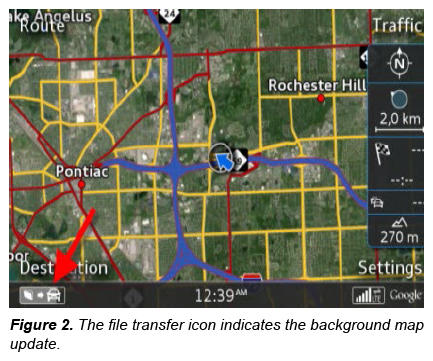
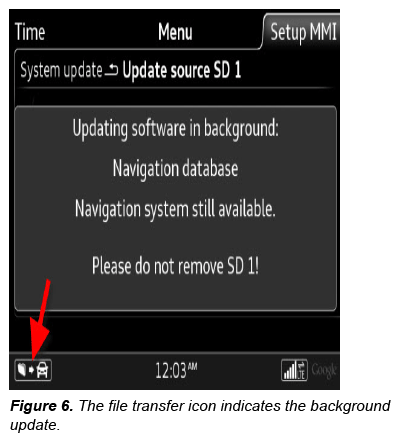
During the map update process, the performance of the MMI system may be slow, with lagging or freezing during screen transitions or after a selection is made. These performance limitations should only occur during the map update, and no repairs should be made to correct them. A file transfer icon appears when the map update runs in the background (Figure 2).
PRODUCTION SOLUTION
Not Applicable
SERVICE
Tip: Map activations should always be performed before updating the map data. Doing so will ensure the navigation system is always available and the correct map data is installed. DO NOT install the map data via the red engineering menu of the MMI until AFTER the map activation is performed via ODIS >> Flash.
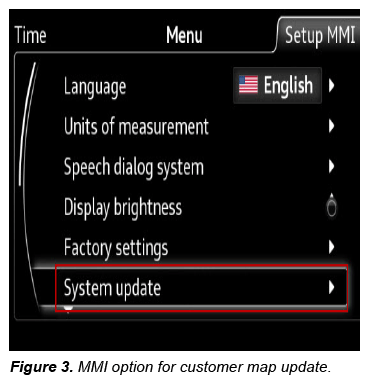
- Using the downloaded map update on the SD card, insert it into the MMI main unit. Once the SD card is inserted, the customer must initiate the MMI's download function (Figure 3). If the map data is an SD Card purchased from the parts department, this update must be performed using the RED ENGINEERING MENU.
For A3/A6/A7:
MENU >> Setup MMI >> System Update.
For TT3/R8NF/Q7NF/B9 A4:
MENU >> Settings >> Left Option >> System maintenance > >System update.
The update does not start automatically when the SD card is inserted.
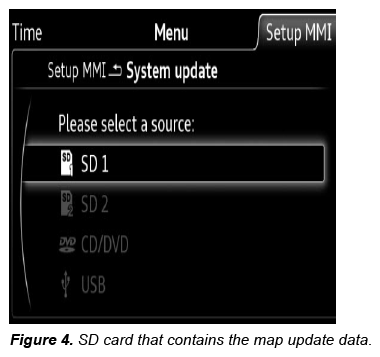
- If the data is downloaded to the SD card correctly, the SD card will be highlighted in white (Figure 4). If there is no SD card highlighted, ask the customer to troubleshoot the issue (check the formatting and verify that all the data is in the media's root directory).
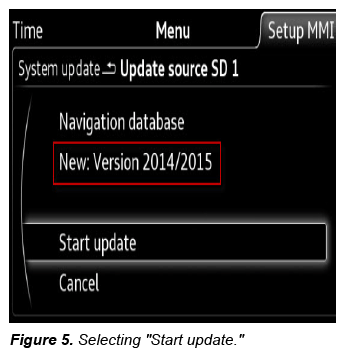
- The new version of the map data will be indicated on the MMI screen. Selecting "Start update" begins the update (Figure 5).
The MMI will automatically perform the update in the background, indicated by the file transfer icon on the lower left-hand side of the MMI screen (Figure 6).
Tell the customer that the vehicle can be shut off during the update process, but the SD card (or other update media) should never be removed from the MMI main unit. If the vehicle is turned off during the update process, the MMI will continue to update in the background for approximately 30 minutes. The update will automatically begin again on the next ignition cycle. The complete process can take about 60-90 minutes with an SD card. If the customer chooses to use a DVD or a USB drive via AMI, the update may take considerably longer.
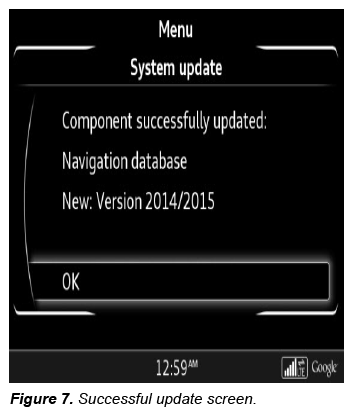
- After the update is complete, the icon on the lower left-hand side of the MMI screen will disappear. Additionally, a confirmation can be seen in the MMI system update screen (Figure 7).
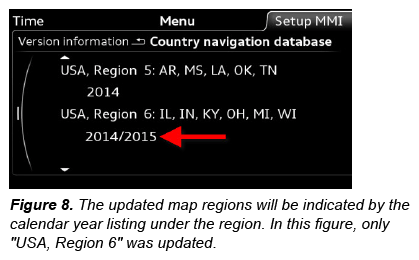
- The update can be verified under the MMI Version Information screen (Figure 8).
For A3/A6/A7:
MENU >> Setup MMI >> Version Information
For TT3/R8NF/Q7NF/B9 A4:
MENU >> Settings >> Left Option >> System maintenance >> Version Information
The MMI system will allow the same map data to be overwritten at any time. This means that if the customer puts the same SD card with the same map data into the main unit after a completed map update, the MMI will still indicate that a map update is available. This does not directly indicate the map update was incomplete; the customer must review the "Version Information" data and verify that the latest calendar year listing is shown under each region (Figure 8).
WARRANTY
This TSB is informational only and not applicable to any Audi warranty.
ADDITIONAL INFORMATION
The following Technical Service Bulletin(s) will be necessary to complete this procedure:
- TSB 2044694: 91 MMI navigation database concerns (Missing traffic info, Incorrect speed limits, Missing streets; POI not listed, etc.).
All part and service references provided in this TSB (2037809 ) are subject to change and/or removal. Always check with your Parts Department and/or ETKA for the latest information and parts bulletins. Please check the Repair Manual for fasteners, bolts, nuts, and screws that require replacement during the repair.
©2023 Audi of America, Inc. All rights reserved. The information contained in this document is based on the latest information available at the time of printing and is subject to the copyright and other intellectual property rights of Audi of America, Inc., its affiliated companies, and its licensors. All rights are reserved to make changes at any time without notice. No part of this document may be reproduced, stored in a retrieval system, or transmitted in any form or by any means, electronic, mechanical, photocopying, recording, or otherwise, nor may these materials be modified or reposted to other sites, without the prior expressed written permission of the publisher.