Front A/C Display Control Head -E87-, Removing And Installing, A4 And A5: Removing
-- Switch off the ignition.
-- Remove the right instrument panel trim -A- with the Front A/C Display Control Head -E87- -B- from the instrument panel. Refer to OVERVIEW - INSTRUMENT PANEL .
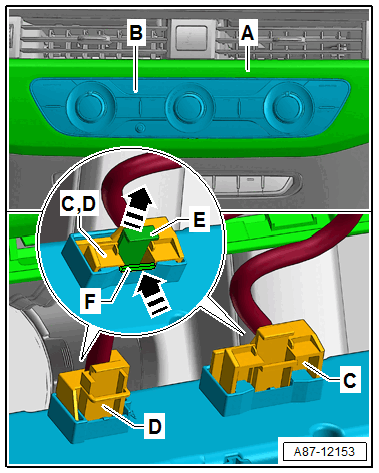
-- If multiple identical in construction connectors are installed in this area, mark the connectors -C- and -D-.
TIP
- Depending on the versions of connectors -C- and -D- on the Front A/C Display Control Head -E87- this illustration shows the layout on a "Low" A/C system.
-- Loosen the locking mechanism -E- from the connectors -C- and -D- by pulling -arrow-.
-- Loosen the catch of the connectors -C- and -D- by pressing -arrow- and remove the connector.
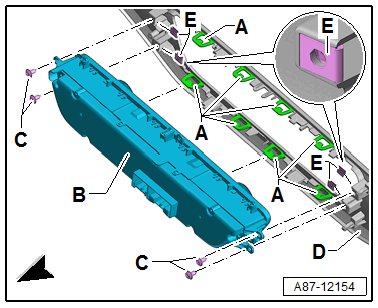
-- If equipped remove the bolts -C-.
TIP
- Depending on the version (and in the case that the tabs -A- do not hold properly) the Front A/C Display Control Head -E87- -B- can also be secured with bolts -C- and the spring nuts -E- on the trim -D-. Refer to the Parts Information.
-- Release the tabs -A- and loosen the Front A/C Display Control Head -E87- -B- from the trim -D-.