Maintenance Service Reminder Reset - Procedure 04
To display remaining distance to service, with ignition on, press button (marked with wrench symbol) on right side of instrument cluster. A function test can be performed with the engine idling or when vehicle speed has reached at least 3 MPH. If there is a priority 1 malfunction (Red symbol), distance remaining will not display. Distance remaining will be updated every 310 miles.
On a new vehicles or immediately after a service has been performed, a "SERVICE IN ---- MI (KM) --- DAYS" message will be displayed for the first 310 miles. As soon as less than 1200 miles of driving are left before the next service is due, a "SERVICE IN 1, 200 MI (2, 000 KM) --- DAYS" message will be displayed when ignition switch is turned to ON position. The display will return to normal after 5 seconds. If service is due immediately, a "SERVICE!" message will be displayed when ignition switch is turned to ON position. Display will return to normal after 5 seconds. To reset interval display after performing required service, perform the following:
- Turn ignition off.
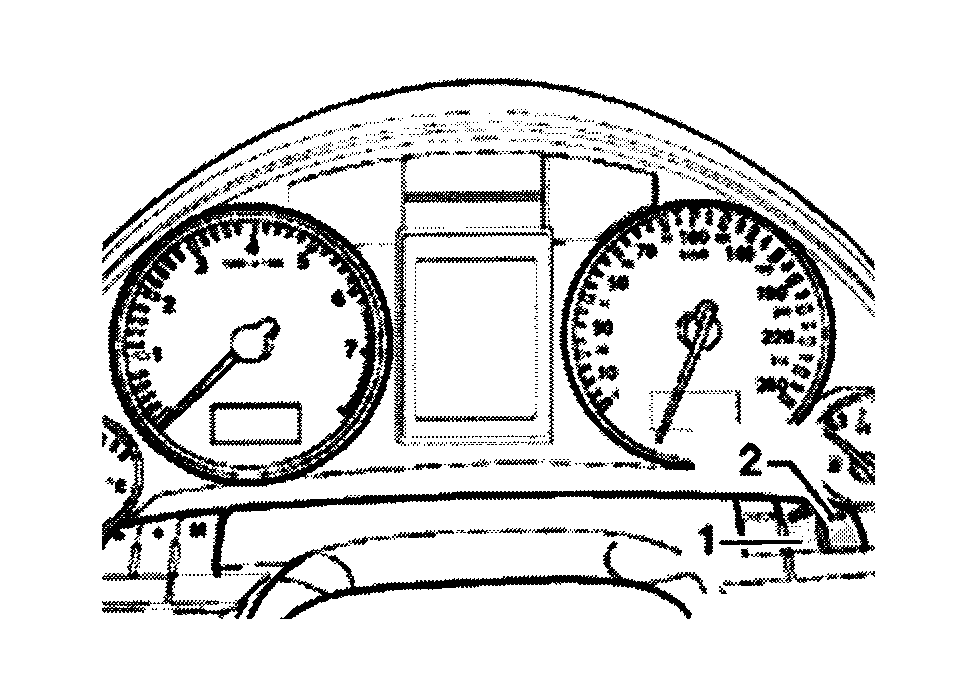
- Press button (1) on right side of instrument cluster and turn ignition switch to ON position. See Fig 1. Either "SERVICE IN ---- MI (KM)" or "SERVICE!" message will be displayed.
- Press reset button (2) on right side of instrument cluster until the following message "SERVICE IN ---- MILES --- DAYS" and "SERVICE!" is displayed. Display will return to normal after 5 seconds.