TPMS Reminder Reset - Procedure 03
NOTE:
In order for the tire pressure monitoring system to work, the specified pressures (provided on tire pressure label located on driver's side door pillar) must be reprogrammed after every change in air pressure or after every wheel change.
- Turn ignition switch to ON position.
- Press the MENU button to open the start menu.
- Move the selection arrow to "SET" by rotating the turn/push knob.
- Press the turn/push knob. The settings menu will appear.
- Move the selection arrow to "TIRE PRESSURE" by rotating the turn/push knob.
- Press the turn/push knob. The sub-menu TIRE PRESSURE will appear.
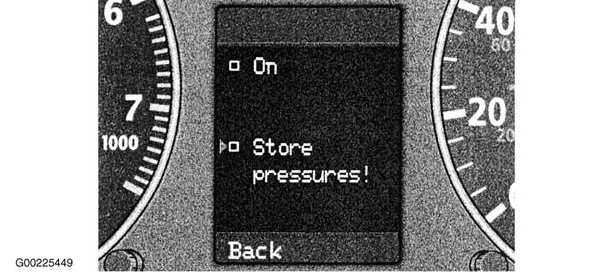
- Move the selection arrow to "STORE PRESSURES!". See Fig 1. When this is initiated, the system automatically starts the learning procedure.NOTE: The learning procedure is launched by storing the air pressures. It takes several minutes while you are driving. The system will learn the tire pressures set on the vehicle, and will check to see if any tires were changed. During the learning phase, the system is operable, but will only issue a warning when the pressure in one or more tires (including the spare) deviates from the specified pressure by more than 6 psi (41 kPa). If this occurs, the Red tire warning symbol and "CHECK TIRE PRESSURE" message will appear.NOTE: If a tire symbol with a slash through it appears in the display at the end of a learning phase, it means that the system cannot recognize which wheels are mounted on the vehicle. This may be because one or more wheels were mounted lacking a wheel sensor.NOTE: During the learning phase, if the system determines that there is a difference of more than 6 psi (41 kPa) between the air pressures on one axle, a message will be displayed showing both affected wheels.
- Press the turn/push knob. A check mark will appear. The system reports that the store request was saved with "THE CURRENT TIRE PRESSURES WILL BE SAVED".
- Move the selection arrow to "BACK".
- Press the turn/push knob to leave the tire pressure menu.