Auxiliary Battery -A1-, REMOVING AND INSTALLING, (VH0 + 0K4): Installing
Install in reverse order of removal and Note The Following :
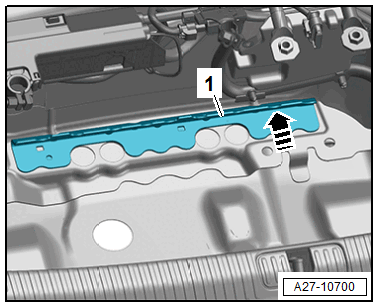
-- Push the protective housing with the Auxiliary Battery -A1- on the stop on the retaining bracket -1- in direction of -arrow- so that the baseboard engages in the retaining bracket.
- The protective housing must not be able to move anymore.
-- Check the protective housing for secure fit after installation.
-- If the Auxiliary Battery -A1- was replaced, a new Auxiliary Battery -A1- must be adapted.
Procedure
-- Connect the Vehicle Diagnostic Tester.
-- Select the Diagnostic mode and start the diagnosis.
-- Select the Test plan tab.
-- Select the Select individual test button and select the following tree structure consecutively:
- Diagnostic-capable systems
- 0080 - Battery regulation, auxiliary storage 1 -A1 (12V Li-Ion)
- 0080 - Battery regulation, auxiliary storage 1 (12V Li-Ion), functions
- 0080 - Control module, Replacing, A1 - Auxiliary Battery
-- Start the selected program and follow the instructions on the Vehicle Diagnostic Tester display.