FIBER-OPTIC CABLE, PREPARING WITH THE Fiber-Optic Conductor Repair Set :VAS6223A
Special tools and workshop equipment required
- Fiber Optic Repair Set :VAS6223B
- Hose Cutting Pliers :VAS6228
Do not bend the fiber-optic cable too much. The bending radius must be no less than 25 mm.
Fiber optic cables must not be routed over sharp edges.
The fiber-optic cable must not be dirty or touched with bare fingers.
Fiber optic cables may not be heated.
It is not permitted to twist together 2 fiber optic cables or one fiber optic cable with a copper wire.
Protect the connector and the connection box from dust. Place the cap on the trunk.
Checking Remaining Cut Indicator
 Courtesy of AUDI OF AMERICA, LLC
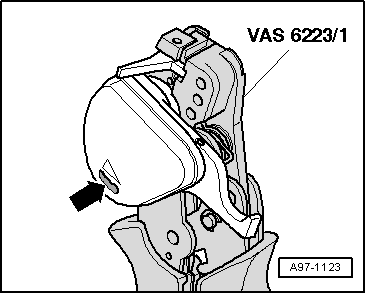
-- Start by checking remaining cut indicator:
- The :VAS6223/1 cutting device can perform approximately 1260 cuts. The blade is rotated for each further cut.
- The remaining cut indicator -arrow - displays the last 150 cuts available.
- Once no further cuts are available, the blade is blocked. It must be replaced. Refer to the Operating Instructions that come with :VAS6223/1 .
:VAS6223/1 Preparing
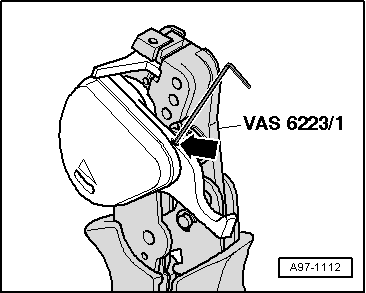
-- Release the transport safety device on the cutter by loosening the bolt -arrow-.
Fiber Optic Cable, Cutting to Length
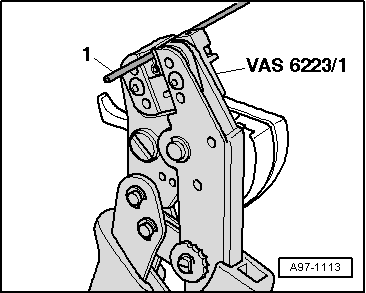
-- Establish length of fiber optic cable required.
-- Open :VAS6223/1 and insert fiber-optic cable -1- into trimming station.
-- Close cutting tool to cut fiber optic cable to length.
Stripping
 Courtesy of AUDI OF AMERICA, LLC
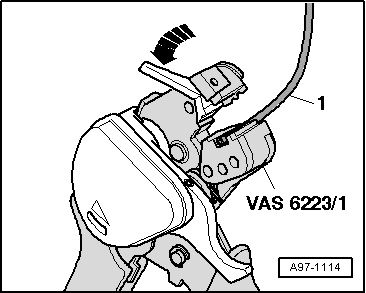
-- Open the :VAS6223/1 .
- Stripping lever must be in lower position -arrow-.
-- Place the fiber optic cable -1- in the stripping point.
- The end of the fiber-optic cable must be flush with the rear side of the cutting pliers.
-- Close :VAS6223/1 until stop and keep closed.
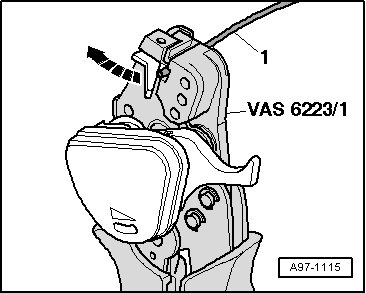 Courtesy of AUDI OF AMERICA, LLC
-- Lift the stripping lever -arrow- upward.
-- Open the cutting tool and take out the fiber-optic cable -1-.
-- Detach the separated section of the insulation from the fiber-optic cable.
Precision Cutting (production of optical end face)
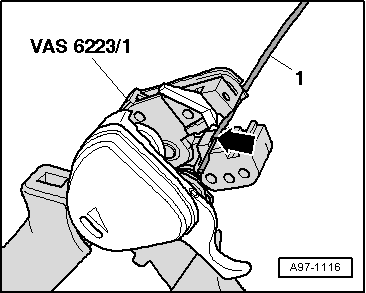
-- Slide the fiber-optic cable -1- into the cutting station.
- The insulation must make contact with the cutting point stop -arrow-.
-- Close the :VAS6223/1 .
-- Press the cutting unit down -arrow-.
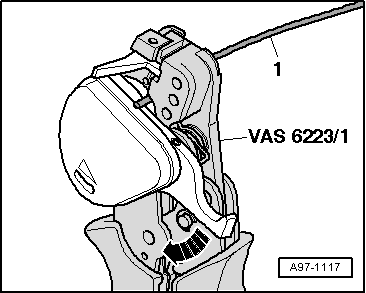
-- Open :VAS6223/1 and remove fiber-optic cable -1-.
The fiber-optic cable should only be placed on a completely clean surface.
Transport Protection, Activating
-- Close the :VAS6223/1 .
-- Tighten the hex socket bolt -arrow- for the transport safety device on the cutter.
Attaching Brass Pin Contact to Fiber-Optic Cable
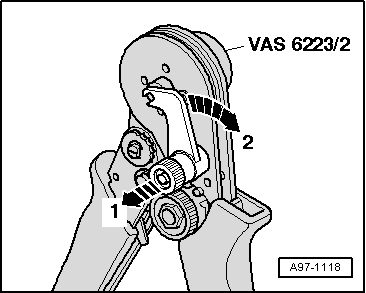 Courtesy of AUDI OF AMERICA, LLC
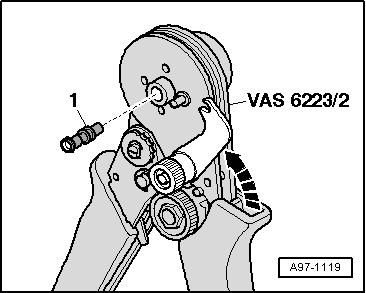
-- Open securing lever on :VAS6223/2 in direction of -arrows 1 and 2-.
-- Insert brass pin contact -1- in the mount.
 Courtesy of AUDI OF AMERICA, LLC
-- Close the safety lever on the :VAS6223/2 -arrow-.
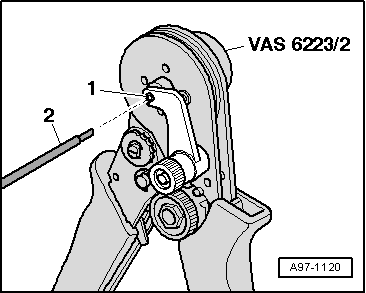
-- Slide the fiber optic cable -2- into the brass pin contact -1- as far as spring-loaded stop.
 Courtesy of AUDI OF AMERICA, LLC
-- Slide fiber-optic cable further in up to fixed stop and close :VAS6223/2 .
-- Open the crimping pliers for fiber-optic cable and remove the fiber-optic cable with the brass pin contact.
Do not bend the fiber-optic cable too much. The bending radius must be no less than 25 mm.
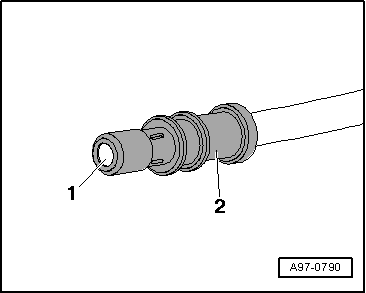
-- Make sure the brass pin contact -2- is secured correctly on the fiber-optic cable -1-.
 Courtesy of AUDI OF AMERICA, LLC
- Four crimp points must be visible at the brass connection pin.
- The brass pin contact must not be able to be removed by hand from the fiber-optic cable.
- The front surface of the fiber-optic cable is 0.01 to 0.1 mm behind the brass pin contact (visual check).
Connector couplings are available for connecting the fiber-optic cables.
For installing the new fiber optic cable in the wiring harness connector. Refer to FIBER-OPTIC CABLE, DISCONNECTING FROM WIRING HARNESS CONNECTOR .
Corrugated Tube, Install on Fiber Optic Cable.
 Courtesy of AUDI OF AMERICA, LLC
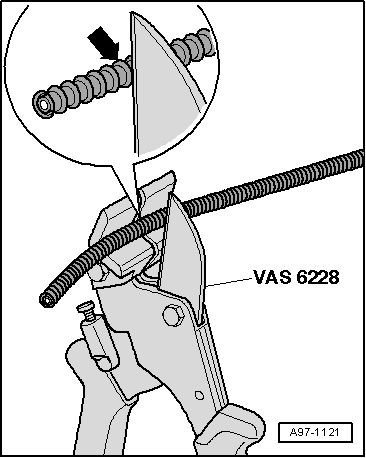
-- Cut the corrugated tube to the appropriate length.
- Use the :VAS6228 or a sharp knife for cutting.
- The corrugated tube must not be cut through using a side cutter under any circumstances
- The corrugated tube must be cut on the wave peak -arrow-, not in the wave trough.
-- Guide fiber-optic cable into :VAS6223/10 as shown in illustration.
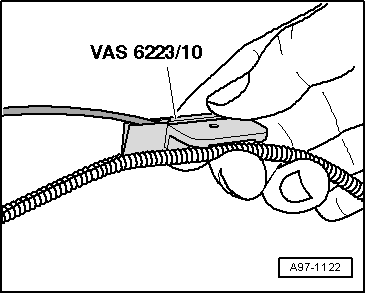 Courtesy of AUDI OF AMERICA, LLC
-- Position the crimping pliers for fiber-optic cable at the slot on the corrugated tube.
-- Slide the crimping pliers for fiber-optic cable along the slot on the circumference of the corrugated tube. The fiber optic cable is then routed in the corrugated tube.
Special tools and workshop equipment required
- Fiber-Optic Conductor Repair Set :VAS6223A
- Hose Cutting Pliers :VAS6228
- Vehicle Diagnostic Tester
Do not bend the fiber-optic cable too much. The bending radius must be no less than 25 mm.
Fiber optic cables must not be routed over sharp edges.
The fiber-optic cable must not be dirty or touched with bare fingers.
Fiber optic cables may not be heated.
It is not permitted to twist together 2 fiber optic cables or one fiber optic cable with a copper wire.
Protect the connector and the connection box from dust. Place the cap on the trunk.
Mount Tool Head for the :VAS6223/1 .
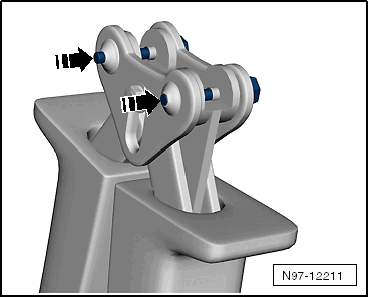
-- Remove the locking pin -arrows-.
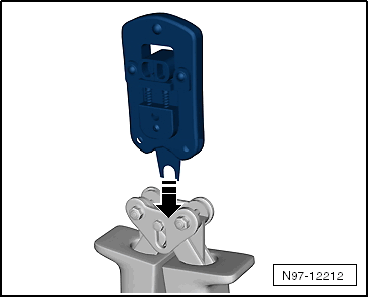
-- Remove the tool set -arrow- and pull the locking pin back.
Fiber Optic Cable, Cutting to Length
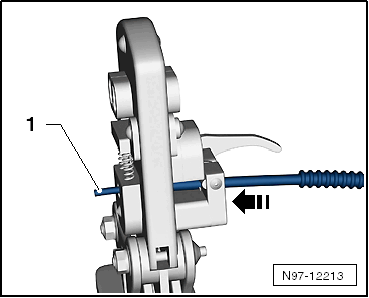
-- Establish length of fiber optic cable required.
-- Open the :VAS6223/1 and lay the fiber-optic cable -1- in the mount.
-- Close the :VAS6223/1 to cut the fiber-optic cable lengths.
Stripping
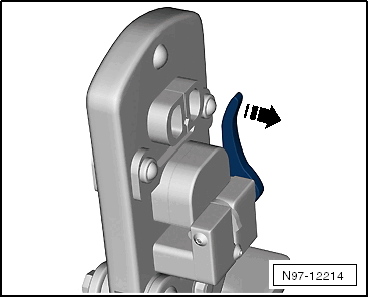
-- Open the :VAS6223/1 .
-- Position the wire stripper in the lower position -arrow-.
-- Insert fiber-optic cable into the stripping station.
- The end of the fiber-optic cable must be flush with the rear side of the cutting pliers.
-- Close the :VAS6223/1 until the stop and keep closed.
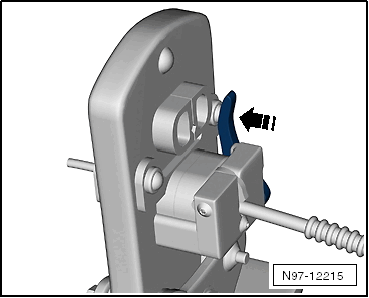
-- Bend the wire stripper upward -arrow- and remove the fiber-optic cable.
Precision Cutting (production of optical end face).
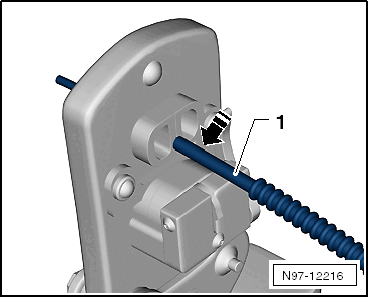 Courtesy of AUDI OF AMERICA, LLC
-- Push the fiber-optic cable -1- into the cutting station.
- Insulation must make contact with cutting point stop.
-- Close the :VAS6223/1 and remove the wire.
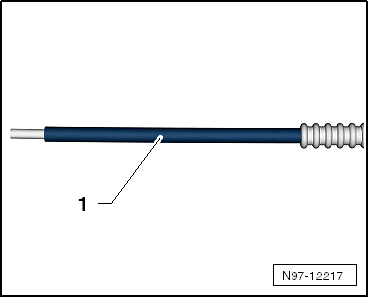
-- Visually inspect the wire -1- to make sure that it was cut correctly and that there are no burrs on the front surface.
Fiber-optic cable is only to be placed on an absolutely clean surface or held in hand.
Use the cap if there is a risk of the fiber-optic cable surface becoming dirty.
Attaching Brass Pin Contact to Fiber-Optic Cable.
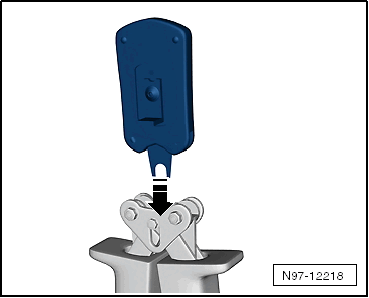
-- Change tool head -arrow-.
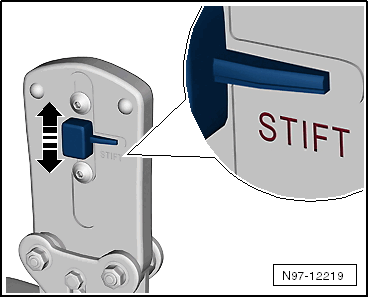
-- Slide the safeguard on the :VAS6223/1 -arrow- so that the word "Stift" (pin) is legible.
-- Insert a brass pin contact -1- in the mount.
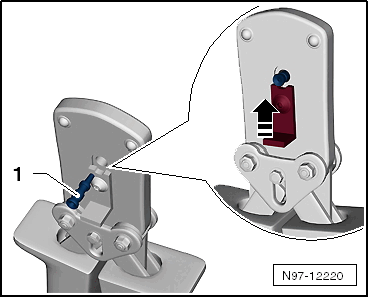
-- Close the securing lever on the :VAS6223/1 -arrow-.
-- Insert the fiber-optic cable into the brass pin contact -arrow- all the way up to the threaded stop and then close the :VAS6223/1 .
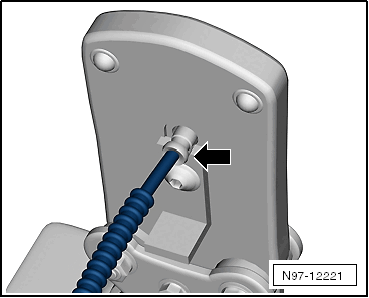
-- Open the fiber-optic cable pliers and remove the fiber-optic cable along with the brass contact pin.
Do not excessively bend or kink the fiber-optic cables (minimum bending radius 25 mm).
-- Make sure the brass pin contact -2- is secured properly on the fiber-optic cable -1-.
Courtesy of AUDI OF AMERICA, LLC- 4 crimped points must be visible on the brass connecting pin.
- The brass pin contact must not be able to be removed by hand from fiber-optic cable.
- The front surface of the fiber-optic cable is 0.01 to 0.1 mm behind the brass pin contact (visual check).
Connector couplings are available for connecting the fiber-optic cables.
To install the new fiber optic cable in wiring harness connector. Refer to FIBER-OPTIC CABLE, DISCONNECTING FROM WIRING HARNESS CONNECTOR .
Corrugated Tube, Install On Fiber Optic Cable
Courtesy of AUDI OF AMERICA, LLC-- Cut corrugated tube to appropriate length.
- Use the :VAS6228 or a sharp knife for cutting.
- The corrugated tube must not be cut through using a side cutter under any circumstances
- The corrugated tube must be cut on the wave peak -arrow-, not in the wave trough.
- The corrugated tube must audibly engage in the fiber-optic cable housing when installing.
-- Guide the fiber-optic cable into the :VAS6223/10 as shown.
Courtesy of AUDI OF AMERICA, LLC-- Position corrugated tube assembly pliers on slot on the tube.
-- Position crimping pliers for fiber-optic cable at slot of corrugated tube. The fiber optic cable is then routed in the corrugated tube.