Mounting Bracket, Removing And Installing: Removing
-- Remove the instrument panel cover. Refer to DRIVER SIDE INSTRUMENT PANEL COVER, REMOVING AND INSTALLING .
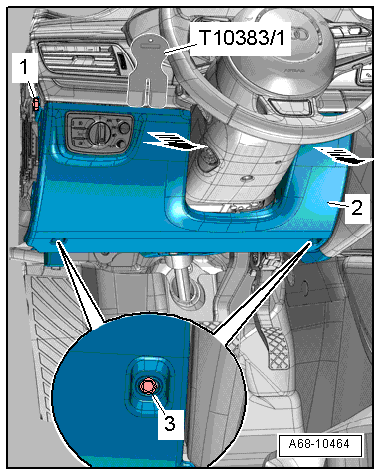
-- Remove the footwell vent. Refer to DRIVER SIDE FOOTWELL VENT, REMOVING AND INSTALLING .
-- Disconnect the brake pedal from the brake booster. Refer to BRAKE PEDAL, DISCONNECTING FROM BRAKE BOOSTER .
-- Remove the steering column. Refer to STEERING COLUMN, REMOVING AND INSTALLING .
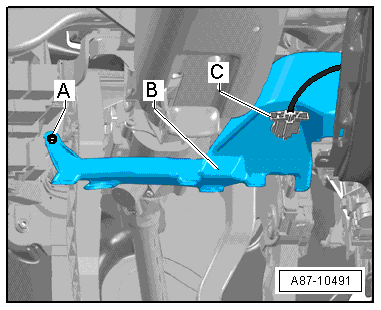
-- Disconnect the connector -C- to the accelerator pedal module and free up the wire.
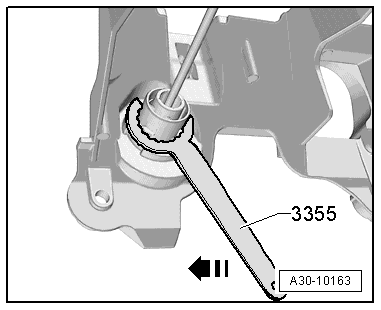
-- Release the clutch master cylinder using the :3355 , and turn the tool clockwise -arrow-.
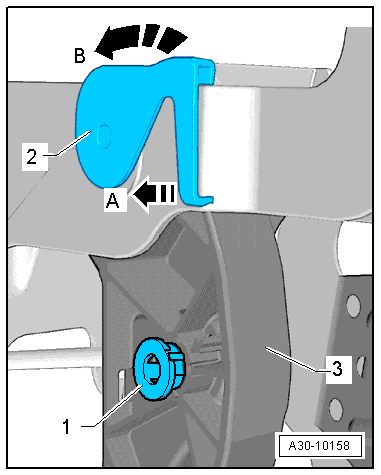
-- Remove the mounting pin for the clutch master cylinder -1-.
-- Remove the plenum chamber cover. Refer to PLENUM CHAMBER COVER, REMOVING AND INSTALLING .
-- Remove the bolts -arrows-.
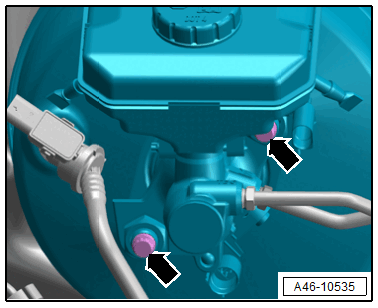
Make sure that no brake lines are bent or damaged.
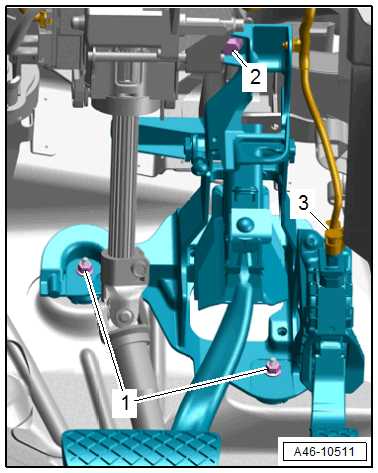
-- Remove the nuts -1- and bolt -2-.
-- Remove the mounting bracket from the vehicle.
-- Remove the brake pedal. Refer to BRAKE PEDAL, REMOVING AND INSTALLING, VEHICLES WITH MANUAL TRANSMISSION .
-- Remove the over-center spring -2-. Refer to the appropriate service information.
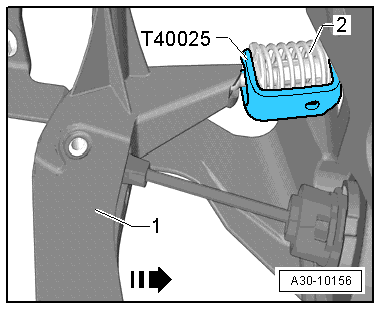
-- Remove the clutch pedal. Refer to the appropriate service information.
-- Remove the accelerator pedal module. Refer to ACCELERATOR PEDAL POSITION SENSORS -G79- / -G185-, REMOVING AND INSTALLING