Left And Right Parking Brake Motor -V282- / -V283-, Removing And Installing: Installing
Install in reverse order of removal and note the following:
- Replace the seal after removal.
- The ring groove for the gasket and the parking brake motor contact surface must not be damaged.
-- Clean the parking brake motor ring groove and contact surface.
-- Install the new seal.
TIP:
Make sure that the gasket is not removed while assembling the parking brake motor.
-- Bring the parking brake motor -1- into the installation position while turning the parking brake motor back and forth slightly.
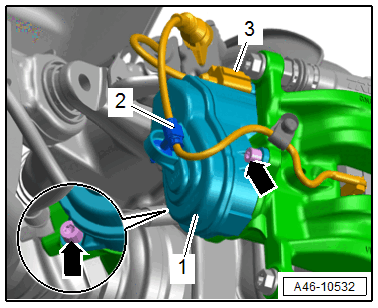
-- Tighten the bolts -arrows-.
- The parking brake motor must be flush with the brake caliper. Under no circumstances may it be pulled against the brake caliper with bolts.
Risk of damaging the threads due to improper handling.
- Never use an impact wrench to loosen or tighten.
- Position the bolts by hand and screw in the first threads.
-- Perform a basic setting after installing:
-- Connect the Vehicle Diagnostic Tester to the vehicle diagnostic connection when the ignition is switched off.
-- Switch the ignition on.
-- Select Diagnostic and start.
-- Select the Test plan tab.
-- Select the Select individual test button and select the following tree structure consecutively:
- Chassis
- Brake System
- 0001 - OBD-capable systems
- 0003 - ABS Control Module -J104-, integrated parking brake
- 0003 - Electronic parking brake functions
- 0003 - Basic setting
-- Start the selected program and follow the instructions on the Vehicle Diagnostic Tester display.
Faulty brakes increase the risk of an accident.
- Make sure the brakes are working correctly before driving the vehicle for the first time.