Requirements for Calibrating
- The camera lens must be clean.
- The vehicle must be standing on a firm and level surface.
- There must be sufficient open space around the vehicle.
- The parking brake must be set.
- The steering wheel must be in the 0 position and the wheels must be straight.
- All doors, the rear lid must be closed.
- There are no people in the vehicle.
- The vehicle is not loaded (curb weight).
- Before each calibration: turn on the ignition.
The : VAS6350A consists of the following parts:
- : VAS6350/1
- : VAS6350/2
- : VAS6350/3A
Overview of installed
The vehicle in the illustration is only a basic outline.
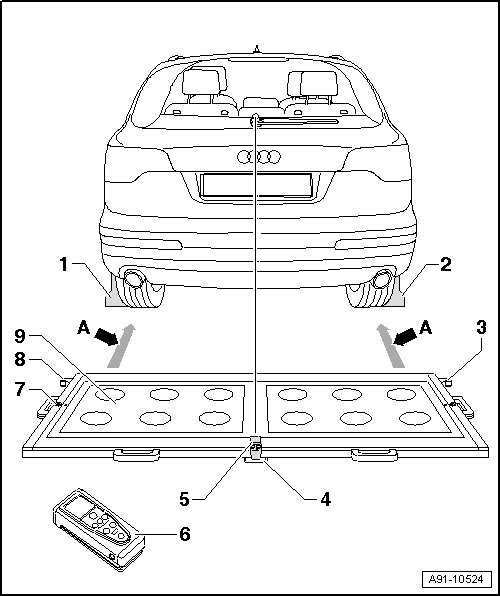
- : VAS6350/1
- : VAS6350/1
- Right Angle Bracket
- : VAS6350/2 mount
- Plastic Foot
- Three on underside of the calibration board
- Adjustable for aligning horizontal position of the calibration board
- : VAS6350/3A
- On the calibration board
- Switching on and off. Refer to the Owner's Manual.
- : VAS6350/2
- On the calibration board
- Refer to the Owner's Manual for notes on the operation.
- Level
- On the calibration board
- For checking the horizontal position
- Left Angle Bracket
- : VAS6350/2 mount
- Calibration Board
- Between the mounts on the calibration board and the : VAS6350/1 -dimension A- 1.47 m through 1.90 m.
Calibration Board Orientation
-- Position the calibration platform behind the vehicle at a distance of 1.47 m to 1.90 m to the rear wheels, see -dimension A- in the overview illustration. Refer to Overview of installed above.
-- Bring the : VAS6350A into a horizontal position.
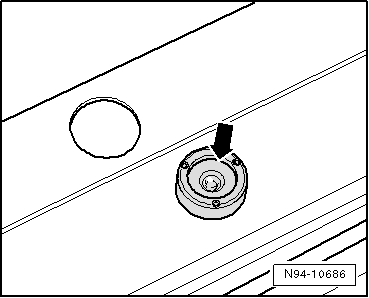
-- Twist the plastic feet under the calibration board so that the air bubble in the level is located exactly in the center of the indicator -arrow-.
 Courtesy of AUDI OF AMERICA, LLC
Make sure light does not reflect off the calibration board.
Reflections impair the Rearview Camera -R189- and may make it impossible to perform the calibration.
The vehicle in the illustration is only a basic outline.
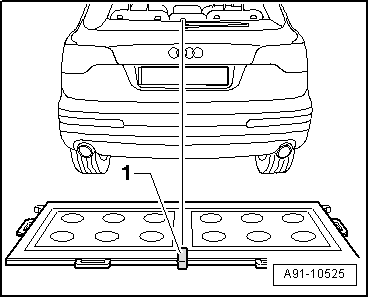
-- Switch on the : VAS6350/3A -1- on the calibration board and adjust the entire : VAS6350A so that the laser beam hits the center of the vehicle rear above the Audi rings.
-- Check that the Audi rings are centered on the rear. Correct the laser beam accordingly.
Continue calibrating the Rearview Camera -R189-. Refer to Rearview Camera -R189-, CALIBRATING .