Adaptive Cruise Control (Acc), Adjusting
Special tools and workshop equipment required
- Wheel Alignment Computer released by VW/Audi
- Vehicle Diagnostic Tester
- Camera :VAS6331/1
- Setting Device - Basic Set :VAS6430/1 or Setting Device - Basic Set :VAS6430/1A
- ACC Reflector Mirror - Audi :VAS6430/3
- Screwdriver with T-bar VAS272001 :VAS272001
There are two choices for calibrating/adjusting:
The "complete alignment"
This procedure should be selected for the following activities if a wheel alignment and calibration/adjustment should be performed.
- The rear axle toe was adjusted.
- The vehicle suspension was changed, for example changing from standard to sport suspension.
The "quick access"
This procedure should be selected for the following activities if only the calibration/adjustment will be performed.
- The Control Module for Adaptive Cruise Control -J428- was removed and installed or replaced.
- The front bumper was removed and installed or replaced.
- The front bumper was loosened or adjusted.
- There is damage on the front bumper.
Both procedures are programmed in the wheel alignment computer. The respective procedure is performed automatically. It is only necessary to select the appropriate program for the procedure that will be performed.
If only the wheel sensor should be calibrated/adjusted, then the "quick access" mode must be selected on the wheel alignment computer.
The procedure in the "quick access" mode is described in the following.
Procedure
The procedure is described for a :VAS6331 .
- Observe the test requirements. Refer to AXLE ALIGNMENT TEST REQUIREMENTS .
- Measurement Preparations for Calibrating and Adjusting Driver Assist Systems. Refer to MEASUREMENT PREPARATIONS FOR CALIBRATING/ALIGNING THE DRIVER ASSIST SYSTEMS, QUICK ACCESS MODE .
-- Check sensors and retainers for damage, external influence and secure fit. Service any damaged components.
-- Check the front bumper cover for damage, cracks and secure fit. Service any damaged components.
-- Drive the vehicle "straight" onto the alignment rack. Switch off the ignition when the vehicle has come to a stop.
-- Check the DTC memory for adaptive cruise control (ACC). Fix all displayed entries.
-- Position the front wheels so they are straight.
-- Install quick-action clamps on the wheels.
-- Mount the reflectors on the quick-action clamps.
-- Carry out wheel run-out compensation.
-- Remove the left and right air intake grille. Refer to Front Bumper .
-- Remove any dirt that may be on the sensor lens.
-- Select the ACC calibration button on the wheel alignment computer.
- The ACC Setting Device must not be moved on the calibration beam.
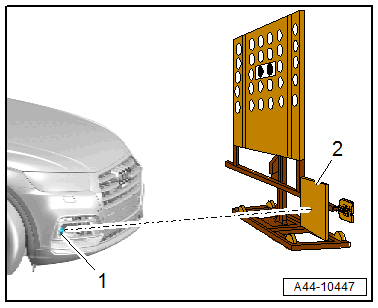
-- Position the :VAS6430/1A at distance -a- from the center of the :VAS6430/3 -1- up to the Audi rings.
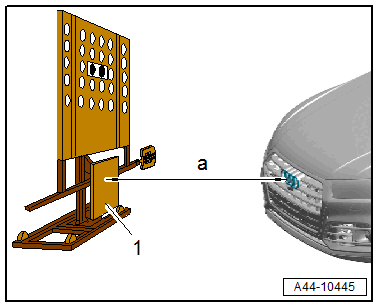
- Dimension -a- = 120 ± 2.5 cm
-- Place the Camera :VAS6331/1 -1- for the ACC adjustment on the :VAS6430 on the right side and tighten.
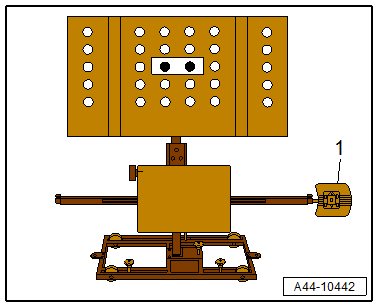
-- Move the :VAS6430/3 -1- to the right on the vertical slits.
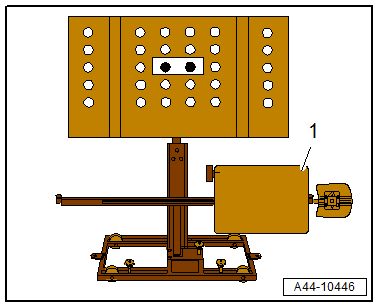
-- Adjust the knob on the :VAS6430/3 -1- so that the number "2" is facing the line marking -arrows-.
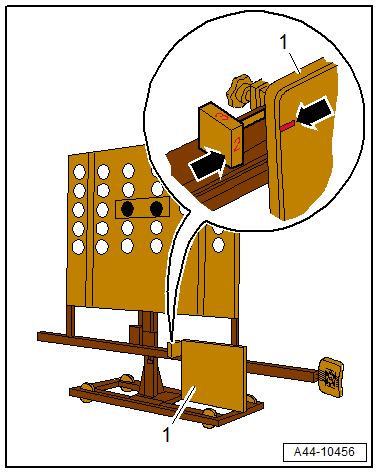
-- Adjust the :VAS6430 by moving the reflector mirror -2- at the side, so that the laser beam strikes the sensor lens -1-.
-- Level the bubble level -A- on the :VAS6430/3 -5- using the adjusting screw -1-.
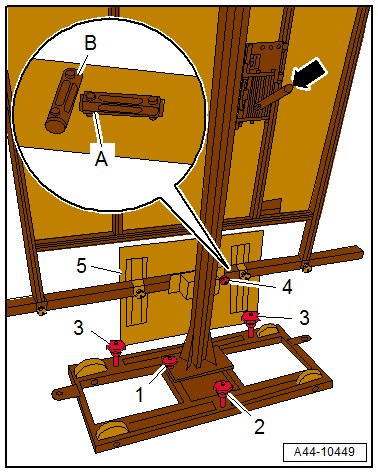
-- Level the bubble level -B- using the adjusting screw -2-.
-- Adjust the height of the reflector mirror with the crank -arrow-, so that the laser beam is in the vertical center of the sensor lens.
-- If necessary, reposition the reflector mirror at the side on the calibration beam, until the laser beam is in the horizontal center of the sensor lens.
-- Turn the fine adjustment screw -4- until the display on the wheel alignment computer is within the tolerance range.
-- Using the laser beam on the reflector mirror, check again if the laser beam contacts the center of the sensor lens. If necessary align the reflector mirror again.
-- Turn on the Vehicle Diagnostic Tester.
-- Switch the ignition on.
-- Select and start the Diagnostic operating mode.
-- Select the Test plan tab.
-- Select the Select individual test button and select the following tree structure consecutively:
- Body
- Electrical system
- 0001 - OBD-capable system
- 0013 - Distance Regulation Control Module J428
- 0013/8B - Distance Regulation Control Module, functions
- 0013/8B - Adjustment
-- Start the selected program and follow the instructions on the Vehicle Diagnostic Tester display.
-- The fine adjustment of the Distance Regulation Control Module -J428- takes place via the upper bolts -1 and 2- with the :VAS272001 .
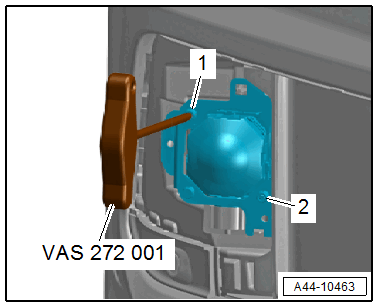
-- When the Distance Regulation Control Module -J428- is successfully adjusted perform the procedure on the Distance Regulation Control Module 2 -J850-.
The procedure for adjusting the Distance Regulation Control Module 2 -J850- is identical to adjusting Distance Regulation Control Module -J428-. To do this, convert the :VAS6430/3 and Camera :VAS6331/1 to the opposite side of the calibration beam.
-- Select the following tree structure for the adjustment:
- Body
- Electrical system
- 01 - OBD-capable systems
- 8B - Distance Regulation Control Module II J850
- 8B - Distance Regulation Control Module, functions
- 13/8B - Adjustment
-- The fine adjustment of the Distance Regulation Control Module 2 -J850- takes place via the bolts -1 and 2- with the Screwdriver with T-bar VAS272001 :VAS272001 .
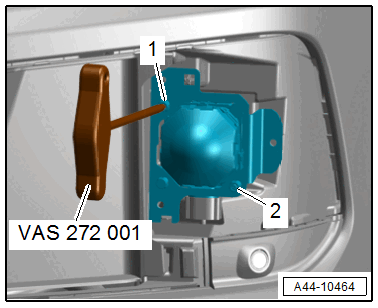
The ACC adjustment is confirmed when "output diagnostic test complete" appears in the Vehicle Diagnostic Tester.
-- Switch off the ignition.
-- Disconnect the Vehicle Diagnostic Tester from the diagnostic connector.
-- Disconnect the battery charger. Refer to BATTERY, CHARGING .
-- Install the air intake grille. Refer to Front Bumper .