91 AUDI Connect User Management Option Greyed Out Or SOS And Roadside With No Function, DTCS P169A00, U13EB00 (GROUP 91, NO. 23-69)
Reference number: GROUP 91, NO. 23-69
Supersedes refnos: 2052299/1, 2052299/2, 2052299/3, 2052299/4, 2052299/5, 2052299/6, GROUP 90, NO. 18-98, GROUP 90, NO. 22-73
91 AUDI CONNECT USER MANAGEMENT OPTION GREYED OUT OR SOS AND ROADSIDE WITH NO FUNCTION, DTCS P169A00, U13EB00
TECHNICAL SERVICE BULLETIN
| AUDI: | 2019-2022 All Audi Vehicles |
| GROUP: | 91 - Radio, Telephone, Board Computer, Multi-Function Indicator (MFI) |
SERVICE INFORMATION
91 23 72 2052299/7 February 10, 2023. Supersedes Technical Service Bulletin Group 91 number 23-69 dated February 6, 2023, for reasons listed below.
| Model(s) | Year | VIN Range | Vehicle-Specific Equipment |
|---|---|---|---|
| All Audi Vehicles | 2019 - 2022 | All | Not Applicable |
CONDITION
| Revision | Date | Purpose |
|---|---|---|
| 7 | - | Revised service (corrected address word) |
| 6 | 02/06/2023 | Revised header (removed MY23) Revised Technical Background (added note) |
| 5 | 06/29/2022 | Revised Condition (updated revision history) |
Customer states:
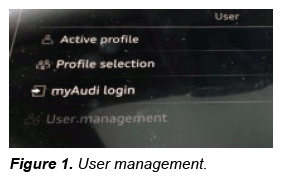
- The Audi connect "User management" screen is greyed out and the customer cannot complete the key user pairing (Figure 1).
OR
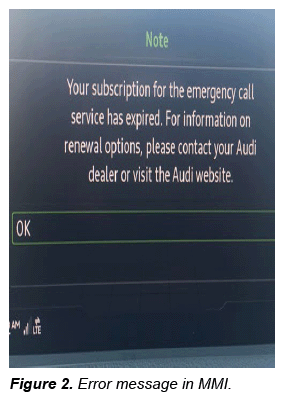
- The SOS emergency button is red or flashing red. When the customer presses the button, the message "Your subscription for the emergency call service has expired. For information on renewal options, please contact your Audi dealer or visit the Audi website" (Figure 2) is displayed.
Workshop findings:
Additionally, the following DTCs are present in the system:
- DTC P169A00 (Transport mode active) is stored in the engine control module (ECM), J623 (address word 0001).
- DTC U13EB00 (Emergency call module and communication unit Flight mode activated) is stored in the emergency call module and communication unit, J949 (address word 0075).
TECHNICAL BACKGROUND
Starting with MY19 vehicles, a new telematics module called the "Control Module for Emergency Call Module and Communication Unit, J949", also known as Connectivity Box or "ConBox" for short, is installed for cars with PR Code IW3. The diagnostic address is 0075 and the module ID is J949. This new ConBox module can only be diagnosed using the VAS 6154 wireless diagnostic head.
For Model Year 2023, please refer to TSB 2069329: 91 ConBox - Flight mode resets on its own after having been successfully removed at PDI (DTC U13EB00).
In order to activate the ConBox LTE data connection, the vehicle must be taken out of transport mode using the VAS 6154. The older diagnostic heads (e.g. VAS 5054 or previous) cannot properly address this control unit over diagnostics due to the new diagnostic protocol. If the VAS 6154 is not used, then the ConBox will remain in transport mode (Flight mode) and will set a DTC of P169A00 (Transport mode active). Additionally, the gateway module will set a DTC of U142100 (Control module for emergency call module and communication unit no communication).
PRODUCTION SOLUTION
Not applicable.
SERVICE
Please perform the following steps (included in PDI Checklist):
- Change the adaptation for fight mode in diagnostic address 0075 at, Self-diagnosis >> Go to address 0075 >> Adaptation values "Basis connect function" >> Flight mode >> Deactivate.
- Hit "Apply".
- Cycle the ignition off and then back on.
- Within Self-diagnosis go to DTC readout for diagnostic address 0075 and clear the DTC.
- Cycle the ignition off and then back on again.
- Verify that the SOS light is green and/or the Audi connect User management option is now selectable.
- If the issue persists disconnect the tester, roll the windows up, close all doors, and lock the vehicle for 2-3 minutes to allow the car to go through a sleep cycle, then retry steps 4- 6 if necessary.
WARRANTY
This TSB is informational only and not applicable to any Audi warranty.
ADDITIONAL INFORMATION
All part and service references provided in this TSB (2052299) are subject to change and/or removal. Always check with your Parts Department and/or ETKA for the latest information and parts bulletins. Please check the Repair Manual for fasteners, bolts, nuts, and screws that require replacement during the repair.
©2023 Audi of America, Inc. All rights reserved. The information contained in this document is based on the latest information available at the time of printing and is subject to the copyright and other intellectual property rights of Audi of America, Inc., its affiliated companies, and its licensors. All rights are reserved to make changes at any time without notice. No part of this document may be reproduced, stored in a retrieval system, or transmitted in any form or by any means, electronic, mechanical, photocopying, recording, or otherwise, nor may these materials be modified or reposted to other sites, without the prior expressed written permission of the publisher.