91 ASI: Apple CARPLAY Pops Up Or Takes Over Audio Without User Intervention (GROUP 91, NO. 24-68)
Reference number: GROUP 91, NO. 24-68
Supersedes refnos: 2072959/1, 2072959/2, GROUP 91, NO. 24-34
91 ASI: APPLE CARPLAY POPS UP OR TAKES OVER AUDIO WITHOUT USER INTERVENTION
TECHNICAL SERVICE BULLETIN
| AUDI: | 2018-2025 All Audi Vehicles |
| GROUP: | 91 - Radio, Telephone, Board Computer, Multi-Function Indicator (MFI) |
SERVICE INFORMATION
91 24 34 2072959/2 July 27, 2024. Supersedes Technical Service Bulletin Group 91 number 24-68 dated February 9, 2024, for reasons listed below.
| Model(s) | Year | VIN Range | Vehicle-Specific Equipment |
|---|---|---|---|
| All Audi Vehicles | 2018 - 2025 | All | Audi Smartphone Interface |
CONDITION
| Revision | Date | Purpose |
|---|---|---|
| 2 | - | Revised Service (Updated steps) |
| 1 | 02/09/2024 | Initial publication |
Customer states:
- While using radio, media player, navigation, etc., Apple CarPlay may display in the foreground or take over the vehicle's audio without user intervention.
Workshop findings:
- The complaint can be reproduced with customer's phone. Other Apple devices may or may not behave differently and not show the problem.
TECHNICAL BACKGROUND
The Apple device controls when CarPlay displays or when it takes over the vehicle's audio. There are various reasons as to why the Apple device takes over the screen or audio. More information is available under the "Service" section.
PRODUCTION SOLUTION
Not applicable.
SERVICE
First check whether the customer has installed the latest iOS version, as this can help you narrow down which of the following options may apply. You can then decide the next steps based on this.
Possible causes:
- A notification is displayed on the iPhone. IMPORTANT: The notification is not necessarily displayed on the CarPlay screen. Depending on the app, the notification may only be displayed on the device screen. However, the iPhone may still "take over" the MMI screen.
In those cases, the MMI screen should return to the previous context (e.g. radio) within a few seconds.
This is the expected behavior. The only way to change this is to disable notifications for apps on the phone.
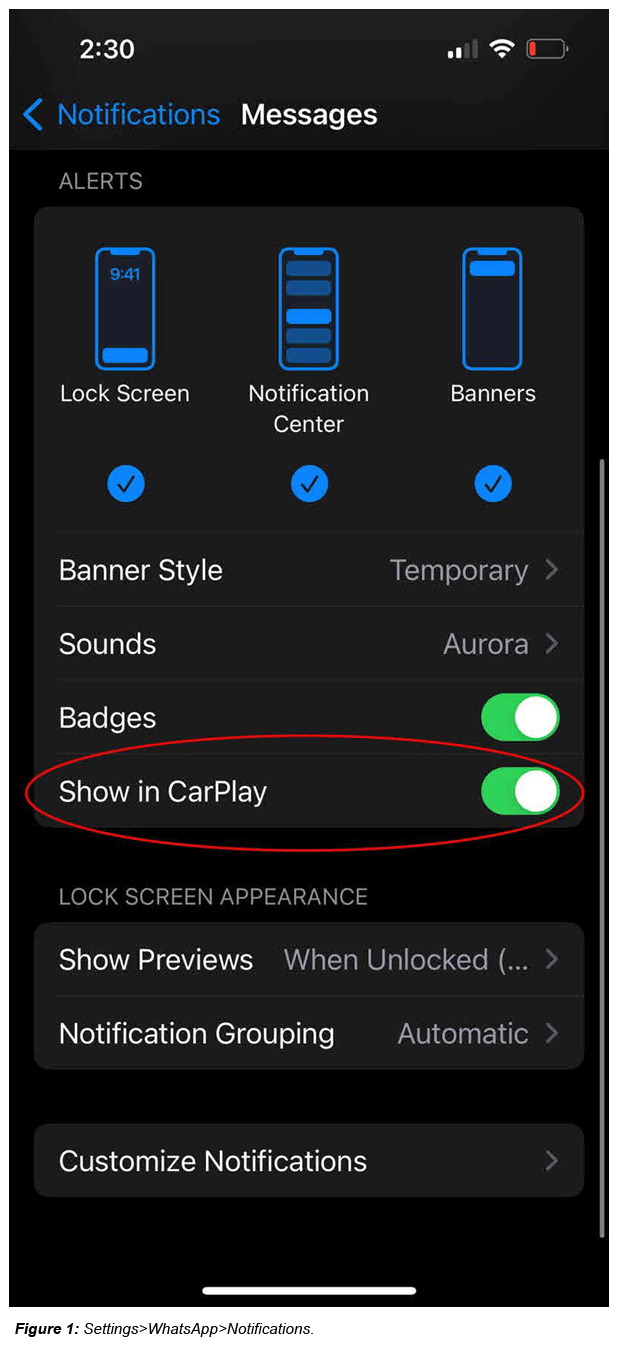
Depending on the app, CarPlay notifications may also need to be deactivated separately. To deactivate notifications, find the corresponding app under the notification settings (see Figure 1).
- iPhone loses the connection to the vehicle and attempts to reconnect.
This behavior is indicated by the message "Smartphone interface deactivated" , which is shown in the MMI. Once the connection has been re-established, the vehicle will switch to CarPlay after a few seconds.
Dropped connections can occur for various reasons both inside and outside the vehicle. Please analyze the cause for the dropped connections.
There may be other TSBs on this subject, such as TSB 2068838 . Please also consult TSB 2073582 . Refer to the TSBs applicable to the VIN.
The CarPlay screen appearing after a connection loss is expected behavior.
If customers do not want CarPlay to automatically start (either after a connection loss or after starting the vehicle), they can turn this feature off in the iPhone settings. Settings>General>CarPlay>Select vehicle>Switch off radio button "CarPlay".
Customers must now manually select the telephone in the MMI in order to use Apple CarPlay.
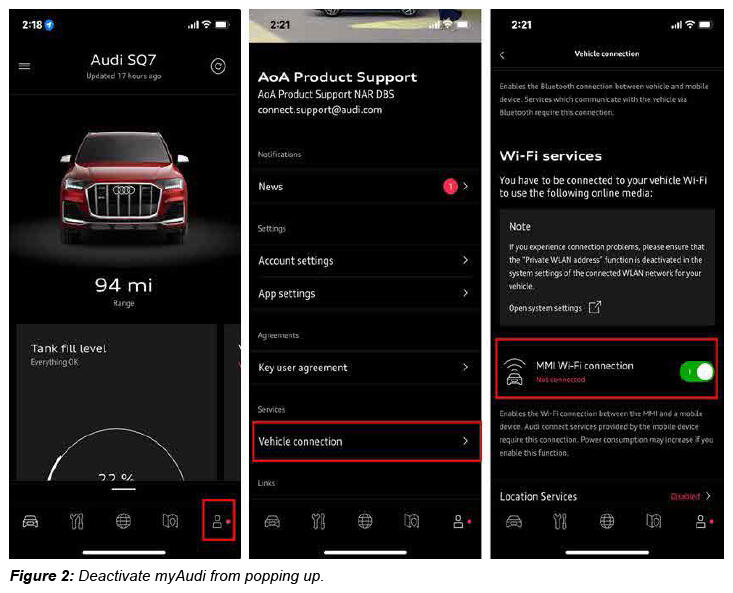
- The myAudi app pops up in the foreground on the phone
When the vehicle connects to the phone, the myAudi app may pop up in the foreground to establish a connection, depending on the settings.
This is not relevant when using Apple CarPlay and can therefore be deactivated (see Figure 2):
NOTE: The Wi-Fi connection in the myAudi app is required for online radio or Amazon Music on older infotainment system generations. Switching it off therefore has no effect on newer infotainment system generations. - A third-party app in the background triggers the iPhone to appear in the foreground.
It is possible that various third-party apps start activities in the background that can cause the iPhone to require the MMI to display CarPlay.
This can also include apps that CarPlay does NOT support and that also have no relevance to in-car use.
Owing to the number of apps and the myriad of settings, we are unable to list specific apps and settings.
However, here is a specific example:
Amazon Music: If you select "Alexa hands-free control" , this may result in the iPhone regularly requiring the MMI to display CarPlay.
General information regarding (4) that can generally increase security and stability of iPhone usage:
- Check that all apps installed on the phone are at their latest software versions.
- Regularly check apps that are no longer used and uninstall them.
- Check app permissions: Are all permissions needed for the customer's use of the app? In case of doubt, remove the permissions and check if this affects usage.
- Check background activity: Are all apps that have background activities known? Is it necessary for those apps to run in the background? In case of doubt, prevent background activities and check if this affects usage.
- Check for notifications: Can various app notifications be switched off?
WARRANTY
This TSB is informational only and not applicable to any Audi Warranty. If parts are changed or replaced without good reason, labor and parts may be debited.
ADDITIONAL INFORMATION
All part and service references provided in this TSB (2072959) are subject to change and/or removal. Always check with your Parts Department and/or ETKA for the latest information and parts bulletins. Please check the Repair Manual for fasteners, bolts, nuts, and screws that require replacement during the repair.
©2024 Audi of America, Inc. All rights reserved. The information contained in this document is based on the latest information available at the time of printing and is subject to the copyright and other intellectual property rights of Audi of America, Inc., its affiliated companies, and its licensors. All rights are reserved to make changes at any time without notice. No part of this document may be reproduced, stored in a retrieval system, or transmitted in any form or by any means, electronic, mechanical, photocopying, recording, or otherwise, nor may these materials be modified or reposted to other sites without the prior expressed written permission of the publisher.