Installing the right oxygen sensor monitor
WARNING:
Hot surfaces.
Risk of burning!
Risk of burning!
- Perform all work only on components that have cooled down.
NOTE:
RISK OF DAMAGE
Electrostatic discharge.
Damage to or destruction of electrical components.
Electrostatic discharge.
Damage to or destruction of electrical components.
- Leave the electrical components in their original packaging until they are being installed. Only use the original packaging for returning the product. Always package removed components straight away.
- Read and comply with user information on using the associated special tool 12 7 060.
- Only tap the housings of electrical components. Do not tap pins or multi-pin connectors directly.
- Wear electrically conductive clothing and antistatic shoes (with ESD symbol).
- For additional information see: NOTES ON ESD (ELECTROSTATIC DISCHARGE) PROTECTION .
- Equipment specification with heat protection mat:
- Position oxygen sensor monitor probe.
- Tighten the oxygen sensor monitor probe with the special tool 0 491 074 (11 7 020). TIGHTENING TORQUES SPECIFICATION
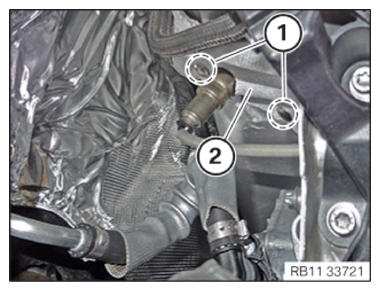
Front Lambda oxygen sensor/oxygen sensor monitor on catalytic converter M18x1.5 tightening torque 50 Nm - Position the heat protection mat (2).
- Clip in the push-buttons (1).
- Position oxygen sensor monitor probe.
- Equipment specification with heat protection wire ring:
- Position oxygen sensor monitor probe.
- Tighten the oxygen sensor monitor probe with the special tool 0 491 074 (11 7 020). TIGHTENING TORQUES SPECIFICATION
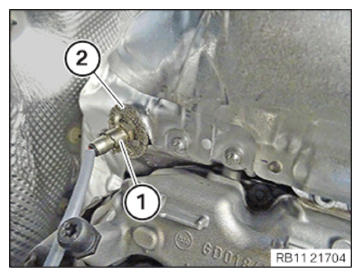
Front Lambda oxygen sensor/oxygen sensor monitor on catalytic converter M18x1.5 tightening torque 50 Nm - Bring the heat protection wire ring (2) into contact.
- Affix the retaining clip (1).
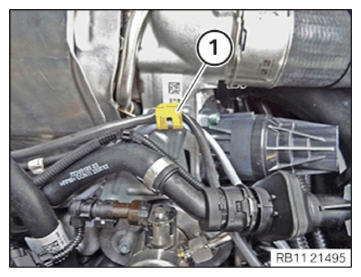
- Clip cable of oxygen sensor control probe into holder (1).
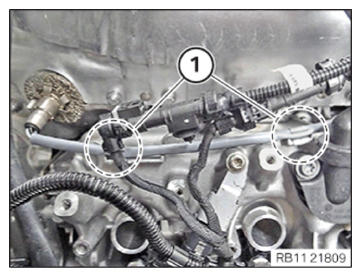
- Clip the cable of the oxygen sensor monitor into the clamps (1).
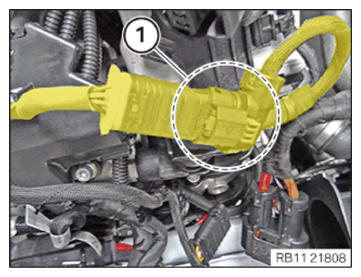
- Connect plug connection (1) and lock.
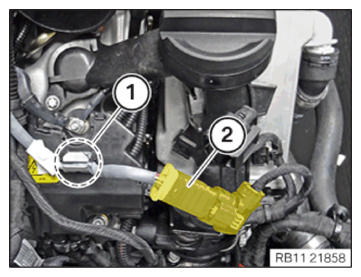
- Clip the cable of the oxygen sensor monitor into the clamp (1).
- Slide the plug connector backwards to the stop.
Follow-up work