Calibration Requirements on Vehicle
- Camera lens must be cleaned, only clean the camera lenses with a wet towel.
- Check the camera images on the Front Information Display Control Head -J685-. Replace the camera if the images are unclear because the camera has been damaged. Check the fastener for the camera if the image is low.
- Make sure both exterior rearview mirrors are folded out.
- The parking brake must be set.
- The steering wheel must be in the 0 position and the wheels must be straight.
- All doors, the rear lid must be closed.
- There are no people in the vehicle.
- The vehicle is not loaded (curb weight).
- The battery charger is connected, the battery charger must not be in the view of the camera.
- Ignition switched on.
- The system is active and is displayed on the Front Information Display Control Head -J685-.
- Do not move the vehicle during the calibration process.
Requirements for the Calibration Equipment/Calibration Environment
- flat calibration surface
- Do not use any objects in the environment of the calibration field, to prevent a false recognition of lines
- Even light (no headlamps or direct illumination), prevent strong light differences
Overview of Installed
WARNING:
Make sure light does not reflect off the : VAS721001 .
Reflections affect the camera and may make it impossible to perform the calibration.
NOTE:
The vehicle in the illustration is only a basic outline.
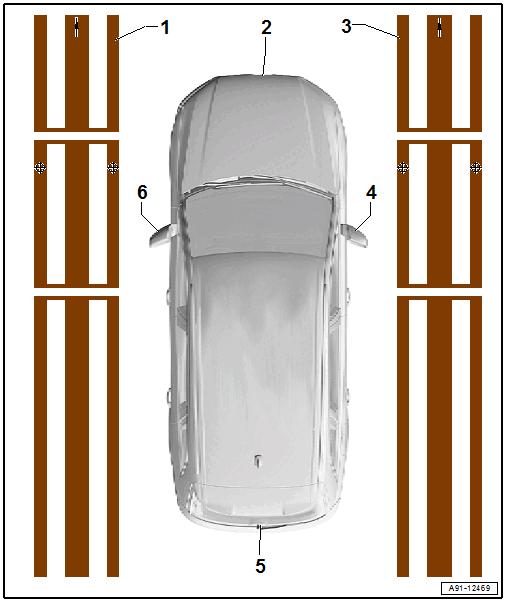
- Left Calibration Device
- Front Peripheral Camera -R243-
- Calibrating. Refer to PERIPHERAL CAMERA SYSTEM, CALIBRATING .
- Right Calibration Device
- Right Peripheral Camera -R245-
- Calibrating. Refer to PERIPHERAL CAMERA SYSTEM, CALIBRATING .
- Rear Peripheral Camera -R246-
- Calibrating. Refer to PERIPHERAL CAMERA SYSTEM, CALIBRATING .
- Left Peripheral Camera -R244-
- Calibrating. Refer to PERIPHERAL CAMERA SYSTEM, CALIBRATING .